
Vandaag of morgen in huis

Kwaliteit gegarandeerd

Welkomstaanbiedingen ontgrendelen: GRATIS bezorging | Tot 80% korting | Gratis 30 dagen JoyPlus-proefperiode
Download de app
A wireless mouse keeps your desk tidy and gives you more freedom to move. However, not every model is right for every user. A mouse for a laptop has different requirements from a wireless gaming mouse or an ergonomic mouse for long working days.
Marketing often focuses on high DPI, long battery life or an “ergonomic” design. These claims only mean something if they suit the way you use your mouse. Pay particular attention to the connection, shape, power source and compatibility.
DPI indicates how far the cursor moves when you move the mouse. A high-DPI mouse can be useful with large screens or for certain games, but a higher setting isn’t automatically more comfortable. For office work, 1,000 to 3,200 DPI is enough for many users. Gamers may want more adjustment options.
Also check whether you can adjust the DPI. A high fixed DPI can be inconvenient if the cursor moves too quickly across the screen.
A mouse with a 2.4GHz USB receiver usually works as soon as you plug in the dongle. A Bluetooth mouse doesn’t use a separate receiver, but your laptop, PC or tablet does need to support Bluetooth.
Check how many USB ports are available. Bluetooth can be handy with a slim laptop. For a desktop PC, a USB receiver may be a simple solution. Some models support both connection types or can connect to several devices.
A model with an AA battery may last for months, while a rechargeable mouse needs to be charged regularly via USB-C. Stated battery life depends on settings, connection type and how often you use the mouse. Treat a battery-life claim as a specification based on certain conditions, not as a guaranteed lifespan.
Also check whether you can keep working while the mouse is charging. This helps prevent interruptions during heavy use.
Before buying, check:
A multi-device mouse is handy if you switch between a laptop, desktop PC and tablet. According to its product description, the Trust Ozaa+ supports connections to up to three devices via a USB receiver and Bluetooth.
A standard mouse is compact and easy to carry. A vertical mouse positions your hand differently and may take some getting used to. Check the dimensions, weight and which hand it’s designed for. Many ergonomic models are made for right-handed use only.
An ergonomic design doesn’t guarantee that everyone will find the mouse comfortable. Hand size, grip and desk height all play a part. So don’t just look for the word “ergonomic”: consider the shape, angle and support it offers your hand.
An optical mouse uses an optical sensor and is suitable for most desks and mouse mats. You may still need a mouse mat on transparent or highly reflective surfaces.
For office work, quiet buttons, a scroll wheel and, optionally, horizontal scrolling are useful. For gaming, DPI is just one consideration: weight, polling rate, the number of programmable buttons and the connection also matter. A wired model may appeal if you don’t want to charge a battery.
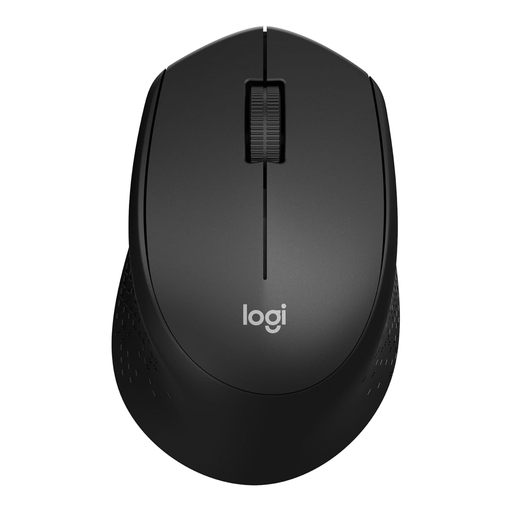
Why it suits this user: This simple wireless mouse uses a USB nano receiver and has a 1,000 DPI optical sensor. According to the product description, its click noise is reduced by more than 90% compared with standard mice.
Its key features are clearly specified: wireless USB connection, three buttons and a stated battery life of up to 24 months.
Quiet clicking, a range of up to 10 metres according to the specifications, and automatic sleep mode.

Why it suits this user: This ergonomic mouse has a 57-degree vertical angle, Bluetooth and a 2.4GHz connection via a USB receiver. Its sensor can be adjusted up to 4,000 DPI.
The shape is clearly described, and you’re not limited to one connection type. Bear in mind, though, that this model is designed for right-handed use.
Rechargeable battery, adjustable DPI and support for Windows, macOS, ChromeOS and iPadOS according to the product information.

Why it suits this user: This wireless gaming mouse uses a 2.4GHz receiver and has an optical sensor of up to 4,800 DPI, six programmable buttons and a polling rate of up to 1,000 Hz.
The connection, DPI, polling rate and battery are listed separately. The built-in battery is rechargeable, and the product description says you can use the mouse while it’s charging.
Weighs around 73 grams, charges via USB-C and has a stated battery life of up to 80 hours.

Why it suits this user: According to the product information, the mouse can connect to up to three devices via 2.4GHz and Bluetooth. The extra horizontal scrolling is handy for spreadsheets and wide timelines.
The product description lists the connection types, number of devices, battery and adjustable DPI separately.
Quiet buttons, rechargeable battery, DPI of up to 3,200 and horizontal scrolling.
We’ve put together a full, up-to-date list of products that meet these strict selection criteria and the applicable European safety regulations.
No. A model with a USB receiver needs a compatible USB port. A Bluetooth mouse only works if your laptop supports Bluetooth. Also check the operating system and any software requirements.
It varies by model. Product information may state that models with replaceable batteries last from several months to several years. A rechargeable mouse runs for less time on each charge, but you can use it again once it’s connected to a cable. Check the power source and whether you can work while it’s charging.
A quiet mouse is designed primarily for a peaceful workspace. For gaming, the polling rate, sensor, weight, connection and programmable buttons are often more important. If you want both features, check whether the gaming model specifically lists quiet switches in its product specifications.
