
Vandaag of morgen in huis

Kwaliteit gegarandeerd

Welkomstaanbiedingen ontgrendelen: GRATIS bezorging | Tot 80% korting | Gratis 30 dagen JoyPlus-proefperiode
Download de app
A wireless headset may seem easy to choose at first glance. However, models vary considerably in comfort, battery life, microphone quality and connectivity. A low price can be tempting, but an unsuitable fit or unclear compatibility can quickly lead to regret.
Listening to music at home, travelling by train, working from home, exercising and gaming all come with different requirements. With this practical guide, you can focus on the specifications that make a real difference in everyday use.
The stated playback time usually depends on the volume, connection and features such as active noise cancellation. A noise-cancelling headset, for example, uses more power when ANC is enabled. So check whether the manufacturer states the battery life with ANC on, ANC off or including the charging case.
With wireless earbuds, the total playback time often consists of the earbuds’ capacity plus several additional charges from the case. This is not the same as listening continuously.
An ANC headset uses microphones and electronic processing to reduce ambient noise. The result varies depending on the type of sound, fit and surroundings. Low, constant sounds such as train or aircraft noise are generally a different scenario from voices or sudden noises.
“Noise cancellation” therefore does not mean that every sound disappears. Also look for a transparency mode if you want to remain aware of your surroundings when walking outdoors or working in an office.
Almost every Bluetooth headset works with a modern smartphone, but features such as multipoint, codecs and low latency vary from model to model. For gaming, Bluetooth is not always the most suitable connection. A gaming headset with a 2.4GHz dongle may offer different latency from a standard Bluetooth model.
Also check whether a USB dongle is suitable for your PlayStation, computer or laptop. For the ONIKUMA GT806, for example, the product information states that Bluetooth does not connect directly to PS4 and PS5; the 2.4GHz mode is required for this.
An over-ear headset completely surrounds the ear. This can be comfortable during long listening sessions and often provides greater physical sound isolation. However, pay attention to the weight and pressure around your head. According to the product information, the Bose QuietComfort weighs 240 grams, while the Sony WH-CH720N weighs 192 grams.
An on-ear headset rests on the ear and is often more compact. The Sony WH-CH520 weighs 147 grams, making it practical for commuting and everyday use. Pressure distribution is a personal matter: an adjustable headband and soft ear cushions are more important than weight alone.
Wireless earbuds and true wireless earbuds are small and easy to carry. Above all, check the fit, IP rating and battery life per charge. The Samsung Galaxy Buds4 Pro lists IP57, while the JBL Wave Buds 2 lists IP54 for the earbuds and IPX2 for the case. An IP rating does not mean you can swim while wearing them; always check the usage limitations.
Compare the following details:
The Sony WH-CH720N is described as offering up to 35 hours with noise cancellation and up to 50 hours without noise cancellation. The Bose QuietComfort lists up to 24 hours. According to the product description, the Baseus EH10 NC offers up to 55 hours with ANC and 80 hours without ANC. These are product specifications; actual battery life may vary depending on volume, codec and usage.
For headphones for music and calls, microphones and wind-noise filtering are important. A headset can sound excellent for music but be less suitable for calls on a busy street.
Multipoint is useful when you use a laptop and smartphone at the same time. The Sony WH-CH520 and WH-CH720N list a multipoint connection. However, check whether your devices and the app you use support this feature.
Frequency range, driver diameter and Bluetooth codecs are measurable specifications, but they do not fully predict how music will sound. The Baseus Bass EP10 Pro, for example, supports SBC, AAC and LDAC. The Sony WH-CH520 and WH-CH720N list AAC and SBC.
Broader codec support is only beneficial when your source device and music service actually use that codec. Fit, equaliser settings and personal preference remain just as important.
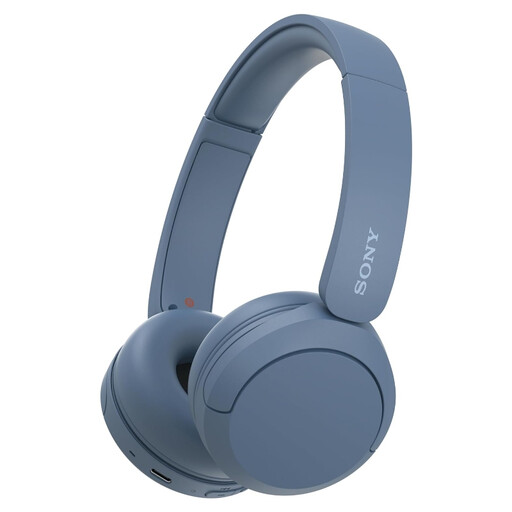
Why it suits this profile: Lightweight on-ear headphones for music, podcasts and calls without complicated set-up.
The product information lists a weight of 147 grams, USB-C charging, a microphone and multipoint. This makes the key basic specifications clear.
Up to 50 hours of battery life according to the product description, Bluetooth and support for connecting to two devices simultaneously.
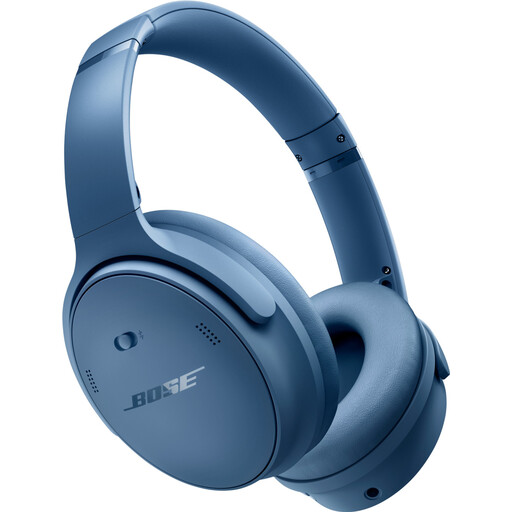
Why it suits this profile: An over-ear model for long listening sessions and travel, ideal for users who value adjustable sound modes.
The specifications list active noise cancellation, Bluetooth 5.1, a range of 9 metres and connections for 2.5 mm and 3.5 mm.
Over-ear design, a weight of 240 grams and up to 24 hours of battery life according to the listed product specifications.
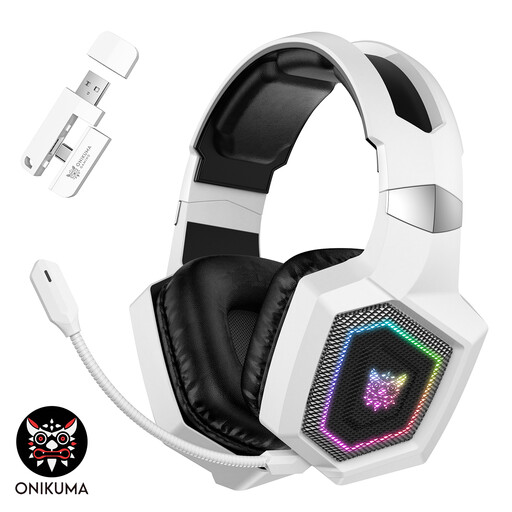
Why it suits this profile: Designed for gamers who want to switch between 2.4GHz, Bluetooth and a wired Type-C mode.
The product information clearly states which devices work via the USB transmitter, Bluetooth or cable. This prevents incorrect expectations about console compatibility.
50 mm drivers, detachable microphone, 2.4GHz and Bluetooth 5.4 connectivity, and up to 40 hours of gaming according to the product description.
We have put together a complete, up-to-date list of products that fully meet these strict selection criteria and the applicable European safety regulations.
Do not use headphones while driving, cycling or carrying out activities where you need to hear your surroundings. Avoid listening at high volume for extended periods. With earbuds, also check the IP rating and keep the charging port dry.
Electronics sold in the EU are covered by statutory consumer rights. Some products in this overview state a minimum statutory warranty of two years or a two-year manufacturer’s warranty. Check the product page for the applicable terms, exclusions and repair procedure.
Switch on the headphones and press and hold the Bluetooth or power button for a few seconds. Then open the Bluetooth settings on your phone and select the product name. With some models, the initial pairing is completed through the manufacturer’s app. If the connection does not work, remove the old pairing and try again.
The service life depends on the battery, charging cycles, build quality and how the headphones are used. A battery may provide less capacity over time. A model with USB-C, fast charging and, where applicable, a wired connection remains practical when the battery is not fully charged.
The electricity costs of charging are generally low. However, after several years, a wireless model may need a new battery or replacement. So do not look only at the purchase price. Also consider the warranty, charging standard, availability of accessories and the option to listen via a wired connection.
