
Vandaag of morgen in huis

Kwaliteit gegarandeerd

Welkomstaanbiedingen ontgrendelen: GRATIS bezorging | Tot 80% korting | Gratis 30 dagen JoyPlus-proefperiode
Download de app
A pair of wireless headphones may seem easy to choose at first glance. You look at the price, colour and battery life, connect via Bluetooth and start listening. Yet many purchases disappoint. Headphones can feel heavy, for example, the advertised playtime can vary significantly depending on how they are used, and powerful bass does not automatically mean clear voices during phone calls.
Joybuy Product Recommendation Officer helps you translate marketing terms into verifiable product specifications. This allows you to decide which type suits the way you use them before comparing specific models.
Manufacturers often state the maximum playtime under specific conditions, such as at a certain volume and with active noise cancellation switched off. With noise-cancelling headphones, battery life may be lower when ANC is enabled.
Therefore, check:
For example, the Sony ULT WEAR product information states up to 50 hours of battery life, but up to 30 hours with noise cancellation active. This difference matters on train journeys, flights and long working days.
Bass headphones are an appealing choice for pop, hip-hop, electronic music and films. However, strong low-frequency reproduction can make voices or instruments less clear if the sound cannot be adjusted. Check whether EQ presets, an app or different sound modes are available.
According to Sony’s own information, the ULT1 and ULT2 modes on the ULT WEAR are intended for different bass profiles. This is a product specification, not a guarantee that every listener will hear the same sound. If you mainly listen to podcasts, attend video meetings or enjoy classical music, you may benefit more from a balanced setting.
Over-ear headphones surround the ear and can be comfortable during longer listening sessions, but they take up more space. In-ear earbuds are more compact, but the fit varies considerably from one ear to another. Open-ear and bone-conduction models let in more surrounding sound, which can be useful during outdoor activities.
Pay attention to:
For example, an IP55 rating on a product indicates protection against dust and water jets under specific test conditions. It is not the same as being suitable for immersion. Always check the official usage restrictions.
A Bluetooth headphone uses a wireless connection to a smartphone, tablet, laptop or television, for example. Bluetooth 5.2, 5.3, 5.4 or 6.0 refers to the technology version used, but on its own it does not tell you everything about range or sound quality.
Also check the supported codecs:
A multipoint connection can be useful if you want to connect to a laptop and smartphone at the same time. However, check that both devices are actually supported.
Active noise cancellation uses microphones and electronics to reduce surrounding noise. Its effectiveness varies depending on the situation. Constant low-frequency sounds, such as the hum of a train engine, are generally handled differently from voices or sudden noises.
A model with an ambient sound mode deliberately lets in more surrounding sound. This can be useful at a station or while out walking. Do not use noise cancellation as a substitute for staying alert in traffic.
If you are looking for headphones for music and calls, it is worth checking the number of microphones and the stated call noise-cancellation features. Headphones with a microphone may be suitable for phone calls, online meetings and voice assistants, but speech clarity also depends on wind, the distance from the microphone and the app being used.
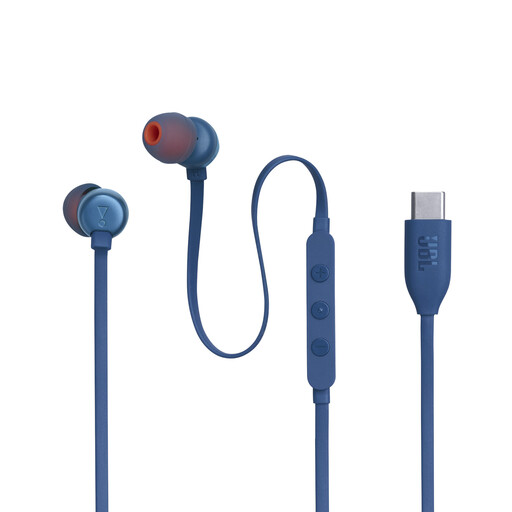
Why it suits this profile: These wired in-ear headphones connect via USB-C and do not require a battery or Bluetooth connection. That makes them practical for everyday use with compatible phones, laptops and gaming devices.
You do not need to compare battery life or wireless codecs. However, check beforehand that your device supports audio via USB-C.
9mm dynamic drivers, a built-in microphone, three buttons and a stated frequency range of 20 Hz to 40 kHz.
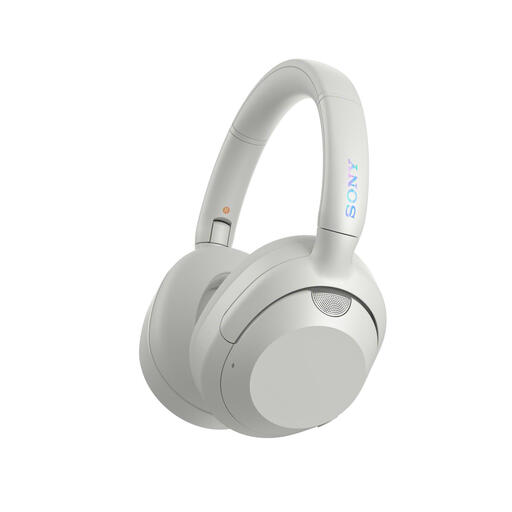
Why it suits this profile: An over-ear model with active noise cancellation, different ULT sound modes, multipoint and a 3.5mm connection is well suited to listening to music, travelling and working.
The listing states the battery life separately with and without noise cancellation. This makes it easier to assess the maximum claim in the right context.
40mm dynamic drivers, Bluetooth 5.2, a microphone, foldable earcups and up to 30 hours of battery life with noise cancellation, according to the product information.
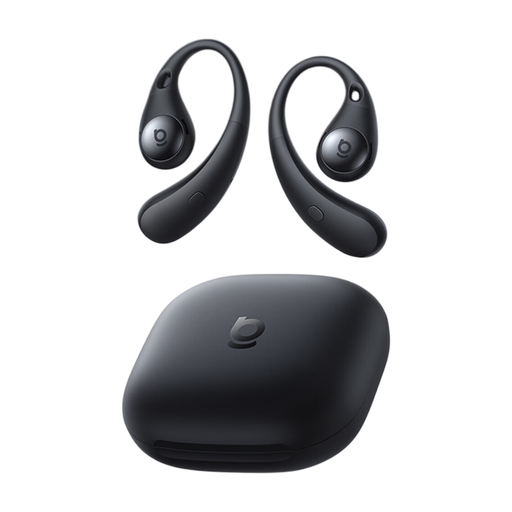
Why it suits this profile: Open-ear sports earbuds leave the ear canal open and are intended for users who want to stay more aware of their surroundings while walking, cycling or exercising.
The open design means you do not automatically rely on noise cancellation. However, surrounding sound can affect the music outdoors or in busier places.
Bluetooth 6.0, support for SBC, AAC and LDAC, USB-C charging and a stated listening time of 8 hours at 50% volume.
We have put together a complete, up-to-date list of products that fully meet these strict selection criteria and the applicable European safety regulations.
Put the headphones into pairing mode, open the Bluetooth settings on your smartphone and select the product name. Some models support Fast Pair on Android or a similar quick-pairing feature on other devices. If you experience problems, check that the headphones are not already connected to another device.
This depends on the volume, codec, active noise cancellation and use of microphone functions. Therefore, compare the stated playtime with ANC switched on and off. A model with fast charging may also be more practical than one with a slightly longer maximum battery life but no fast-charging function.
Many models have a built-in microphone, but call quality varies depending on the design. For regular calls, multiple microphones, beamforming and voice noise cancellation are relevant specifications. Also check whether multipoint is useful for your combination of laptop and phone.
