
Vandaag of morgen in huis

Kwaliteit gegarandeerd

Welkomstaanbiedingen ontgrendelen: GRATIS bezorging | Tot 80% korting | Gratis 30 dagen JoyPlus-proefperiode
Download de app
A wireless gaming mouse gives you more freedom of movement than a wired mouse. However, not every wireless model is suitable for gaming. A high DPI rating, RGB lighting or a low price says little about ease of use on its own.
For Dutch PC and laptop gamers, three things are particularly important: the connection, the weight and how you charge the mouse. Below, you’ll discover what to look out for and which models suit different playing styles.
DPI indicates how sensitively the cursor responds to movement. A 4800 DPI gaming mouse, for example, may be suitable for different games and screen sizes. However, a higher maximum DPI does not automatically mean you’ll play more accurately. Many gamers actually use lower sensitivity during FPS games.
So check whether the DPI can be adjusted and which increments are available. A physical DPI button is useful when you want to switch quickly between, for example, low sensitivity for aiming and a higher setting for everyday use.
A wireless mouse can work via Bluetooth or with a 2.4GHz USB receiver. Bluetooth is convenient for laptops with few spare USB ports, but gaming mice with a 2.4GHz receiver are often designed to provide a direct connection with low latency.
Pay attention to the receiver type and the ports available. A USB-A receiver won’t fit directly into every modern laptop. You may therefore need a suitable adapter or USB hub. According to Trust’s product information, the GXT 929 Helox uses a 2.4GHz connection with ultra-low latency; this is a product specification and does not guarantee the same experience with every PC configuration.
Long battery life is useful, but also check how you charge the mouse. A built-in battery with USB-C makes charging simple. Even more practical is a model that lets you continue playing while it charges. Also note the difference between “up to” a certain number of hours and actual usage time. RGB lighting, polling rate and how intensively you use the mouse can all affect power consumption.
An ultralight gaming mouse moves more easily across a large mouse mat. Models weighing around 60 to 80 grams are popular with players who make lots of fast arm movements. However, a lower weight isn’t comfortable for everyone. Some users prefer a heavier mouse with a more solid grip.
Consider the shape too. An ergonomic right-handed gaming mouse often has an asymmetrical shell that fits the right hand more naturally. Left-handed users, or people who regularly switch hands, may be better off looking for a symmetrical model.
An optical sensor tracks movement across the surface. As well as DPI, check the adjustability, supported polling rate and compatibility with your operating system. A polling rate of 1000 Hz means that, according to the product specification, the mouse position is reported up to 1000 times per second.
A higher polling rate may require more processing power. This is particularly worth checking with models that support 4000 Hz, to make sure your PC can handle it smoothly. For many users, 1000 Hz is a practical setting.
A gaming mouse with programmable buttons can put shortcuts, abilities or media controls within easy reach. Check how many buttons are genuinely programmable. A DPI button, for example, does not always count as a fully customisable button.
You may need downloadable software to assign buttons and adjust RGB profiles and DPI settings. Check beforehand that the software works with your version of Windows. For a wireless mouse for PC and a wireless mouse for laptop, it’s also important to check whether a USB receiver is included.

Why it suits this profile: This right-handed mouse combines 2.4GHz wireless connectivity with features that are easy for beginner gamers to understand.
The DPI can be adjusted from 800 to 4800, and the mouse can be used via USB-C while charging. This means you’re less dependent on having a full battery.
75 grams, six programmable buttons, RGB lighting and a stated battery life of up to 80 hours.
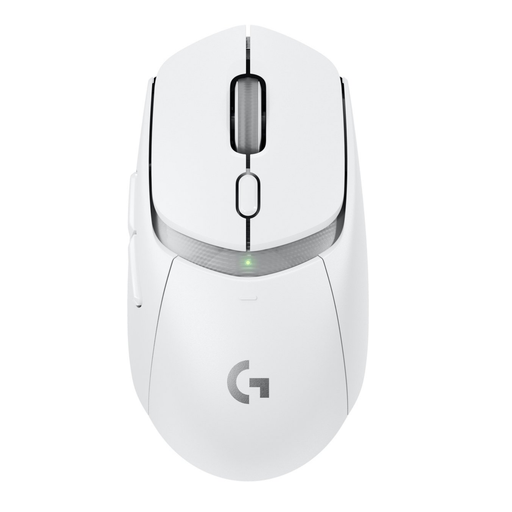
Why it suits this profile: This model offers Lightspeed and Bluetooth, allowing you to switch between gaming and using it with other devices.
The connection options are clearly separated: Lightspeed for wireless gaming and Bluetooth for flexible everyday use. There’s no RGB lighting, which makes energy consumption easier to manage.
Up to six programmable buttons, a stated weight of 68 grams without a battery when used with Powerplay, and up to 300 hours with an AA battery according to Logitech.
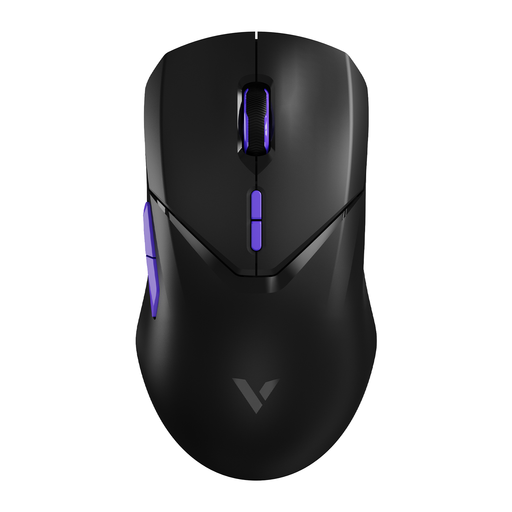
Why it suits this profile: Designed for users looking for plenty of customisation options and long battery life during intensive gaming sessions.
The polling rate is adjustable, so you don’t have to use 4000 Hz all the time. According to the product information, this setting may result in higher CPU usage.
Up to 26000 DPI, ten programmable buttons, 68 grams and a stated battery life of up to 180 hours.
We’ve put together a complete, up-to-date list of products that fully meet these strict selection criteria and the applicable European safety regulations.
Where possible, plug the USB receiver directly into the computer rather than positioning it behind a metal PC case or in a busy USB hub. Then install the manufacturer’s software if you want to adjust the buttons, DPI or RGB settings.
Use a hard or fabric mouse mat suitable for optical sensors. Keep the sensor and glide feet free from dust. Charge a built-in battery using the supplied or compatible cable, and avoid contact with liquids. According to the product information, the legal guarantee applies for at least two years where EU consumer rules apply; additional rights may vary depending on the circumstances.
That depends on the connection and settings. A 2.4GHz receiver, adjustable polling rate and a suitable sensor are all relevant specifications. Also check that the mouse fits comfortably in your hand and that the software works reliably on your system.
Battery life varies from one model to another. In the product information mentioned above, it ranges from around 50 to 180 hours or more. RGB lighting, polling rate and usage intensity all affect runtime. So consider both the stated figure and whether you can continue playing while the mouse is charging.
Yes, as long as your laptop supports the required connection. With a 2.4GHz mouse, you’ll usually need a spare USB-A port. A Bluetooth model works without a dongle, but before buying, check that its gaming features remain available when connected via Bluetooth.
