
Vandaag of morgen in huis

Kwaliteit gegarandeerd

Welkomstaanbiedingen ontgrendelen: GRATIS bezorging | Tot 80% korting | Gratis 30 dagen JoyPlus-proefperiode
Download de app
A wireless gaming mouse gives you more freedom of movement at your desk, but not every wireless gaming mouse model is automatically suitable for competitive gaming. With FPS and MOBA games in particular, you quickly notice whether the connection is stable, the mouse feels comfortable in your hand and the sensor responds accurately.
Marketing copy often focuses on extremely high DPI, long battery life or an ultra-lightweight design. These figures are useful, but they do not tell the whole story. Below, you can read which features you really need to check and which models suit different types of gamer.
A gaming mouse with a high DPI rating may display impressive figures, but most players use a much lower sensitivity in games. A sensor with 30,000 or 44,000 DPI is mainly interesting because of the range of adjustment it offers. Stable tracking, a suitable polling rate and the ability to fine-tune sensitivity are more important.
Also look out for differences between the sensor resolution and the settings actually supported in the software. Always check the product specifications and whether the configuration software is compatible with your operating system.
“Up to” a certain number of hours does not mean you will achieve that figure with every setting. Polling rate, lighting, connection mode and software settings all affect power consumption. According to Rapoo’s product specifications, the VT3 MAX can last up to 750 hours at 1000 Hz and with specific settings. That is not the same as 750 hours of continuous use at 8K.
A mouse with an AA battery can be practical because you can quickly insert a spare battery. A built-in rechargeable battery avoids waste from disposable batteries, but it does require regular charging.
An ultra-lightweight gaming mouse will not be comfortable for every hand or grip style. A lower weight can be useful for fast flicks in FPS games, but a shape that is too small or too low can actually give you less control. Pay attention to:
The polling rate indicates how often the mouse reports its position to the computer. 1000 Hz theoretically means one update per millisecond. Higher values such as 4000 or 8000 Hz can refine response processing, but they place greater demands on your computer and may drain the battery faster.
A gaming mouse with low latency usually uses a 2.4GHz dongle. Bluetooth is convenient for laptops and everyday use, but it generally has a different priority from a dedicated gaming connection. Ideally, position the dongle close to your mouse and avoid sources of interference such as an overloaded USB hub.
An optical gaming mouse uses an optical sensor to register movement. Do not just look at the maximum DPI; also check how adjustable it is and what the software supports. For FPS gaming, stable, consistent tracking is more important than an extremely high maximum figure.
Also check whether the mouse has a DPI button and whether you can save separate profiles for different games. Independent X/Y adjustment can be useful with wide screens, but it is not an essential feature for most players.
Mice weighing around 50 to 70 grams are classed as ultra-lightweight. Models weighing around 80 to 90 grams may feel more stable and are often suitable for longer sessions. An ergonomic gaming mouse with a clearly defined right-handed shape can provide comfort, while a symmetrical model is more flexible for different grip styles.
Extra programmable buttons can be useful for MOBA players. For FPS players, five or six easily accessible buttons are often enough. More buttons do not automatically mean more control; the layout needs to suit your hand and playing style.
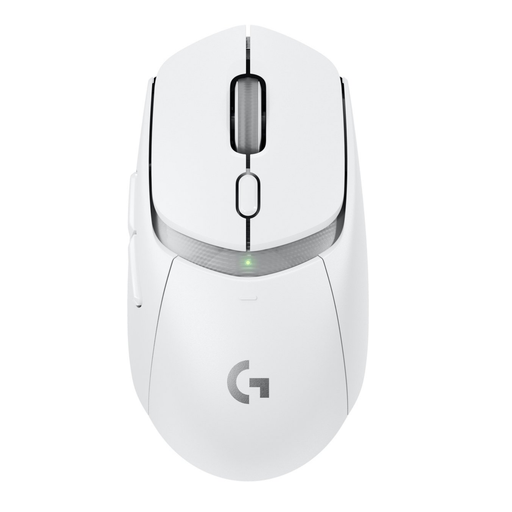
Why it suits this profile: This model combines an AA battery with LIGHTSPEED and Bluetooth. That means you can carry on without a long wait when the battery runs out.
The stated 1000Hz polling rate and 25.600 DPI are verifiable specifications. The battery is replaceable, so the mouse does not rely on a built-in rechargeable battery.
86 grams including the AA battery, six programmable buttons, an optical HERO 25K sensor and a stated battery life of more than 300 hours.

Why it suits this profile: Its low weight and high polling rate are ideal for players who value fast movements and immediate response.
The 54-gram weight and optical Focus Pro 35K sensor are listed separately. This allows you to assess the weight, sensor and shape independently of marketing claims.
54 grams, polling rate of up to 8000 Hz, six programmable buttons and a stated battery life of up to 95 hours.

Why it suits this profile: For long gaming sessions and players who want plenty of features, this model combines low weight, extra buttons and a high polling rate.
The manufacturer lists separate figures for the 8K connection, 1000Hz battery mode and 750-hour battery life. Check the driver settings before using these features.
53 grams, up to 30,000 DPI with independent X/Y adjustment, ten programmable buttons and optical switches with a stated lifespan of 120 million clicks.
We have put together a complete, up-to-date list of products that fully meet these strict selection criteria and the applicable European safety regulations.
Use this quick checklist before placing your order:
Yes, provided the model has a stable 2.4GHz connection, a suitable polling rate and an accurate optical sensor. Bluetooth is mainly convenient for general use. For competitive FPS games, many players choose a dedicated dongle connection.
Its lifespan depends on the switches, rechargeable battery or disposable battery, charging habits and intensity of use. Manufacturers often state a click rating and maximum battery life. These are product specifications measured under certain conditions, not a guarantee of a fixed lifespan.
That depends on the power system. With an AA or AAA model, you need to account for replacement or rechargeable batteries. A model with a built-in rechargeable battery has charging costs and may lose capacity over time. So do not compare only the purchase price; also consider how you use the mouse every day.
