
Vandaag of morgen in huis

Kwaliteit gegarandeerd

Welkomstaanbiedingen ontgrendelen: GRATIS bezorging | Tot 80% korting | Gratis 30 dagen JoyPlus-proefperiode
Download de app
A wireless gaming headset gives you more freedom of movement than a wired model. However, “wireless” does not automatically mean that a headset is suitable for every console, remains comfortable during long sessions or has a clear microphone. Important details can be missing from the product title, especially with cheaper models.
If you search for wireless gaming headset, it is therefore better to compare the connection, compatibility, battery life and fit rather than looking only at the price or eye-catching RGB lighting.
Bluetooth is practical for a phone, tablet or laptop. For gaming, however, many headsets use a 2.4GHz USB receiver, as this connection is intended, according to the product specifications, to provide a direct wireless connection with compatible devices.
Pay attention to the exceptions. The ONIKUMA GT806, for example, states that Bluetooth does not work directly with PS5, PS4 or PC. For these devices, you need 2.4GHz mode or a separate Bluetooth adapter. Always check which connection your device supports.
A quoted battery life does not always apply under the same conditions. RGB lighting, 2.4GHz gaming and high volume can affect power consumption. The ONIKUMA GT806, for example, states up to 60 hours in music and video mode without lighting, and up to 40 hours when gaming via 2.4GHz.
Results may also vary by connection method with other models. So do not look only at the highest figure. Check whether it applies to the mode you actually use.
A gaming headset with 7.1 surround sound generally uses software-based or virtual channel processing. This can alter the sense of space, but it does not guarantee that you will hear footsteps more clearly in every game. Support may also depend on PC software, the operating system or the game.
The Trust GXT 491 Fayzo states that it offers virtual 7.1 surround and 50mm drivers. The Razer Barracuda X lists virtual surround support for Windows. Treat these features as an additional setting, rather than a guaranteed performance promise.
A wireless headset with microphone can connect in several ways:
Also check the individual platform list. “Compatible with multiple devices” does not mean that every feature is available on every platform. With a gaming headset for PS5 and PC, for example, you should check whether the dongle works with both devices or whether an adapter is required. Xbox compatibility requires extra attention, as USB dongles and Bluetooth do not function in the same way on every Xbox.
For team chat, the words “noise cancelling” are not the only important factor. Check whether the microphone is detachable, flip-up or fixed, and whether there is a physical mute button. According to the product description, the Trust GXT 491 Fayzo has a detachable microphone and comes with a pop filter. The Razer Barracuda X uses a detachable microphone.
According to the product description, the Corsair VOID RGB V2 features a bendable omnidirectional microphone with noise reduction. The stated NVIDIA Broadcast function depends on compatible hardware and software. Do not therefore regard it as universal functionality on every device.
An over-ear gaming headset fully covers the ears and can partially block out ambient noise. Consider:
According to the specifications, the Razer Barracuda X weighs approximately 250 grams. The Trust Fayzo weighs 290 grams and has swivelling ear cups. The HyperX Cloud III S weighs 340 grams, but features memory foam ear cushions and an adjustable headband. Lower weight is not the deciding factor for everyone; the fit often makes a greater difference during long gaming sessions.

Why it suits this profile: The Fayzo combines wireless connectivity via 2.4GHz and Bluetooth with a 3.5mm connection. This makes it suitable for anyone who wants to play on PC or PlayStation and also connect a phone.
The product information lists the different connection types and the battery life of up to 22 hours separately. This makes it clear which connection you are using.
50mm drivers, virtual 7.1 surround, detachable microphone and a quoted battery life of 22 hours.
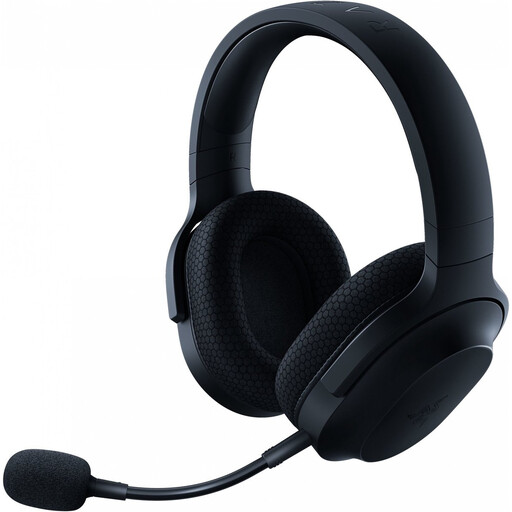
Why it suits this profile: This model is designed for users who want a single headset for PC, PlayStation, Nintendo Switch, Android and everyday use.
The stated 2.4GHz, Bluetooth and 3.5mm options are listed separately. This makes it clear that Bluetooth is not the only way to use the headset.
Bluetooth 5.2, USB-C dongle, detachable microphone, a weight of approximately 250 grams and up to 50 hours of battery life.

Why it suits this profile: The quoted battery life makes this model appealing for long gaming sessions and users who do not want to recharge frequently.
The product description distinguishes between up to 120 hours via 2.4GHz and 200 hours via Bluetooth. This makes it easier to compare the figures with your own usage.
2.4GHz and Bluetooth, 53mm drivers, detachable microphone and memory foam ear cushions.
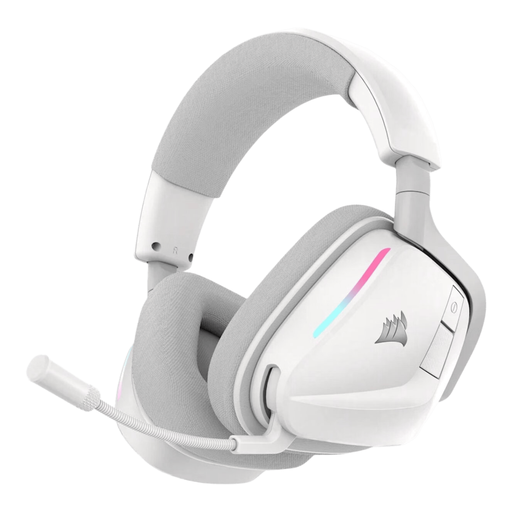
Why it suits this profile: Suitable for anyone who wants to switch between PC, PlayStation, Switch and mobile, and values controls on the ear cup.
The product specifications list 2.4GHz and Bluetooth 5.3 separately and state which receiver is required. Before buying, check which connection your device uses.
Up to 70 hours of quoted battery life via 2.4GHz, 50mm drivers, physical controls and support for Dolby Atmos according to the product description.
We have compiled a complete, up-to-date list of products that fully meet these strict selection criteria and the applicable European safety regulations.
Use this order when comparing wireless gaming headsets:
Not always. PS5 does not directly support every Bluetooth audio connection. Many gaming headsets therefore use a 2.4GHz USB dongle. Check the compatibility information for the specific model; with some products, Bluetooth works with a phone but not directly with PS5 or PS4.
Usage time on a single charge varies considerably by model and connection mode. In the selection mentioned above, the quoted battery life ranges from 22 hours to 120 hours via 2.4GHz, while some models quote a higher figure for Bluetooth. Overall lifespan also depends on charging habits, storage, cable use and the condition of the ear cushions.
You do not pay a subscription for a wireless headset, but you do need to recharge the built-in battery regularly. This involves a small amount of electricity usage. A model with USB-C and long battery life generally needs less frequent attention. A 3.5mm cable as a back-up also ensures that you can still use the headset when the battery is flat.
