
Vandaag of morgen in huis

Kwaliteit gegarandeerd

Welkomstaanbiedingen ontgrendelen: GRATIS bezorging | Tot 80% korting | Gratis 30 dagen JoyPlus-proefperiode
Download de app
Wireless earbuds are ideal for listening to music, making calls, travelling, working and exercising. Even so, a purchase can sometimes fall short. A model may offer long battery life on paper but feel less comfortable in practice. Features such as noise cancellation and water resistance are also often interpreted more broadly than buyers expect.
This practical guide helps you focus on the specifications that make the biggest difference in the Netherlands. Afterwards, you’ll find some popular choices for different situations.
Manufacturers often state the maximum playback time of the earbuds under specific conditions. The total figure including the charging case is different. Features such as active noise cancellation, high audio quality and phone calls can also affect battery life.
So always check:
A model offering 10 hours of playback per charge may be more practical for long working days than a model with a higher total figure but a shorter individual listening time.
An IP rating describes protection against dust and water. IPX4, for example, means protection against splashing water, but not immersion. This may be relevant when exercising in the rain, but swimming or showering is not suitable with this rating.
Also pay attention to the difference between the earbuds and the charging case. The earbuds may be splash-resistant while the case needs to stay dry. Check the charging contacts after exercising and only put the product away once it is dry.
Noise-cancelling earbuds use active technology to reduce surrounding noise. However, their performance also depends on the seal in your ear. The wrong ear-tip size can affect comfort, sound reproduction and noise reduction.
An open-ear design works differently. These models deliberately allow surrounding sound through. This can be useful when walking or exercising, but on a busy train you may hear more background noise than with closed in-ear earbuds.
True wireless earbuds consist of two separate earbuds with no cable between the units. An in-ear model partially seals the ear and is suitable for music, commuting and calls. Check whether several ear-tip sizes are included.
Open-ear earbuds rest beside or above the ear. They keep the ear canal clear and may be suitable for running, cycling or work where you need to remain aware of your surroundings. Sound isolation is usually more limited.
A wireless pair of headphones for music and calls with an over-ear design fully covers the ear. This can be comfortable when travelling, but the size and weight are greater than those of Bluetooth earbuds.
Bluetooth 5.3 or 5.4 is found in many modern models. A higher version number does not automatically mean better sound. Also check support for features such as multipoint, which allows you to connect a laptop and phone at the same time, for example.
The supported codec is relevant for music. The Soundcore Liberty 4 NC, for example, lists Bluetooth 5.3 and LDAC in its product specifications. Whether you benefit from this depends on your smartphone, streaming service and settings.
If you make frequent calls, don’t just look at the number of microphones. Wind reduction, microphone placement and your surroundings also affect call quality. A model with multiple microphones may look appealing on paper, but the actual experience varies depending on the situation.
For example, the Liberty 4 NC lists six microphones, while some open-ear models use two microphones. If you make a lot of calls, choose a model with clear call functions and check that the controls are easy to reach.
A lightweight model is not automatically suitable for every user. Consider the shape, ear tips, ear hook and pressure on your ear. For exercise, a secure fit and suitable IP rating are more important than powerful bass alone.
Touch controls are convenient, but they can cause accidental touches when adjusting an earbud. Physical buttons sometimes provide more feedback. Also check whether charging takes place via USB-C and whether a charging case is included.
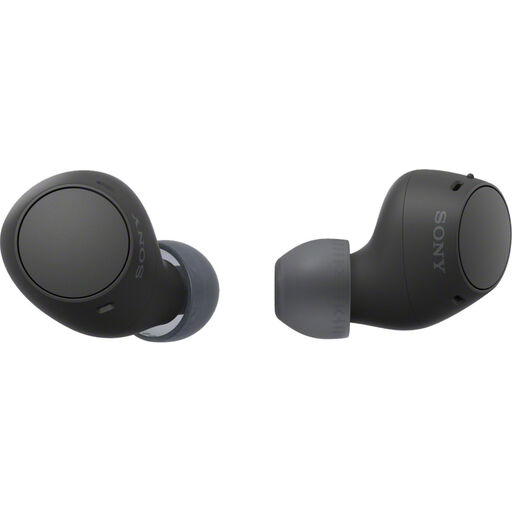
Why it suits this profile: This compact in-ear model is suitable for everyday listening, calls and commuting. The stated total battery life is 22 hours with the charging case.
The product specifications list the battery life including the case and the IPX4 rating separately. This makes it clear that it offers splash protection, not waterproofing.
Bluetooth 5.3, multipoint, microphone, USB-C and a weight of approximately 4.6 grams per earbud.
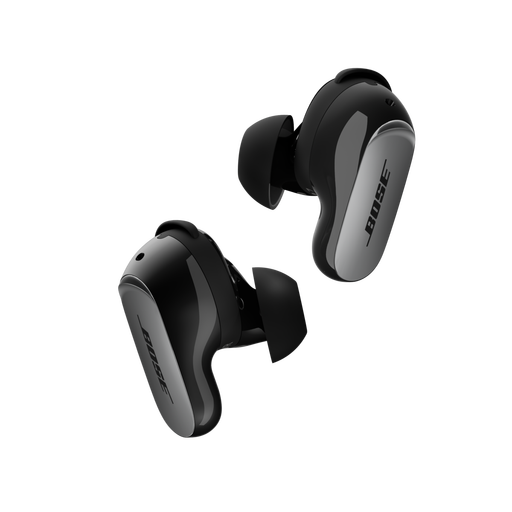
Why it suits this profile: According to Bose product information, these in-ear earbuds are designed for travelling, work, everyday use and exercise. They combine Bluetooth 5.3 with active noise cancellation and an Aware mode.
The included Fit Kit contains three sizes of ear tips and stability bands. This helps you adjust the fit, which is important for comfort and a good seal.
Up to 6 hours of playback per charge, IPX4 splash protection and a charging case that can be charged via USB-C or wirelessly.
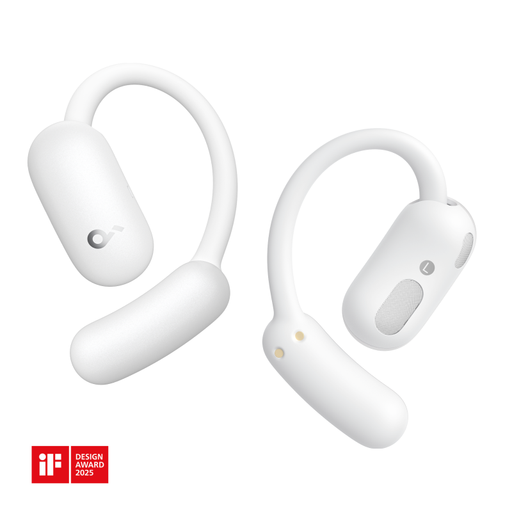
Why it suits this profile: The open-ear design is intended for exercise, conversations and everyday use when you want to remain aware of surrounding sounds.
The product specifications clearly state the open-ear wearing style and IP55 rating. This highlights the difference from closed in-ear earbuds and limits use to the stated level of protection.
Bluetooth 5.4, two microphones, button controls and stated IP55 protection against dust and water.
We’ve put together a complete, up-to-date list of products that fully meet these strict selection criteria and the applicable European safety regulations.
Charge the earbuds, open your phone’s Bluetooth settings and select the product name. When pairing for the first time, the case is usually open, or you activate pairing mode using the controls. If the connection does not work, remove the old Bluetooth profile and try again.
Their lifespan depends on charging cycles, use, storage and maintenance. Keep the charging contacts clean, avoid heat and store the earbuds in the case. Stated battery life is a usage specification, not a guarantee that the battery will retain that capacity throughout the entire product lifespan.
No, power consumption per charge is generally limited. However, the charging case does need to be charged regularly. USB-C makes this simple, while wireless charging offers extra convenience when supported by the model and charger.
