
Vandaag of morgen in huis

Kwaliteit gegarandeerd

Welkomstaanbiedingen ontgrendelen: GRATIS bezorging | Tot 80% korting | Gratis 30 dagen JoyPlus-proefperiode
Download de app
Buying a wireless speaker or soundbar seems simple, until you have to choose between Bluetooth, Wi-Fi, Dolby Atmos, a subwoofer and all sorts of power claims. A high wattage doesn’t automatically mean better sound in your living room. And even a compact Bluetooth speaker can be inconvenient if the battery runs out quickly or the casing isn’t weather-resistant.
Use these buying tips to compare wireless speakers and soundbars based on the features that make a real difference. That way, you won’t pay for features you don’t use.
Manufacturers sometimes list peak power, while other retailers use RMS power. Peak power describes a brief maximum output. RMS power gives you a more useful indication of continuous output, but it still doesn’t tell you everything about the sound, distortion or bass response.
So, also consider:
A 2.0 computer speaker is designed for a desk and has different requirements from a 5.1 soundbar for a large living room.
A Dolby Atmos soundbar can simulate or deliver height effects using upward-firing drivers. The result depends on ceiling height, placement, source material and room layout. A 2.0 model with virtual surround doesn’t offer the same speaker setup as a physical surround sound system with rear speakers.
So, check whether you’re getting:
A portable Bluetooth speaker isn’t automatically suitable for the beach, camping or cycling. Look for a specific IP rating. An IP66-rated casing is completely dust-tight and protected against powerful water jets. IP67 adds protection against temporary immersion, under the stated test conditions.
Also check the battery life. The stated playback time is affected by volume, Bluetooth codec, lighting and content. So, “up to 25 hours” isn’t a guarantee for every listening situation.
A Bluetooth speaker connects directly to a smartphone, tablet or laptop. Bluetooth 5.3 or 5.4 can provide a stable connection, but range and performance also depend on obstacles and the source device.
A Wi-Fi speaker or smart speaker is especially useful for streaming at home. Wi-Fi can support multi-room features and services such as AirPlay 2. For example, the Edifier ES300 lists Bluetooth 5.3, 2.4 and 5 GHz Wi-Fi, USB, AUX and AirPlay 2. According to the product information, you can also pair multiple speakers for multi-room audio.
For a TV soundbar, HDMI ARC or eARC is usually the most convenient connection. It sends your TV’s audio to the soundbar and often lets you control both with a single remote. Check that your television supports ARC or eARC.
An optical connection is a useful alternative. USB and 3.5mm AUX are handy for computer speakers, especially if you want to avoid Bluetooth lag when gaming or watching videos. Active speakers have a built-in amplifier; passive bookshelf speakers need a separate amplifier.
Don’t just compare the advertised battery life. Also consider:
Place a soundbar in front of the television without blocking its lower edge or infrared sensor. A subwoofer won’t sound the same in every position, so try different distances from walls and corners.

Why it suits this profile: These compact gaming speakers are designed for desk use and connect via Bluetooth 5.3, USB or 3.5mm AUX. This makes them easy to connect to a PC, laptop or mobile device.
The product specifications list 10 watts of peak power and make no exaggerated home cinema claims. So you know this is a desktop speaker set, not a replacement for a soundbar with a subwoofer.
USB power, three input options, RGB lighting and different modes for gaming, music and films.

Why it suits this profile: For music lovers who want to listen wirelessly and through a wired connection, this model offers several connection options and supports AirPlay 2.
As well as total power, the set lists its drivers, Bluetooth 5.3, USB, AUX and Wi-Fi. This gives you more context than a wattage claim alone.
According to the product information, it has a 4-inch mid-bass driver, two tweeters, multi-room audio via AirPlay 2 and battery life of up to 12 hours.
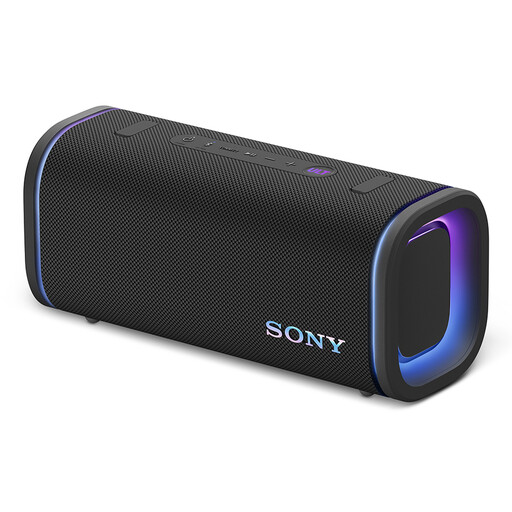
Why it suits this profile: This portable Bluetooth speaker is suitable for the garden, camping and outdoor use when battery life and protection against dust and water matter.
The IP67 rating is more specific than a general description such as “for outdoor use”. Make sure you close the ports properly and stay within the stated conditions of use.
According to the product information, it offers up to 25 hours of battery life, USB-C, LDAC support, a 10-band equaliser and weighs 3.3 kg.
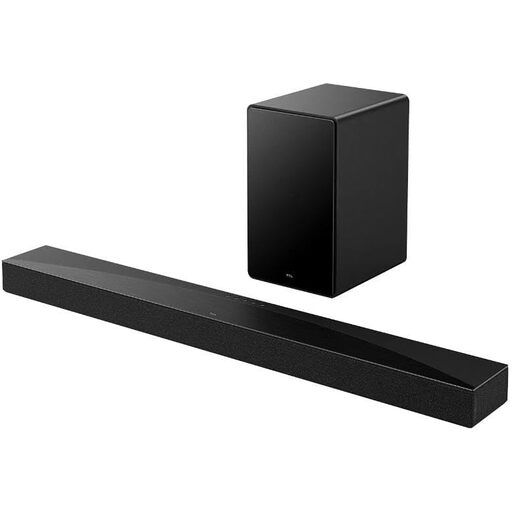
Why it suits this profile: This soundbar is designed for TV entertainment, with a separate wireless subwoofer, HDMI eARC and support for Dolby Atmos and DTS:X.
The product specifications list its 5.1 channels, separate subwoofer, connections and supported formats. This makes it clearer which components are physically included.
580 watts according to the product specifications, a 100-watt RMS wireless subwoofer, Bluetooth 5.3 and the option to wall-mount it.
We’ve put together a complete, up-to-date list of products that meet these strict selection criteria and comply with current European safety regulations.
Not necessarily. Bluetooth is quick to pair and well suited to mobile use. Wi-Fi is more convenient for fixed speakers at home, streaming services and multi-room audio. Choose Bluetooth for simplicity and portability; choose Wi-Fi if you want to synchronise multiple rooms.
Its lifespan depends on battery use, charging habits, moisture, heat and physical wear. A built-in battery gradually wears out. If you often use a speaker outdoors, pay extra attention to its IP rating and make sure the charging ports are properly sealed.
No. A compact 2.0 soundbar may be enough for dialogue and everyday TV viewing. A soundbar with a subwoofer makes more sense if you watch a lot of films, play games or listen to bass-heavy music. Check how much space you have and whether the subwoofer connects wirelessly or by cable.
