
Vandaag of morgen in huis

Kwaliteit gegarandeerd

Welkomstaanbiedingen ontgrendelen: GRATIS bezorging | Tot 80% korting | Gratis 30 dagen JoyPlus-proefperiode
Download de app
There’s a wireless speaker for almost every situation, from a compact Bluetooth speaker for listening on the go to a complete home cinema system with a soundbar and subwoofer. With so much choice, finding the right one isn’t always easy. A high wattage, for example, says little about the listening experience you’ll get, while an attractive app doesn’t automatically mean the speaker will work well with your network or TV.
Product pages often show a high peak power rating. This isn’t the same as continuous power. RMS power gives you a more useful idea of how much power a speaker can deliver over an extended period. The design matters too: the number of drivers, the enclosure, bass reflex ports and the amplifier all affect the sound.
As a result, a speaker with fewer watts may sound more enjoyable than a model with a higher peak rating. So don’t compare wattages alone. Consider what you’ll use it for, the driver configuration and the dimensions too.
A wireless speaker usually works without an audio cable, but often still needs a power cable. A portable speaker with a built-in battery is an exception. With a soundbar and wireless subwoofer, only the connection between the subwoofer and soundbar is usually wireless; both components will generally still need a mains socket.
Also check that the connection you need is available. Bluetooth is handy for a smartphone, while a Wi-Fi speaker may be a better fit for multi-room listening, AirPlay 2 or streaming music over your home network.
Dolby Atmos, DTS:X and similar technologies support spatial audio, but the results depend on the source, the room, speaker placement and the number of speakers. A 2.0 soundbar often uses virtual surround effects. A system with separate rear speakers has a different setup and may take up more space.
So check which channels are actually included. A 3.1 system, 5.1 system and 7.1 system are not the same, even if they’re all described as “surround”.
When choosing a Bluetooth speaker, check the Bluetooth version, multipoint support and available inputs. USB, AUX and optical connections are useful for devices that don’t support modern wireless connections.
For a TV, HDMI ARC or eARC is often a practical option. It sends sound to the soundbar through a single HDMI cable and often lets you control it with your TV remote. Check in advance whether your TV supports ARC or eARC. A Dolby Atmos soundbar also needs a compatible source and connection to transmit Atmos audio.
If you want sound in several rooms, consider a multi-room speaker or an AirPlay 2 speaker. According to its product specifications, the Edifier ES300 supports 2.4 and 5 GHz Wi-Fi, Bluetooth 5.3 and AirPlay 2. Check that your phone, streaming service and home network can work with these features too.
For a portable speaker, battery life, weight and protection matter more than maximum volume alone. Manufacturers usually state battery life for specific conditions, such as a particular volume level. In practice, it may be shorter when playing music loudly or using lighting effects.
An IP rating indicates how well a device is protected against dust and water. According to the product information, the Bose SoundLink Plus has an IP67 rating and a stated playback time of up to 20 hours. Use an IP rating as a guide, but always check the exact limitations in the manual.
A compact speaker fits on a desk or bookshelf, while a soundbar needs space in front of the TV. A model with upward-firing drivers ideally needs enough clear space above it. If your speaker has a subwoofer, placing it close to a wall can affect the amount of bass.
Measure the available width, depth and height in advance. Also consider ventilation, power sockets and the distance from your router if you’re using a Wi-Fi speaker.

Why it suits this need: This compact 2.0 system is designed for a desk, laptop or gaming PC. Bluetooth 5.3, USB and 3.5mm AUX offer several connection options without a complicated set-up.
The stated 10-watt peak power isn’t presented as a measure of room-filling sound. The clearly specified 2.5-inch drivers and three inputs make it easy to see what the speaker can do.
USB power, Bluetooth 5.3, AUX connection and five RGB lighting effects according to the product specifications.

Why it suits this need: This speaker is well suited to listening to music in the living room, working from home and use in several rooms. Its wooden enclosure, USB and AUX inputs, and app control make it a good fit if flexibility matters to you.
The choice isn’t based on the stated power alone. The product details list a 4-inch mid-bass driver, two 1.25-inch tweeters, Wi-Fi, Bluetooth and physical inputs.
60 watts total RMS according to the product specifications, AirPlay 2, LDAC, multi-room support and a stated battery life of up to 12 hours.
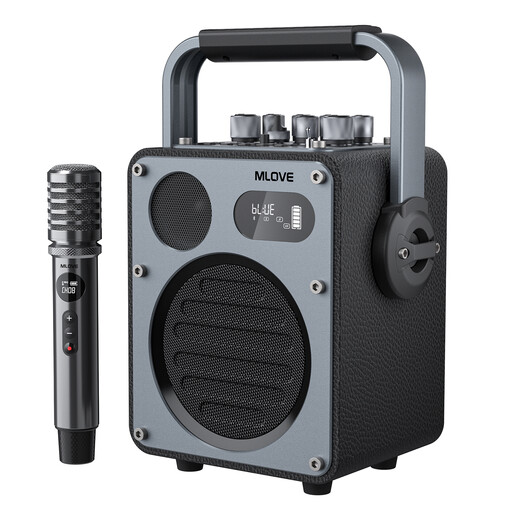
Why it suits this need: This model is designed for karaoke, performances, livestreams and parties. The included wireless microphone and several sound modes make it well suited to situations where speech and singing take centre stage.
You’re not just buying a general-purpose portable speaker. The specifications list separate music and karaoke modes, microphone support, AUX, USB and USB-C OTG.
Bluetooth 5.4, one wireless microphone, USB-C charging and a stated playback time of up to 10 hours in music mode.
We’ve put together a complete, up-to-date list of products that meet these strict selection criteria and the current European safety requirements.
Choose a soundbar if TV, films and gaming are your main priorities. A model with a separate subwoofer can give more emphasis to bass. A Dolby Atmos soundbar with HDMI eARC is particularly well suited to a TV set-up used to watch compatible films and series.
A standalone wireless speaker is more versatile for music and moving from room to room. Gaming speakers are practical for use at a desk, while a karaoke speaker with a microphone input may make more sense for performances or parties. If you want to connect several rooms, consider a multi-room speaker with Wi-Fi and app control.
For every product, check the latest specifications, included accessories, returns policy and statutory guarantee. Under EU consumer rules, many electronics products come with a statutory guarantee of at least two years, but check the information for the specific product and seller.
First check whether the speaker supports Bluetooth, HDMI ARC/eARC, optical or AUX. Bluetooth is simple to use, but can cause a delay with some TVs. For a soundbar, HDMI ARC or eARC is usually practical because you can manage the picture and sound through your TV set-up. Also check that your TV supports the audio formats you want to use.
It depends on the battery, volume, connection used and extra features such as lighting. Stated battery life is a maximum under certain conditions. If you regularly use your speaker outdoors, a handle, its weight and water or dust protection are important too. Don’t leave a lithium battery completely flat for long periods, and use the supplied charger or a suitable alternative.
While playing music, a Wi-Fi speaker uses power for its amplifier and network connection. Power consumption is generally lower in standby, but the exact figure varies by model. A portable battery-powered speaker doesn’t use mains power while in use, but it will need recharging. To reduce power consumption, switch the speaker off when you’re not going to use it for a while.
