
Vandaag of morgen in huis

Kwaliteit gegarandeerd

Welkomstaanbiedingen ontgrendelen: GRATIS bezorging | Tot 80% korting | Gratis 30 dagen JoyPlus-proefperiode
Download de app
A cable-free desk not only looks clean, but it also provides a sense of freedom. However, switching to wireless peripherals can feel like navigating a minefield. Manufacturers promise the world, but in reality, a poor choice leads to frustration and wasted money. As a Product Recommendation Officer at Joybuy, I filter out the noise and give you the facts that matter, ensuring you make a purchase you'll actually value.
Before we look at products, let's discuss the most common pitfalls.
Don't be distracted by flashy marketing. These three technical specifications determine if a product is right for you.
Wireless computer accessories connect via two main technologies:
Many modern devices offer both options, providing maximum flexibility.
The DPI (Dots Per Inch) of a mouse determines its sensitivity to movement. A higher DPI means the cursor moves faster across the screen.
Most mice use an optical sensor, which works well on most surfaces. A laser sensor is often even more precise and works on glossy surfaces like glass.
The type of switch under the keys determines the typing experience, sound, and durability.
Based on objective specifications, we have selected a number of products that suit different user profiles and avoid the pitfalls mentioned earlier.

Why This Fits Their Persona: This compact set is designed for flexibility. Ideal for those who switch between the office, home, and on the go. The ability to connect to three devices simultaneously is perfect for the modern multitasker who switches between a laptop, tablet, and phone.
Tackles the connectivity problem by offering both RF and Bluetooth. The rechargeable battery (with a Trust-claimed life of up to 6 months) is more transparent than vague claims about disposable batteries.
Multi-device connectivity for 3 devices and a compact, lightweight design. The scissor-switch keys are quiet and comfortable.
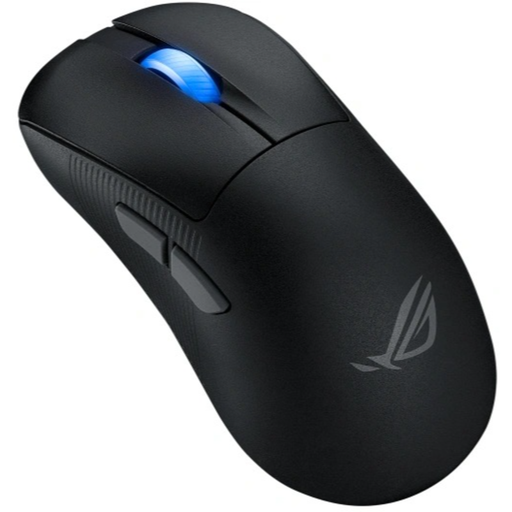
Why This Fits Their Persona: For gamers who make no compromises. This mouse is ultra-lightweight (54 grams) and has an extremely high DPI and polling rate, designed for maximum speed and precision in competitive games.
Avoids the input lag pitfall with a high-performance RF connection and a polling rate up to 8000 Hz (wired). The specifications are focused on measurable performance, not vague marketing claims.
42,000 DPI optical sensor and a weight of just 54 grams. The combination of low weight and high precision is a clear advantage for fast-paced games.
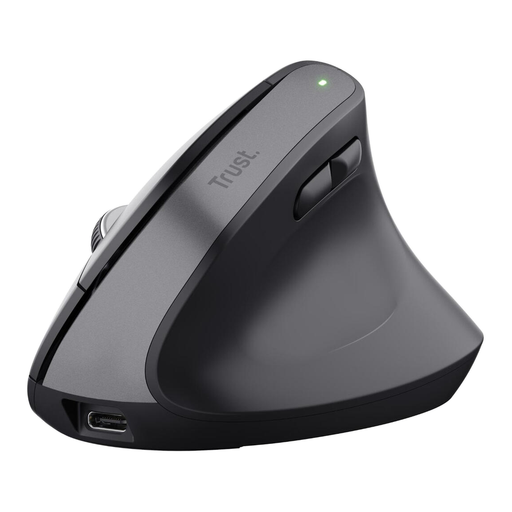
Why This Fits Their Persona: For anyone who spends long days at the computer and wants to prevent wrist or arm strain. The vertical design promotes a natural 'handshake' posture, which can reduce muscle tension.
This isn't an 'ergonomic' product in name only. The vertical design is a proven concept for reducing strain and directly tackles the 'ergonomic myth' pitfall. The silent clicks are an added bonus for a quiet work environment.
The vertical ergonomic design is the key advantage. It also offers multi-device connectivity and is rechargeable via USB-C, which eliminates the hassle of batteries.
Beyond PC accessories, wireless technology also offers freedom for audio and other smart devices.
We have compiled a complete, up-to-date list of products that fully meet these strict selection criteria and comply with Dutch and EU guidelines.
This depends heavily on usage. Factors like the intensity of use, keyboard backlighting, and the connection method play a significant role. A rechargeable model with a clear battery capacity (expressed in mAh) often provides a more reliable picture than vague claims of 'months-long' life. Look at the specifications and read user reviews for a realistic expectation.
For most casual games, a modern Bluetooth keyboard (version 5.0 or newer) is perfectly adequate. The delay is unnoticeable for most people. However, for competitive first-person shooters or other games where reaction speed is crucial, a 2.4GHz RF connection is generally recommended due to its lower and more stable latency.
An ergonomic mouse, particularly a vertical model, places your hand and wrist in a more neutral, natural posture similar to a handshake. This can reduce the strain on the muscles and tendons in your forearm. It's not a miracle cure, but it can help prevent or reduce discomfort and complaints from prolonged computer use.
