
Vandaag of morgen in huis

Kwaliteit gegarandeerd

Welkomstaanbiedingen ontgrendelen: GRATIS bezorging | Tot 80% korting | Gratis 30 dagen JoyPlus-proefperiode
Download de app
A wireless office mouse may seem like a simple product, but you notice the differences between models every day. A mouse that is too small, runs out of power quickly or does not work with your laptop can make a purchase less practical than expected. This applies to home workers, students, office employees and business users who regularly switch between devices.
Pay particular attention to these three common pitfalls:
An RF wireless mouse generally works via a 2.4GHz USB receiver. This is practical for a desktop PC or laptop with a free USB-A port. You often do not need to install any additional software: connect the receiver and switch on the mouse.
A Bluetooth mouse pairs directly with a compatible device. This is useful when you want to keep your USB ports free, for example on a slim laptop or tablet. Models with both RF and Bluetooth offer greater flexibility, especially if you use several devices.
Check the following before buying:
An optical mouse uses a light sensor to track movement across a surface. The DPI value indicates how sensitively the cursor responds to physical movement. A mouse with adjustable DPI, for example between 800 and 1600 DPI, allows you to tailor the speed to your screen, software and personal preference.
For general office work, these features are particularly relevant:
A higher DPI is not automatically more useful. When working with text and spreadsheets, a lower setting can actually give you greater control.
An ergonomic mouse should suit your hand and the way you hold it. Pay attention to the dimensions, weight and shape. A right-handed mouse often provides dedicated thumb support, while a symmetrical mouse may be suitable for both left- and right-handed use.
Also consider the power supply:
A silent mouse can also be useful in a shared office, library or home office. However, check whether the product information specifically refers to silent buttons; this does not mean that the scroll wheel or other components are completely silent.
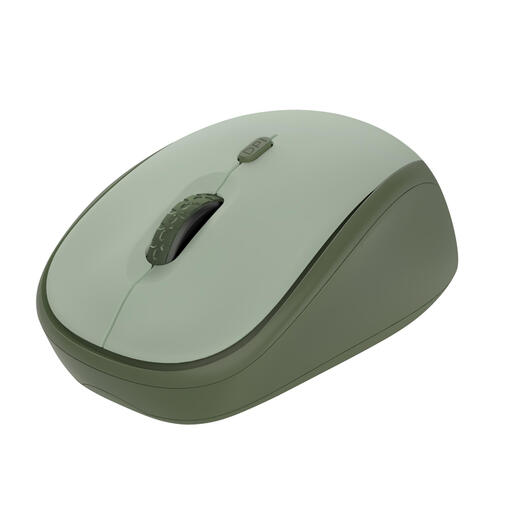
Why it suits this profile: According to the product information, this compact office mouse uses a 2.4GHz USB receiver and is ready to use without additional drivers. The mouse is suitable for Windows, macOS and ChromeOS.
The DPI can be adjusted from 800 to 1600, and the buttons are specified as silent. This gives you control over cursor speed without relying solely on a high DPI figure.
Compact design, 8-metre wireless range, a stated battery life of up to 12 months and 83% recycled material, according to the product information.
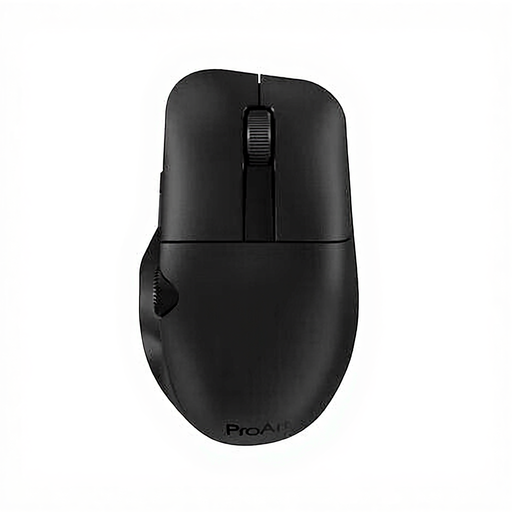
Why it suits this profile: This model is designed for right-handed users who want extra customisation options and two connection types for office work and creative applications.
The choice between RF wireless and Bluetooth means you are not dependent on just one connection. The six programmable buttons provide extra functions without relying solely on higher DPI as a selling point.
Optical sensor up to 4200 DPI, RF and Bluetooth connectivity, six programmable buttons and a built-in 800 mAh rechargeable battery.
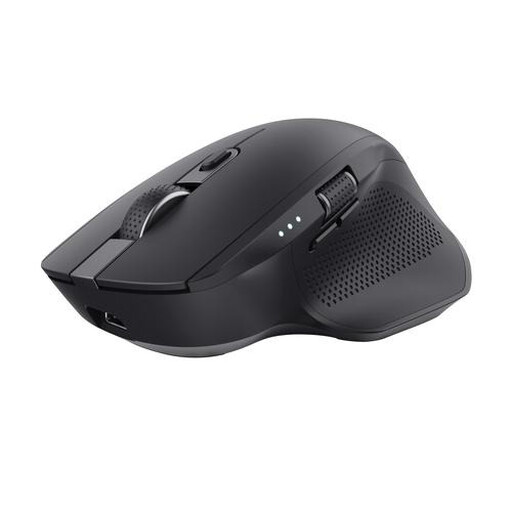
Why it suits this profile: This larger right-handed multi-device mouse is designed for users who switch between a laptop, desktop and tablet, and who often work with wide spreadsheets or timelines.
The mouse combines RF with two Bluetooth channels and supports switching between up to three devices. This means you do not have to keep moving the receiver between devices.
Horizontal scroll wheel, silent buttons, six buttons, optical sensor up to 3200 DPI and a rechargeable battery with LED indicator.
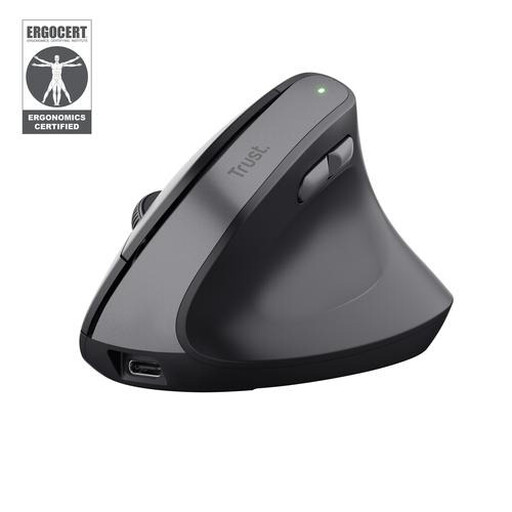
Why it suits this profile: The 57-degree vertical angle and right-handed design are intended for users who want to try a different grip from that of a traditional office mouse.
The shape is clearly specified, allowing you to decide in advance whether a vertical mouse suits your working posture and hand position. This model uses RF rather than Bluetooth, preventing incorrect expectations about multi-device use.
57-degree vertical design, silent buttons, two thumb buttons, adjustable DPI from 800 to 2400 and a rechargeable battery.
We have put together a complete, up-to-date list of products that fully meet these strict selection criteria and the applicable European safety regulations.
With an RF model, you usually connect the supplied USB receiver and switch on the mouse. With a Bluetooth mouse, you first need to follow your operating system’s pairing instructions. Check which connection your laptop supports and whether a USB-A port is available.
This varies by model, usage intensity and battery type. Some models with standard batteries have a stated battery life of several months; a rechargeable mouse needs to be charged periodically via USB. A battery indicator or on/off switch helps reduce wasted energy and prevent unexpected power loss.
Yes, silent buttons can be practical in a shared workspace, library or home office. However, check the full product specification: “silent buttons” generally refers to the clicking sound and not necessarily to the scroll wheel or every other movement.
