
Vandaag of morgen in huis

Kwaliteit gegarandeerd

Welkomstaanbiedingen ontgrendelen: GRATIS bezorging | Tot 80% korting | Gratis 30 dagen JoyPlus-proefperiode
Download de app
A wireless mouse gives you a tidier desk and greater freedom of movement. However, it is not advisable to focus solely on the DPI count or an eye-catching design. A mouse that looks comfortable in the product photo may prove less suitable after a few weeks because of an unsuitable shape, limited compatibility or a battery that needs frequent charging.
This buying guide helps homeworkers, students, office professionals and gamers assess specifications in practical terms and choose a suitable wireless computer mouse.
A mouse with adjustable DPI can be useful, but an extremely high resolution is not automatically necessary. For word processing, spreadsheets and browsing the internet, a range of around 1,000 to 2,400 DPI is often perfectly adequate. Gamers may benefit more from higher settings, particularly when adjusting the speed for each game or screen resolution.
So check whether the DPI can actually be adjusted, rather than simply being listed as a maximum marketing figure.
An ergonomic mouse should suit your hand size, grip and preference for left- or right-handed use. A vertical mouse, for example, creates a different hand position from a traditional model. This can feel comfortable, but it usually takes some getting used to.
Pay attention to:
A model designed for right-handed users is not automatically suitable for left-handed use.
A Bluetooth mouse works without a separate receiver, which is useful with laptops and tablets. A mouse with a USB receiver is often easy to use straight away with computers that have a free USB port. Some models support both options, while others work exclusively via 2.4 GHz radio or Bluetooth.
Check in advance:
For office work, both Bluetooth and 2.4 GHz are suitable. Bluetooth saves a USB port, while a USB receiver usually requires very little installation. For models that support multiple devices, the number of connected devices is more important than the maximum range alone.
A mouse that supports three devices can be useful if you switch between a laptop, desktop computer and tablet, for example. Also check whether switching is done with a button or through software.
A rechargeable mouse means you do not have to replace loose batteries, but you do need to plan when to charge it. Compare the stated usage time and check which type of cable is included. A model powered by AA or AAA batteries may be more practical if you want to work for a long time without recharging.
Battery claims depend on usage. According to the product information, some models can last for months or even longer, but intensive use, lighting and frequent connections can affect the actual battery life.
An optical sensor is common for everyday use. A laser or high-quality optical sensor can offer greater flexibility on different surfaces, but always check the recommended surface in the manual.
Programmable buttons are particularly useful for productivity and gaming. For office work, shortcuts for copying, scrolling or opening applications can be handy. For gaming, polling rate, response time, weight and button placement also matter.
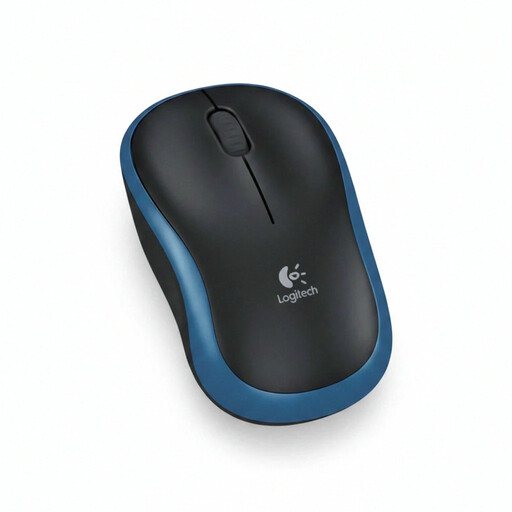
Why it suits this profile: The simple 2.4 GHz connection and nano USB receiver are suitable for studying, home use and basic tasks without additional software.
The product details specify a symmetrical shape, optical tracking and plug-and-play installation. You therefore do not pay for features you may not use.
1,000 DPI, three buttons, one AA battery and suitable for left- and right-handed use.

Why it suits this profile: This model is aimed at business users who scroll frequently, use multiple devices and want to customise the buttons.
The specifications list both Bluetooth and a Logi Bolt receiver, eight programmable buttons and adjustable DPI. This makes the features verifiable, rather than based solely on appearance.
8,000 DPI, horizontal scrolling, quiet clicks, a rechargeable battery and connection to up to three devices.

Why it suits this profile: Gamers looking for programmable features, RGB lighting and a high-resolution sensor get more customisation options here than with a standard office mouse.
The product description specifically mentions 11 programmable buttons, wireless and wired connections, and a 35,000 DPI sensor. However, check whether you genuinely need these features.
11 programmable buttons, 35,000 DPI, 2.4 GHz/Bluetooth and Razer Chroma RGB lighting.

Why it suits this profile: The vertical design is intended for right-handed users who want to try a different wrist position during long office or home-working sessions.
The 57-degree angle and right-handed design are clearly stated in the product specifications. This allows you to assess in advance whether the design suits your working posture.
4,000 DPI, adjustable speed, Bluetooth, USB receiver and a rechargeable battery with a stated usage time of up to four months.
We have compiled a complete, up-to-date list of products that fully meet these strict selection criteria and the applicable European safety regulations.
Not always. A Bluetooth mouse requires Bluetooth support on the laptop. A model with a USB receiver needs a suitable USB port. Also check the supported operating system and any software requirements.
This varies considerably depending on the model and how it is used. Product information may state a lifespan of several months to around two years. Lighting, frequent use and the type of connection affect the actual runtime. A rechargeable mouse is useful if you do not want to use disposable batteries; a model with an AA battery may be appealing when you want to work for a long time without a cable.
Yes, if you want to reduce clicking noise in a shared working environment. According to Logitech, SilentTouch reduces clicking noise by up to 90 per cent on certain models; this is a brand claim and not a guarantee for every working environment. Also consider the noise made by the scroll wheel and side buttons.
