
Vandaag of morgen in huis

Kwaliteit gegarandeerd

Welkomstaanbiedingen ontgrendelen: GRATIS bezorging | Tot 80% korting | Gratis 30 dagen JoyPlus-proefperiode
Download de app
A wireless mouse gives you a tidier desk and greater freedom of movement. However, not every model is suitable for every user. A compact wireless mouse can be convenient when you’re out and about, but less comfortable during long working days. A gaming mouse with a high DPI rating may have impressive specifications, while 30,000 DPI is usually of little benefit for word processing.
The most important choice is therefore not just the price or appearance. Pay particular attention to the connection, shape, power supply and features you will actually use.
DPI determines how far the cursor moves with a particular hand movement. An adjustable DPI mouse gives you control over the cursor speed. For office work, settings between around 800 and 1,600 DPI are often practical. A higher adjustable setting can be useful for image editing, large screens or gaming.
An optical mouse with 30,000 or 42,000 DPI is not automatically better suited to everyday use. Also check whether the mouse has a DPI button and whether the settings suit your screen, software and playing style.
A mouse powered by AA or AAA batteries can work for months, but you will eventually need to replace the batteries. A rechargeable mouse avoids that recurring expense, but it needs to be connected to the charger in good time. Therefore, check:
Battery life depends on usage, connection and features. A stated maximum usage time is therefore not a guarantee for every working situation.
A right-handed mouse will not automatically be comfortable for a left-handed user. If you switch between both hands, it may be better to look for an ambidextrous mouse. Also consider the length, width, height and weight.
Check your computer too. A model with a USB receiver mouse works via a free USB-A port. A Bluetooth mouse can be useful with laptops and tablets that have no free port, but pairing requires Bluetooth support. An RF wireless mouse usually uses a 2.4GHz receiver and often works immediately after connection.
A USB receiver is generally straightforward: connect it, switch on the mouse and start using it. Do check that your laptop has enough USB ports. With a Bluetooth mouse, you do not need to carry a receiver, but the pairing process can vary from one device to another.
Models with both options are useful if you switch between a desktop computer, laptop and tablet. Some mice can remember multiple devices or remain connected to several at once. Check the exact number of devices supported and how you switch between connections.
An optical tracking mouse uses an optical sensor to register movement across a surface. The sensor usually works well on a standard mouse mat or a smooth desk. Reflective, glass or very smooth surfaces may be less suitable for certain models.
DPI is primarily an adjustment feature, not a quality rating. For office work, smooth movement, a practical scroll wheel and a suitable shape are often more important than extremely high resolution. Gamers also consider polling rate, weight, programmable buttons and whether to use a wired or wireless connection.
A basic office mouse generally has two main buttons and a scroll wheel. Extra buttons can be useful for browser navigation, shortcuts or games. Programmable buttons are particularly useful when you actually assign them to specific functions.
A quiet mouse can be ideal in a shared workspace, library or home office. However, check that the product description specifically mentions quiet buttons. “Quiet” is not a universal standard; the clicking sound can be perceived differently depending on the model and the user.
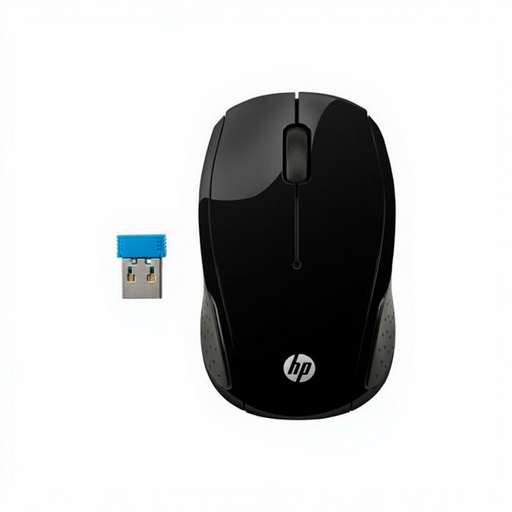
Why it suits this profile: This model uses a 2.4GHz USB receiver, has a symmetrical shape and, according to the product information, comes with two AAA batteries. This makes it a practical choice for basic use with a Windows or Mac computer.
The specifications are straightforward: 1,000 DPI, two buttons and a scroll wheel. You are not paying for features you may not use.
Symmetrical design, optical sensor, wireless range of up to 10 metres and batteries included.

Why it suits this profile: This wireless gaming mouse is designed for users who want to combine low weight, extensive adjustability and wireless gaming. It is right-handed and weighs 63 grams according to the product specifications.
Alongside the high DPI rating, you get a stated polling rate of 1,000 Hz, five programmable buttons and the option to use it via cable or an RF wireless connection.
Optical sensor up to 30,000 DPI, rechargeable battery with a stated usage time of up to 90 hours, and an ergonomic right-handed shape.

Why it suits this profile: According to the product description, the Ozaa+ is designed for office and home use with multiple devices. The combination of RF, two Bluetooth channels, a side-scrolling wheel and a large design is well suited to wide spreadsheets and lengthy documents.
The multi-device setup is clearly specified: one USB receiver and two Bluetooth connections. You also avoid buying separate batteries, as the mouse is rechargeable.
Up to three devices, quiet buttons, horizontal scroll wheel and adjustable optical sensor up to 3,200 DPI.
We have put together a complete, up-to-date list of products that fully meet these strict selection criteria and the applicable European safety regulations.
Many basic RF models are plug-and-play. Connect the USB receiver and switch on the mouse. Additional software may be required for programmable buttons, lighting or customised DPI profiles. Always check compatibility with Windows, macOS or ChromeOS.
Its lifespan depends on build quality, battery type, clicking frequency and daily use. According to the manufacturer, a model powered by AA batteries may work for months; with a rechargeable mouse, you should mainly check the stated usage time per charge. The statutory guarantee in the EU for these product listings is at least two years, although this does not represent a fixed technical lifespan.
Neither connection type is automatically more suitable for every user. Bluetooth saves a USB port and is convenient for laptops and tablets. An RF mouse with a receiver is often quick to set up on a desktop or work PC. If you use both types of device, consider a model with both Bluetooth and RF.
