
Vandaag of morgen in huis

Kwaliteit gegarandeerd

Welkomstaanbiedingen ontgrendelen: GRATIS bezorging | Tot 80% korting | Gratis 30 dagen JoyPlus-proefperiode
Download de app
A wireless mouse keeps your desk tidier and is useful when working from home, in the office, studying or on the go. However, many models look very similar. A low price says little about comfort, while a high DPI value does not automatically mean the mouse is better suited to the way you use it.
Pay particular attention to these three common pitfalls:
A mouse with a USB receiver often uses a 2.4GHz RF connection. Plug the nano or micro receiver into a spare USB port and you can usually get started straight away. This is practical for a dedicated mouse for a PC or office computer. However, check whether your laptop has a suitable USB-A port or whether you need an adapter.
A Bluetooth mouse connects without a separate receiver. This is convenient for laptops, tablets and devices with few USB ports. Models with both Bluetooth and RF are suitable if you want to switch between multiple devices. Always check the supported operating systems and how many devices can be paired at the same time.
An optical mouse uses an optical sensor to detect movement across a surface. Sensitivity is expressed in DPI. A 1000 DPI or 1600 DPI mouse is generally sufficient for word processing, web browsing and spreadsheets. With a 3200 DPI mouse, you can set a higher cursor speed, which can be useful with large screens or wide documents.
A higher DPI is not automatically more accurate for every user. Above all, look for the option to adjust the DPI. For example, the Trust Zaya offers settings of 800, 1200 and 1600 DPI, while the Trust Ozaa+ can be adjusted up to 3200 DPI.
An ergonomic mouse should primarily suit your hand, working posture and grip. Look at the model’s width, height and length. A right-handed shape can provide more support for your palm, while an ambidextrous mouse is suitable for both left- and right-handed users.
A quiet mouse can be a welcome choice for a shared workspace. Check whether quiet buttons are actually listed as a product specification. Extra features are also worth considering: thumb buttons are useful for browser navigation, while a horizontal scroll wheel can save time when working with wide spreadsheets.
Also consider the power supply:
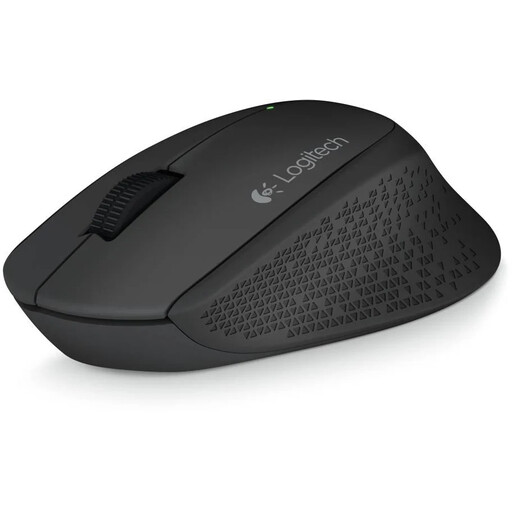
Why it suits this profile: This right-handed mouse is designed for straightforward everyday use at home or in the office, without additional software.
The connection, range of up to 10 metres and supplied AA battery are clearly stated. This means you know in advance that a USB port is required.
1000 DPI optical sensor, three buttons, rubber grips and a nano USB receiver.

Why it suits this profile: The large right-handed shape and connection to up to three devices are ideal for a fixed workstation with a laptop, PC and tablet.
The product information lists both Bluetooth and a 2.4GHz receiver. This means you are not limited to a single connection type.
Adjustable up to 3200 DPI, six buttons, horizontal scroll wheel and built-in rechargeable battery.
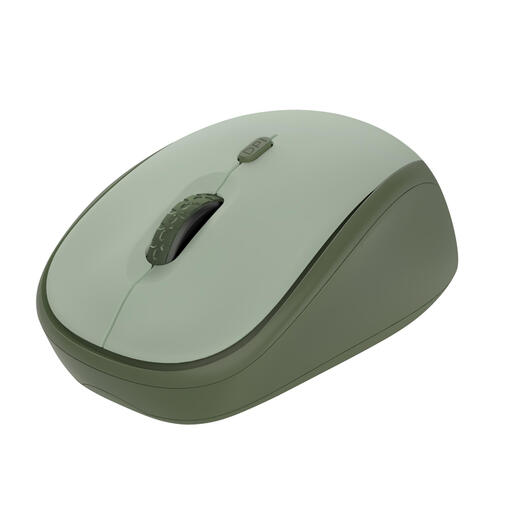
Why it suits this profile: This compact model is designed for the office and travel. The product specifications mention quiet buttons and an RF connection.
The click function and DPI setting from 800 to 1600 DPI are clearly specified, so you do not have to rely solely on a general promise of comfort.
Compact size, adjustable DPI, 2.4GHz receiver and, according to the product information, battery life of up to 12 months.
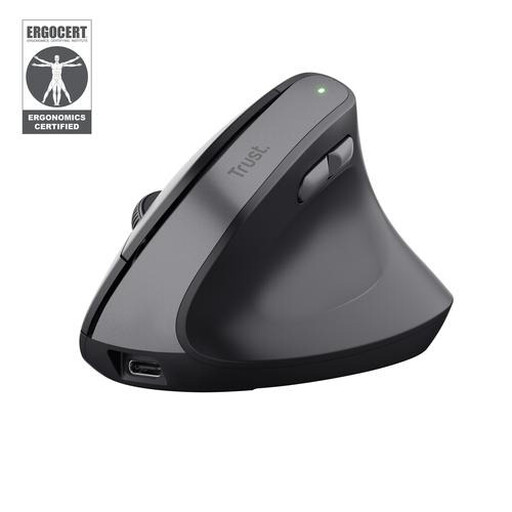
Why it suits this profile: The vertical, right-handed shape is designed for users who deliberately want to try a different wrist and hand position during long working days.
The vertical angle, right-handed orientation and RF connection are explicitly stated. However, check that this shape suits your hand before ordering.
DPI settings from 800 to 2400, quiet buttons, two thumb buttons and a rechargeable battery.
We have put together a complete, up-to-date list of products that fully meet these strict selection criteria and the applicable European safety regulations.
Not automatically. An RF mouse needs a spare USB port and a compatible receiver. A Bluetooth mouse requires Bluetooth support on the laptop. Also check compatibility with Windows, macOS or ChromeOS.
This varies depending on the model, battery type and usage. Models with AA or AAA batteries can last for months according to the product specifications. A rechargeable mouse needs to be charged periodically via USB. Treat the stated usage time as a guideline, not a fixed guarantee.
For most office and study tasks, 1600 DPI is more than sufficient. With a larger monitor or fast cursor movements, a 3200 DPI mouse can offer additional adjustment options. Accuracy also depends on the sensor, surface and preferred cursor speed.
