
Vandaag of morgen in huis

Kwaliteit gegarandeerd

Welkomstaanbiedingen ontgrendelen: GRATIS bezorging | Tot 80% korting | Gratis 30 dagen JoyPlus-proefperiode
Download de app
A wireless mouse gives you a tidier desk and greater freedom of movement. However, many models appear better on paper than they are for your particular needs. A high DPI value, for example, says little about comfort, and a wireless connection does not always work without an additional USB receiver.
Use these practical checks to choose a wireless computer mouse that suits your laptop, workspace or gaming setup. Afterwards, you’ll find a selection for different user profiles.
DPI determines how quickly the cursor moves with a particular hand movement. A mouse with 4,000 or 12,000 DPI is not automatically more accurate for office work. For documents, websites and spreadsheets, a lower or adjustable sensitivity is often more practical. Gamers may benefit more from a combination of adjustable DPI, a suitable sensor and a high polling rate.
Also check the available DPI steps. A laptop mouse with several fixed levels is easier to fine-tune than a model with just one sensitivity setting.
A Bluetooth mouse connects directly to a compatible laptop, tablet or PC. This is useful when you have few USB ports. A mouse with a USB receiver generally uses 2.4 GHz RF. This connection is often straightforward: plug in the receiver and switch on the mouse.
Before buying, check the following:
A multi-device mouse can be useful for a laptop, desktop and tablet, but always check that all devices and operating systems are supported.
The shape of an ergonomic mouse should suit your hand size, grip and preferences. A vertical mouse, for example, takes up more space and requires some adjustment. A compact mouse is easy to carry around, but may be less suitable for prolonged use with a larger hand.
“Quiet” does not necessarily mean that every component is completely silent. Check whether the product information specifically refers to quiet main buttons, and see whether the scroll wheel is mentioned separately.
For everyday office work, a wireless mouse with a USB receiver is often plug-and-play. A range of around 8 to 10 metres is generally more than sufficient for a desk. With a Bluetooth mouse, you should check that the right Bluetooth version and your preferred operating system are supported.
A dual-mode or tri-mode model offers greater flexibility. However, you may sometimes need to switch manually between Bluetooth, 2.4 GHz and cable.
Most models in this selection use an optical mouse. Use one on a flat, non-reflective surface for stable cursor movement. DPI is primarily a cursor-speed setting. For gaming, the polling rate may also be important: the Trust GXT 929 Helox, for example, specifies a polling rate of up to 1000 Hz.
For office work, 1,000 to 1,600 DPI settings are often sufficient. For gaming or large screens, a higher range can be useful, provided the setting can be adjusted accurately.
A rechargeable mouse means you do not have to replace AA or AAA batteries regularly. Do check the stated battery life and charging time. “Up to” indicates the manufacturer’s maximum stated figure; actual results depend on usage, lighting and connection.
A battery-powered mouse may be more practical if you do not want to wait for it to recharge. In that case, check the battery type, the number of batteries required and whether a battery is included.
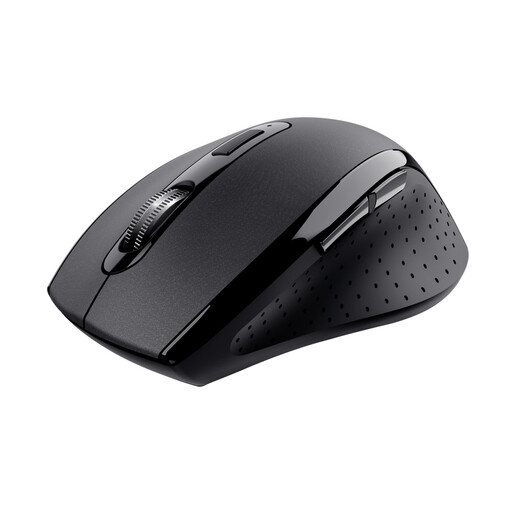
Why it suits this profile: The Sura is designed for home and office use and connects via a USB receiver. Its ergonomic shape, six buttons and adjustable 1500 DPI provide practical essentials without gaming-focused extras.
The product information clearly states the RF connection, optical system, DPI level and required AAA batteries. This means you will not mistakenly expect Bluetooth support or a built-in battery.
Optical sensor, range of up to 10 metres, six buttons and support for left- and right-handed use according to the product specifications.

Why it suits this profile: The vertical shape, set at a 57-degree angle, is designed for users who deliberately want to try a different hand position during long working sessions. The model works via Bluetooth or a USB receiver.
The shape, right-handed orientation, 4000 DPI and rechargeable battery are clearly stated. Bear in mind that a vertical mouse feels different from a standard model.
Adjustable 4000 DPI, Bluetooth, USB receiver and fast-charging function. According to the product description, the stated battery life is up to four months.

Why it suits this profile: This mouse is designed for PC and laptop gamers looking for a lightweight model with programmable buttons and a 2.4GHz connection.
The relevant gaming specifications are listed separately: 4800 DPI, polling rate of up to 1000 Hz, weight of 75 grams and six programmable buttons. It is a right-handed model, however, and does not support Bluetooth.
Optical sensor, USB-C charging and the ability to play while charging. According to the product information, the battery life is up to 80 hours.

Why it suits this profile: According to the product specifications, the Ozaa+ can connect up to three devices via one USB receiver and two Bluetooth channels. The additional side-scrolling function is practical for wide spreadsheets.
The product description explicitly mentions quiet buttons, the three connection options and the rechargeable battery. Its large size is less suitable for small hands or a compact laptop bag.
Adjustable sensor up to 3200 DPI, quiet buttons, horizontal scroll wheel and the ability to work while charging, according to the product information.
We’ve put together a complete, up-to-date list of products that fully meet these strict selection criteria and the applicable European safety regulations.
Not automatically. A model with a USB receiver requires a free USB port. A Bluetooth mouse only works if the laptop supports Bluetooth and the operating system is compatible. Also check whether the receiver uses USB-A or USB-C.
This depends on the power source, usage and the quality of the components. Models with AA or AAA batteries often state an estimated operating time. With a rechargeable mouse, battery capacity decreases over time. As well as battery life, check the charging options and the statutory guarantee.
Yes, but choose a wireless gaming mouse specifically, with a stable 2.4GHz connection, adjustable DPI and preferably a high polling rate. A basic quiet office mouse is primarily designed for navigation and word processing, not fast in-game movements.
