
Vandaag of morgen in huis

Kwaliteit gegarandeerd

Welkomstaanbiedingen ontgrendelen: GRATIS bezorging | Tot 80% korting | Gratis 30 dagen JoyPlus-proefperiode
Download de app
A wireless mouse keeps your desk tidier and is useful for working from home, studying or working on the go. However, not every wireless computer mouse is suitable for everyday use. A model may be compact, but feel less comfortable as a result. A quiet mouse can be ideal in the office, but may only work with a USB receiver. And while a Bluetooth mouse eliminates the need for a dongle, it does require compatibility with your laptop or tablet.
So don’t just focus on appearance or a high DPI rating. The following three pitfalls are common when buying a wireless mouse.
DPI determines how quickly the cursor moves across the screen. A higher value is not automatically more accurate or more comfortable. For word processing, spreadsheets and browsing the internet, an adjustable setting of around 800 to 1600 DPI is often practical. A higher setting can be useful for larger screens or specific software.
So check whether the mouse is a mouse with adjustable DPI. For example, the Trust Primo offers settings from 1000 to 1600 DPI. According to the product specifications, the Lofree Wavy Chips ranges from 800 to 3600 DPI across five levels.
“Quiet” can mean something different from one brand or model to another. Check whether the product information explicitly refers to silent buttons, quiet clicks or Silent Touch technology. This is particularly relevant in a shared study, library or open-plan office.
According to its product description, the Logitech M330 Silent Plus reduces noise by more than 90% compared with traditional mice. This is a claim made by Logitech; treat it as a stated product specification rather than a universal guarantee for every noise level.
A mouse with a USB receiver will generally work immediately once you plug the small receiver into a USB port. For a slim laptop with few ports, a Bluetooth mouse may be more practical. However, do check the Bluetooth version and whether your operating system supports it.
An RF connection via 2.4 GHz is not the same as Bluetooth. Some models support both, such as the Trust Ozaa+ and the Lofree EP115. This makes them suitable for users who switch between a laptop, PC and tablet.
Check the following:
A receiver that can be stored inside the mouse reduces the risk of losing it. This is the case with various Trust models.
For short sessions, a compact mouse can be comfortable. For a full day of work, its shape is at least as important as its weight. Consider the following:
Terms such as “ergonomic” describe a design choice, not a guaranteed effect. According to the product information, the Logitech MX Vertical has an angle of 57 degrees. The Trust Bayo II also has a vertical angle of 57 degrees. Choose based on shape, hand preference and personal experience; if you experience prolonged discomfort, take breaks and adjust your workspace.
A mouse powered by AA or AAA batteries can run for a long time and is ready to use again immediately once you replace the battery. A rechargeable mouse eliminates the need for loose disposable batteries, but does need to be charged periodically.
Compare the following:
Battery life depends on usage. Phrases such as “up to 12 or 24 months” are stated maximum values under the manufacturer’s conditions.
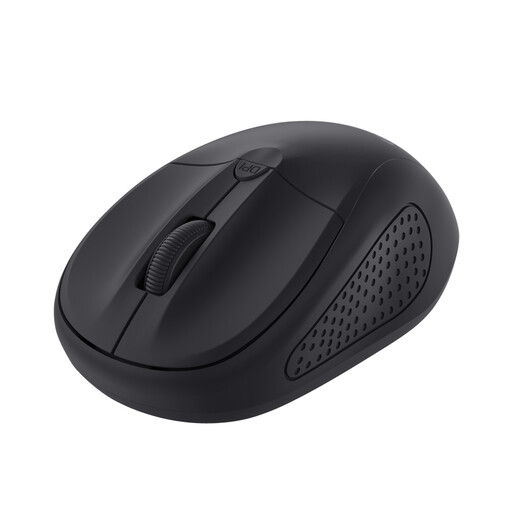
Why it suits this profile: This compact optical mouse has a simple three-button layout and a scroll wheel. Its symmetrical shape is suitable for left- and right-handed use, and its stated range is 6 metres.
The adjustable DPI from 1000 to 1600 makes it easy to set the cursor speed to your preference. The USB receiver and on/off switch keep installation and everyday use simple.
Compact size, optical sensor, 1600 DPI as the highest setting and suitable for either hand.
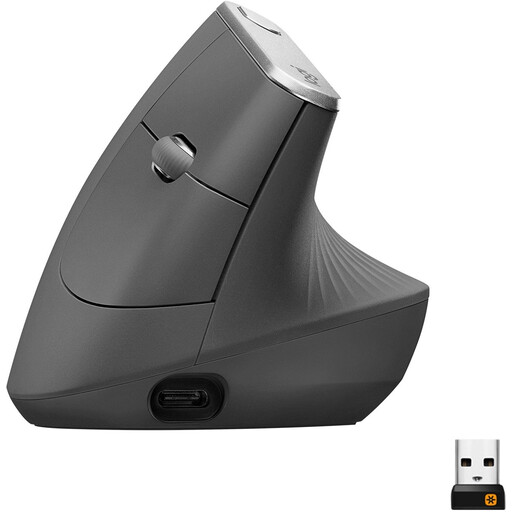
Why it suits this profile: Its vertical shape, Bluetooth and 2.4 GHz connectivity, adjustable sensor of up to 4000 DPI and rechargeable battery are aimed at users looking for plenty of features and connection options.
The connection options are clearly listed, so you are not limited to using a USB port. The shape is specifically shown in the product specifications and differs from that of a standard mouse.
Bluetooth, USB receiver, rechargeable battery, 4000 DPI and a stated range of 10 metres.
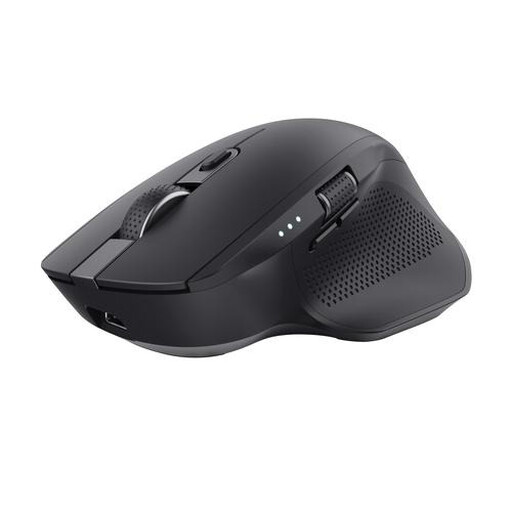
Why it suits this profile: According to the product information, this larger mouse supports up to three devices via a USB receiver and two Bluetooth channels. The horizontal scroll function is practical for wide spreadsheets and timelines.
The connection options and number of devices are clearly specified. The mouse is also rechargeable, so you are not dependent on loose AA or AAA batteries.
Up to 3200 DPI, quiet buttons, rechargeable battery and horizontal scrolling for wide documents.
We’ve put together a complete, up-to-date list of products that fully meet these strict selection criteria and the applicable European safety regulations.
Not automatically. A model with a USB receiver requires a suitable USB port or adapter. A Bluetooth mouse only works if Bluetooth is supported by the laptop and the operating system is compatible. Also check that the receiver or Bluetooth pairing is included as described.
This varies depending on the model, battery type and usage. Manufacturers sometimes state a maximum operating time, such as up to 12 or 24 months for models with an AA battery. A rechargeable mouse usually states an estimated operating time per charge. Treat these figures as a guide and check whether automatic switch-off or a sleep mode is available.
Yes, provided the shape, click noise and connection suit the way you work. A quiet mouse can be useful in a shared space. For spreadsheets, a mouse with extra buttons or a horizontal scroll wheel can save time. If you regularly switch between devices, a multi-device mouse with Bluetooth and a USB receiver can be particularly useful.
