
Vandaag of morgen in huis

Kwaliteit gegarandeerd

Welkomstaanbiedingen ontgrendelen: GRATIS bezorging | Tot 80% korting | Gratis 30 dagen JoyPlus-proefperiode
Download de app
A wireless mouse gives you more space on your desk and is handy for a laptop, home office or flexible working environment. However, not every model is suitable for every user. A compact mouse may feel less comfortable after extended use, Bluetooth does not work with every older computer, and a high DPI rating says little about how easy a mouse is to use in practice.
With this practical guide, you can focus on the specifications that really matter in the UK: connection, hand shape, DPI, power supply and the features you use every day.
The term silent mouse usually means that the buttons make less noise. It does not automatically tell you anything about the scroll wheel, side buttons or connection quality. So check which components are described as quieter in the product information.
For example, Logitech states that the SilentTouch technology in the Logitech Signature M650 L reduces click noise by up to 90 per cent, according to its own information. Treat this as a product specification from the brand, not as a guarantee of a completely silent workspace.
DPI determines how far the cursor moves in response to a particular mouse movement. A mouse with adjustable DPI is flexible, but 10,000 or 30,000 DPI is usually unnecessary for word processing. For office work, comfort, stable tracking and a suitable shape are often more important.
Gamers may benefit from a wider range of settings. In that case, also consider the polling rate, number of buttons, software support and whether you can use the mouse with a cable if the battery runs out.
A mouse with a battery life of several months or years sounds practical, but check which type of power supply it uses. A model with an AA battery can quickly be used again when you are out and about simply by fitting a spare battery. A rechargeable mouse eliminates the need for loose batteries, but it needs to be charged via USB-C in good time.
Also check whether the mouse switches off automatically, how the battery status is displayed and whether the supplied receiver is compatible with your laptop or PC.
A Bluetooth mouse is practical for laptops with few USB ports. You do not need a separate receiver, but pairing takes place through your device’s Bluetooth settings. Check beforehand that your operating system is supported.
A 2.4GHz connection with a USB receiver often works immediately after connection. This is handy for a wireless mouse for PC or a laptop with a spare USB port. Models with both options offer greater flexibility. For example, the Logitech MX Vertical supports Bluetooth and a wireless connection via receiver.
If you use several devices, check how many can be paired. Some models switch between up to three computers, while others support just one device.
A mouse should suit your hand and working posture. Consider the following:
An ergonomic mouse can be comfortable for extended computer use, but the right choice depends on your hand, grip and desk set-up. An unusual shape is not automatically comfortable for everyone.
For general use, a sensor of around 1,000 to 1,600 DPI is often sufficient. Adjustable DPI is useful if you switch between large spreadsheets, photo editing and everyday navigation.
A gaming mouse usually has extra buttons, higher DPI settings and a higher polling rate. That does not automatically make it suitable for office work: RGB lighting, software and a heavier casing may be unnecessary. Also check whether the settings are only available on Windows.
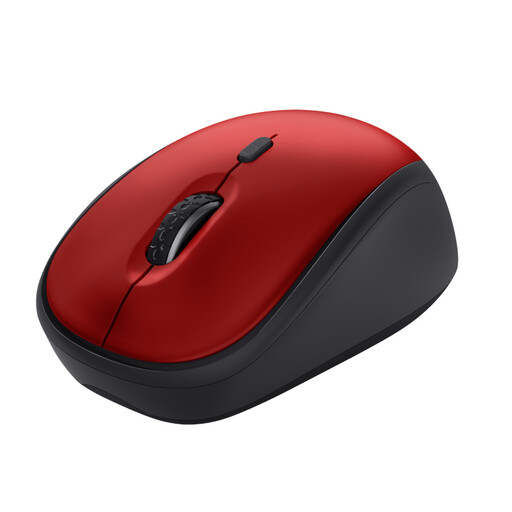
Why it suits this profile: A compact wireless mouse for the office, studying and use on the go, with a USB receiver and adjustable cursor sensitivity.
The product description mentions quiet clicks, a range of 8 metres and battery life of up to 12 months. The DPI can be adjusted from 800 to 1,600, so you are not restricted to a single speed.
2.4GHz connection, optical sensor, compact casing and, according to the description, 83 per cent recycled material.

Why it suits this profile: Designed for right-handed office professionals who work with several devices, lengthy documents and large spreadsheets.
The mouse combines Bluetooth with a Logi Bolt receiver and, according to the specifications, can be used with three devices. This means it is not dependent on a single type of connection.
Rechargeable battery, 8,000 DPI, eight programmable buttons, horizontal scrolling and, according to Logitech, Quiet Click technology.

Why it suits this profile: For right-handed users who are keen to try a vertical mouse during long work or study sessions.
The shape and angle are clearly stated in the specifications: the model has a vertical design with an angle of 57 degrees. This means you know in advance that the grip will feel different from that of a standard mouse.
4,000 DPI, adjustable cursor speed, Bluetooth, USB receiver and a rechargeable battery with, according to the product information, a usage time of up to four months.
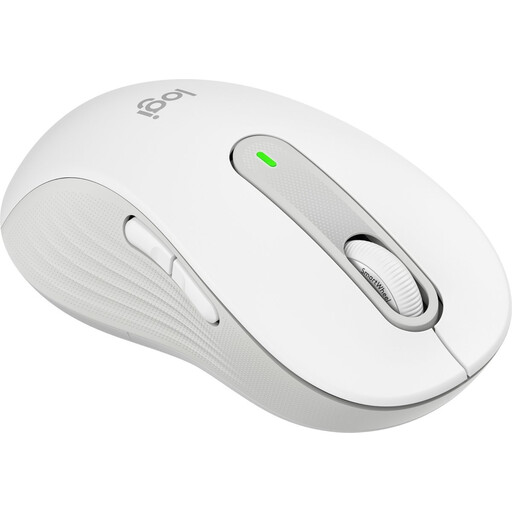
Why it suits this profile: Designed for left-handed users with larger hands who find a standard symmetrical mouse less suitable.
The hand orientation is explicitly stated as left-handed. This prevents you from discovering only after purchase that the thumb buttons or shape are not suitable.
2,000 DPI, five buttons, Bluetooth Low Energy or Logi Bolt and an AA battery with, according to Logitech, a usage time of up to two years.
We have put together a complete, up-to-date list of products that fully meet these strict selection criteria and the applicable European safety regulations.
No. A Bluetooth mouse requires Bluetooth support on the laptop. A model with a USB receiver needs a suitable USB port. Also check which operating systems are supported, particularly with macOS, ChromeOS and tablets.
This varies by model and usage. The product specifications include examples ranging from around 12 months to two years with an AA battery. A rechargeable mouse often works for weeks or months on a single charge. Intensive use, lighting and a high polling rate can reduce battery life.
It can be, provided the model has a stable connection, a suitable polling rate and sufficient battery life. A gaming mouse with 2.4GHz, Bluetooth and USB-C operation offers greater flexibility. For competitive gaming, a wired connection may still be preferable because it provides a more predictable connection. Also check that the programming software works with your operating system.
