
Vandaag of morgen in huis

Kwaliteit gegarandeerd

Welkomstaanbiedingen ontgrendelen: GRATIS bezorging | Tot 80% korting | Gratis 30 dagen JoyPlus-proefperiode
Download de app
A wireless mouse gives you more freedom of movement at your desk, but not every model is suitable for every user. A compact mouse can be handy with a laptop, while a large ergonomic model may feel more comfortable during long working days. The connection, battery and hand orientation can also make a big difference in everyday use.
So watch out for these common pitfalls:
A wireless Bluetooth mouse is practical for laptops, tablets and devices without a spare USB port. Do check that your operating system and Bluetooth version are supported. An RF connection via a USB receiver usually works on a plug-and-play basis, making it useful for a desktop or office PC.
A multi-device mouse takes things a step further. You can use it to connect a laptop, desktop and tablet, for example, and switch between devices. According to the product description, the Trust Ozaa+ supports up to three devices via a USB receiver and Bluetooth. This is particularly useful if you regularly switch between your workplace and home office.
DPI stands for dots per inch and indicates how far the pointer moves with a particular hand movement. A mouse with adjustable DPI offers greater flexibility:
Don’t just look at the maximum figure. For everyday use, a clear DPI button, a comfortable shape and a stable connection are often more important.
An ergonomic mouse should suit your hand and working posture. Pay attention to the dimensions, weight and position of the thumb buttons. A vertical mouse, such as the Logitech MX Vertical or Razer Pro Click V2 - Vertical Edition, has an angled shape that feels different from a traditional mouse.
According to Logitech’s own research, the MX Vertical may reduce muscle activity; this is a brand claim and not a general guarantee for every user. Treat ergonomic features as product specifications rather than a medical solution.
A left-handed mouse or ambidextrous model prevents you from buying a shape designed exclusively for right-handed use. Always check this in the technical specifications. The Logitech Signature M650 L is specifically intended for left-handed users with larger hands.
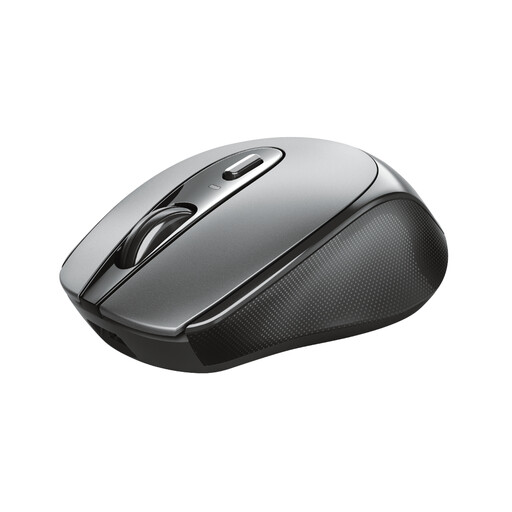
Why it suits this profile: This compact wireless mouse is suitable for working from home, studying and using on the go. According to the specifications, its shape works for both left- and right-handed users.
You’re not reliant on separate batteries: the mouse has a built-in rechargeable battery and USB-C port. DPI can be set to 800, 1,200 or 1,600.
2.4GHz connection with a range of up to 10 metres, four buttons and storage for the USB receiver.

Why it suits this profile: This model is designed for intensive office work involving multiple devices, plenty of scrolling and additional customisation options.
The choice isn’t based on DPI alone: you also get Bluetooth, a Logi Bolt receiver, horizontal scrolling and customisable buttons.
Rechargeable battery, up to 8,000 DPI, support for three devices and quiet clicks according to the product specifications.

Why it suits this profile: The vertical shape, programmable buttons and combination of Bluetooth and HyperSpeed are well suited to users who work and game.
The specifications clearly state that this is a right-handed model. This helps you avoid the wrong purchase if you use your left hand.
Sensor of up to 30,000 DPI, six buttons, rechargeable battery and connection to multiple devices.
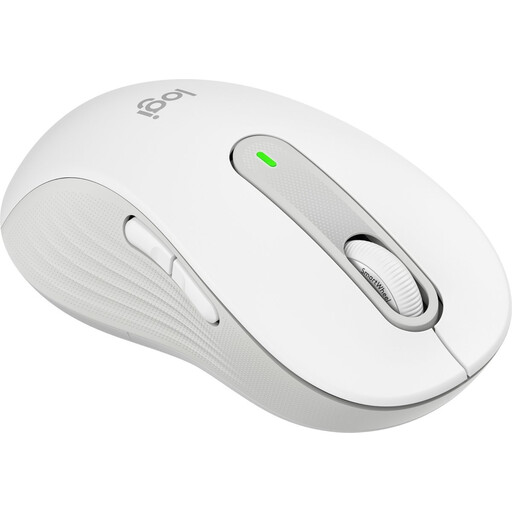
Why it suits this profile: This model is specifically designed for left-handed users with larger hands and is suitable for laptop and office work.
The hand orientation and size are clearly stated. You therefore don’t have to adapt a standard right-handed mouse for use with your left hand.
Bluetooth and RF connection, SilentTouch according to Logitech, and a stated battery life of up to two years using one AA battery.
We’ve put together a complete, up-to-date list of products that fully meet these strict selection criteria and the applicable European safety regulations.
Not automatically. A Bluetooth model requires Bluetooth support on the laptop. An RF mouse needs a USB receiver. Also check the operating system, particularly with ChromeOS, macOS and tablets.
It varies from product to product. Manufacturers sometimes quote months or years, but actual battery life depends on usage, sleep mode and battery type. A rechargeable mouse eliminates the need for separate batteries, but it needs to be charged regularly. With RF models, store the USB receiver in the mouse if it has a dedicated compartment.
No. “Silent click” generally means that the click sound has been reduced according to the product specifications. The scroll wheel and contact with the desk may still be audible. A silent mouse is nevertheless a practical choice for a shared workspace, provided its shape and connection also suit the way you use it.
