
Vandaag of morgen in huis

Kwaliteit gegarandeerd

Welkomstaanbiedingen ontgrendelen: GRATIS bezorging | Tot 80% korting | Gratis 30 dagen JoyPlus-proefperiode
Download de app
A wireless mouse keeps your desk tidier and is handy for working from home, studying or gaming. However, a low price or a high DPI figure doesn’t tell you everything. Some models use a USB receiver, while others connect via Bluetooth. Battery life, shape, click noise and compatibility can also vary considerably.
Look out for these common pitfalls:
A Bluetooth mouse connects directly to a laptop, tablet or compatible PC, leaving your USB port free. A 2.4 GHz connection usually uses a small USB receiver and often works as soon as you plug it in.
A dual-mode or multi-device mouse combines both options. This is useful if, for example, you switch between a laptop, desktop and tablet. Check:
For a wireless mouse for PC and Mac, the operating system isn’t the only thing to consider. Check the receiver’s connector, too. A USB-A dongle won’t fit every modern laptop without an adapter.
DPI determines how far the cursor moves in response to the same physical mouse movement. A mouse with adjustable DPI lets you control that speed. Lower or mid-range settings are often easier to manage for word processing, spreadsheets and browsing. Gamers may want higher settings or an adjustable polling rate.
Don’t just look at the highest figure. Check:
An optical sensor works well on most desks. According to the product information, a model such as the Logitech MX Master 4 for Business uses an 8,000 DPI Darkfield laser sensor and is suitable for use on glass, according to the manufacturer. This is a product specification, not a guarantee that it will perform the same way on every surface.
An ergonomic mouse should suit your hand, grip and working posture. A vertical design, such as the Logitech MX Vertical, takes some getting used to. A classic shape is often easier to use straight away. Also consider:
A rechargeable mouse means you won’t have to replace batteries regularly. A model that takes AA batteries may be more convenient if you don’t want to carry a charging cable. Also check whether you can keep using it while it charges.
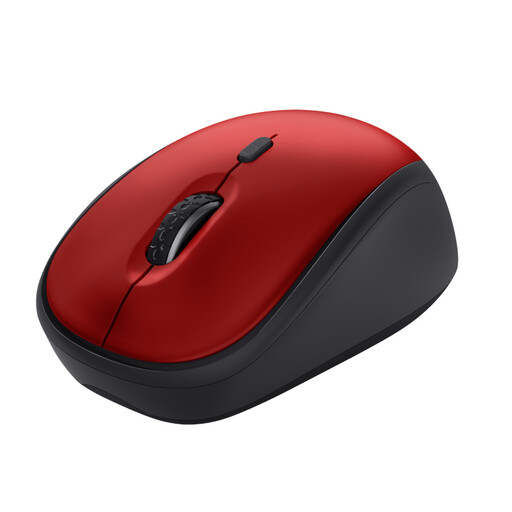
Why it suits this user: This compact wireless computer mouse is designed for office work and use on the go. The 2.4 GHz USB receiver makes it easy to set up.
The specifications list quiet buttons, adjustable DPI from 800 to 1600 and a wireless range of up to 8 metres. So you don’t have to rely solely on a marketing claim about speed.
Compact design, quiet clicks and a stated battery life of up to 12 months. The model is compatible with Windows, macOS and ChromeOS.

Why it suits this user: This model is designed for intensive office work involving multiple devices, lots of scrolling and programmable functions.
The product specifications list Bluetooth, Logi Bolt, connection to up to three devices and adjustable DPI. This lets you choose the connection that best suits your workspace.
8,000 DPI, USB-C charging, horizontal scrolling, eight buttons and a stated quiet-click function.

Why it suits this user: A good choice for gamers looking for a lightweight mouse, a high polling rate and programmable buttons. These features aren’t essential for standard office work.
The stated polling rate, weight and DPI figure are clearly listed. Bear in mind that a higher polling rate may require more system resources.
53 grams, up to 26,000 DPI and, according to the product information, battery life of up to 750 hours at 1,000 Hz.

Why it suits this user: The vertical design is aimed at users who want to try a different wrist and hand position during long working days.
The product specifications list a 57-degree angle, a right-handed design and a sensor of up to 4,000 DPI. The right shape is a personal choice, so adjust your grip gradually.
Bluetooth and 2.4 GHz connectivity, a rechargeable battery, adjustable DPI and a stated battery life of up to four months.
We’ve put together a complete, up-to-date list of products that meet these strict selection criteria and the current European safety requirements.
Not necessarily. A Bluetooth mouse requires your laptop to support Bluetooth. A model with a 2.4 GHz receiver needs a compatible USB port. Also check the operating system and whether the required software is available.
It varies by model and usage. According to the product specifications, a mouse that takes AA batteries can last for months or even more than a year. For a rechargeable mouse, battery life depends on factors such as lighting, connection type and how intensively it’s used. Check the stated battery life and how the model is charged.
Yes, but when choosing a gaming mouse, focus on connectivity, polling rate, weight, sensor and software. Bluetooth can be energy-efficient, while 2.4 GHz or a wired USB mode is often chosen for a more direct connection. A high DPI figure alone doesn’t guarantee better gaming performance.
