
Vandaag of morgen in huis

Kwaliteit gegarandeerd

Welkomstaanbiedingen ontgrendelen: GRATIS bezorging | Tot 80% korting | Gratis 30 dagen JoyPlus-proefperiode
Download de app
A wireless mouse keeps your desk tidier and is useful alongside a laptop. However, not every wireless computer mouse is suited to the same task. A compact mouse can be convenient when you’re on the move, but less comfortable during long working days. A high DPI value may sound appealing, but it says little about the shape, buttons and compatibility.
Anyone who focuses only on price or marketing terms is most likely to encounter these three pitfalls:
A mouse with a 2.4GHz connection and USB receiver generally works via a small dongle. This is practical for desktop PCs and laptops with a spare USB-A port. Pairing is often straightforward, and you don’t need to adjust Bluetooth settings. Do check that the receiver is included in the packaging and that your laptop has a suitable port.
A Bluetooth mouse connects directly to a device that supports Bluetooth. This saves a USB port, which is useful with modern laptops that have few connections. Check the supported operating systems and Bluetooth version before buying. Some models are suitable for Windows, macOS, ChromeOS, iPadOS and Android, but not every combination is guaranteed to be supported.
A multi-device mouse can be paired with several devices. According to the product specifications, the Trust Ozaa+ supports up to three devices: one via the 2.4GHz receiver and two via Bluetooth. This is useful if you regularly switch between a laptop, PC and tablet.
Most models in this selection use an optical sensor. This works on many desk surfaces, but shiny, reflective or glass surfaces can affect tracking. A mouse mat is therefore a simple solution if the cursor moves erratically.
DPI stands for dots per inch and indicates how sensitively the cursor responds to movement. A wireless mouse for laptop and office work will often be perfectly adequate at around 1,000 to 1,600 DPI. For photo editing, large screens or gaming, adjustable DPI can be more practical.
Don’t just look at the highest figure. Also consider:
For example, the AJAZZ AJ159 V2 MC lists an adjustable range of up to 24,000 DPI and a polling rate of up to 1,000 Hz. These are product specifications from the product listing; the practical benefit depends on the game, settings and computer.
A silent mouse can be useful in a shared home office, library or workplace. Do check whether only the main buttons are silent, or whether the scroll wheel and side buttons are quiet too. The Trust Yvi+ and Philips 3000 Series are described as having silent buttons in the product information.
Also consider the shape in relation to your hand:
Batteries and charging affect the cost of use. A model powered by AA or AAA batteries can quickly be made ready for use with a replacement battery. A rechargeable mouse avoids recurring battery purchases, but needs to be charged in good time. According to the product listing, the Trust Ozaa+ has a rechargeable battery with a charging indicator. HP states in the specifications for the HP 635 that its battery life is up to twelve months.
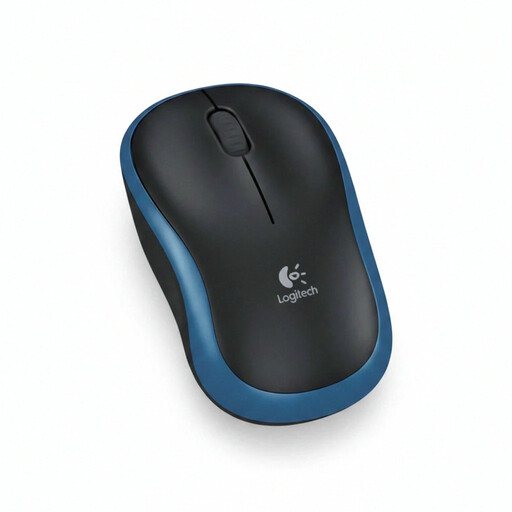
Why it suits this profile: This compact wireless mouse uses a 2.4GHz connection with a nano USB receiver and is designed for everyday work, study and laptop use.
The connection and included AA battery are clearly specified. The ambidextrous shape reduces the risk of choosing the wrong hand orientation.
1,000 DPI optical sensor, three buttons, ambidextrous shape and plug-and-play use via a USB nano receiver.

Why it suits this profile: This larger right-handed model is designed for office work involving multiple devices, wide spreadsheets and long documents.
The connection is not limited to one method: you can use 2.4GHz and two Bluetooth channels. The product information also specifies silent buttons.
Up to 3 paired devices, horizontal scroll wheel, rechargeable battery and adjustable optical sensor up to 3,200 DPI.
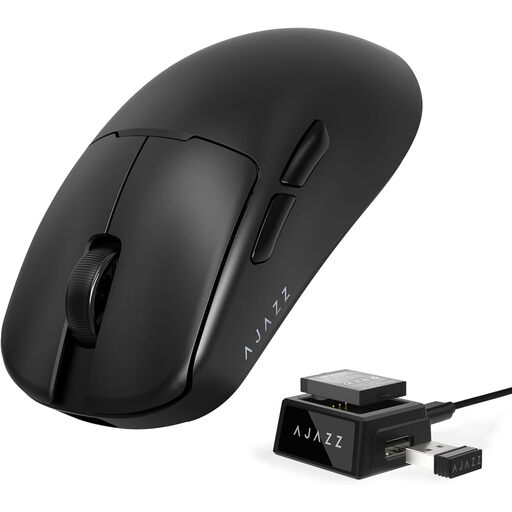
Why it suits this profile: The three connection options and programmable settings suit users who game and also work across multiple devices.
You’re not limited to Bluetooth alone: the model also lists 2.4GHz and wired USB-C connectivity. Do check beforehand whether you need the driver functions.
PAW3311 sensor, adjustable DPI up to 24,000, tri-mode connection, weight of approximately 54 grams and replaceable 300mAh batteries according to the product listing.
We’ve put together a complete, up-to-date list of products that fully meet these strict selection criteria and the applicable European safety regulations.
Always check the following before placing your order:
Not automatically. A model with a USB receiver requires a suitable USB port. A Bluetooth mouse requires Bluetooth support and sometimes a specific operating system. Always check the product’s compatibility list.
This varies by model, battery type and usage. Manufacturers often provide an estimated operating time under specific conditions. A rechargeable mouse needs to be connected to a cable regularly, while a mouse with an AA or AAA battery remains usable after replacement. Switch the mouse off when you won’t be using it for an extended period.
It can be, but look beyond the word “gaming”. Check the wireless technology, polling rate, sensor, adjustable DPI, weight and available settings. A standard wireless mouse may be sufficient for casual gaming; for fast-paced competitive games, the technical differences are more significant.
