
Vandaag of morgen in huis

Kwaliteit gegarandeerd

Welkomstaanbiedingen ontgrendelen: GRATIS bezorging | Tot 80% korting | Gratis 30 dagen JoyPlus-proefperiode
Download de app
A wireless mouse keeps your desk tidy and is comfortable to use with a laptop, desktop computer or tablet. However, the range of options is not always easy to compare. A high DPI value, for example, says little about comfort, while a long battery life can be inconvenient if the mouse requires a charger you do not already have.
Pay particular attention to these three common pitfalls:
A Bluetooth mouse is useful for laptops and tablets, as you generally do not need a separate receiver. However, check that your device supports the required Bluetooth version and that the operating system is compatible.
A mouse with a USB receiver typically uses a 2.4 GHz connection. It is simple to set up: connect the receiver and pair the mouse. On laptops with few USB ports, a multi-device mouse with Bluetooth may be more practical. Some models combine Bluetooth with 2.4 GHz or a wired USB connection.
Also check how many devices can be paired at the same time. The Trust Lyra, for example, can connect to up to three devices: one via the USB receiver and two via Bluetooth.
DPI determines how far the cursor moves with the same physical hand movement. A mouse with adjustable DPI is more flexible for different tasks:
A mouse with adjustable DPI is not automatically more accurate. The type of sensor, surface, polling rate and software also play a role. For gaming, low latency, programmable buttons and a stable 2.4 GHz mode may be more important than an impressive maximum figure.
An ergonomic wireless mouse should suit your hand and grip. A vertical shape can feel very different from a traditional model. Right-handed users also have more choice than left-handed users when it comes to strongly ergonomic designs. A symmetrical mouse is often more versatile.
Also check:
With a rechargeable mouse, the stated usage time is usually an indication provided by the manufacturer. According to the manufacturer’s product information, the Trust Lyra can work for up to six months per charge, while the Lofree EP115 has a stated battery life of around one month. Actual battery life depends on usage, connection and settings.

Why it suits this profile: This compact set combines a wireless mouse with a keyboard and is suitable for small desks, home offices and users who switch between a laptop, tablet and phone.
The connection and compatibility are clearly specified. The mouse has quiet clicks and three DPI levels from 800 to 1200.
Rechargeable keyboard and mouse, support for up to three devices, and compatibility with Windows, macOS, iOS, iPadOS, Android and Chrome OS.

Why it suits this profile: This model is aimed at office professionals who scroll frequently, use multiple devices and value extra buttons for their workflows.
The specifications mention a quiet click, adjustable DPI and support for up to three devices. This makes the choice easy to verify.
8 programmable buttons, horizontal scroll wheel, Bluetooth and Logi Bolt. The stated sensor resolution is 8000 DPI.
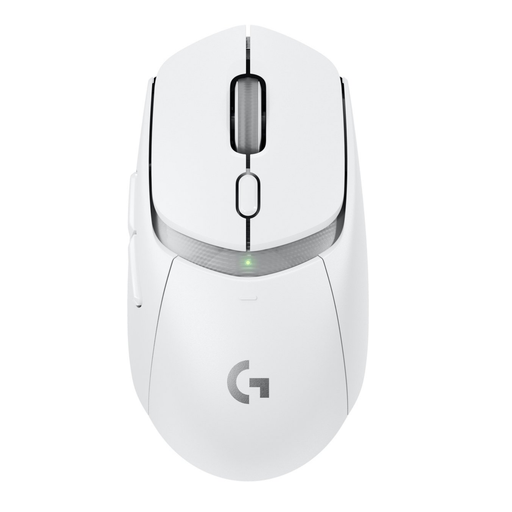
Why it suits this profile: This wireless gaming mouse is designed for players who value low weight, programmable buttons and a fast wireless connection.
The product information specifies both LIGHTSPEED and Bluetooth, six programmable buttons and a HERO 25K sensor. However, note that the mouse is not specified as a silent model.
According to the product information, usage time exceeds 300 hours with an AA battery. The stated weight is 86 grams with the battery.
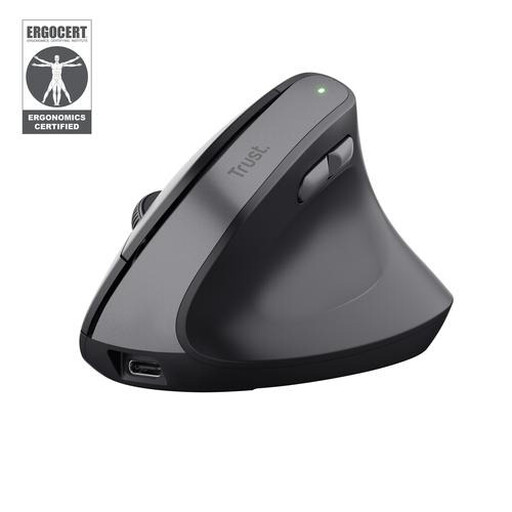
Why it suits this profile: The vertical shape and quiet buttons suit right-handed users who work for long periods and want fewer distractions in the office.
The shape, hand orientation, connection and DPI range are clearly specified. This prevents you from buying a vertical mouse without checking whether it suits your hand.
57-degree vertical design, quiet buttons, adjustable DPI from 800 to 2400 and a rechargeable battery with a stated usage time of up to three months.
We have compiled a complete, up-to-date list of products that fully meet these strict selection criteria and the applicable European safety regulations.
Not every laptop. Check that your laptop supports Bluetooth when choosing a Bluetooth mouse. With a model that has a USB receiver, you need a free USB-A or USB-C port, depending on the receiver supplied. Also check which operating systems are supported.
This varies by model and usage. Manufacturers often state a period ranging from several weeks to several months per charge. Battery life may decrease as the built-in battery gets older. A model that remains usable while charging prevents interruptions.
Yes, a silent mouse can be useful in shared workspaces, meeting rooms or at home when others are working in the same room. However, check whether only the mouse clicks are quiet or whether the scroll wheel is quiet too. If you want a completely silent workstation, a wireless keyboard and mouse set with quiet keys could be a sensible choice.
