
Vandaag of morgen in huis

Kwaliteit gegarandeerd

Welkomstaanbiedingen ontgrendelen: GRATIS bezorging | Tot 80% korting | Gratis 30 dagen JoyPlus-proefperiode
Download de app
A wireless mouse gives you more freedom of movement at your desk, but not every model suits every user. A compact model can be convenient when you are out and about, while a lightweight wireless gaming mouse is particularly well suited to fast movements. The connection, battery and shape also determine whether you will still be working comfortably after several months.
The biggest purchasing mistakes often stem from three misunderstandings:
A Bluetooth mouse is convenient for a laptop, tablet or computer with built-in Bluetooth. You keep a USB port free and can often switch between devices. However, check that the mouse is compatible with your operating system. Some features, such as macros or DPI profiles, only work through specific software.
A wireless mouse with a USB receiver usually uses 2.4GHz radio. This is practical for desktop PCs and gaming, as you only need to plug the receiver into a USB port. Check beforehand whether your computer has USB-A or USB-C and whether the receiver is included in the package.
Tri-mode models combine Bluetooth, 2.4GHz and a USB cable. This offers flexibility across multiple devices, but may mean that additional software is needed for advanced settings.
A mouse with adjustable DPI offers different sensitivity levels. For office work, values of around 1000 to 1600 DPI are sufficient for many users. In gaming, a wider range can be useful, particularly if you want to adjust the settings for each game or screen resolution.
A high sensor resolution does not guarantee a better user experience. Also consider:
For example, the product details for the Logitech G PRO X Superlight 2c list a HERO 2 sensor of up to 44,000 DPI and a polling rate of up to 8 kHz. These are verifiable specifications, but they are not essential for everyday office work.
An ergonomic mouse should suit your hand and the way you hold it. A vertical mouse can encourage a different wrist position, but often requires a short adjustment period. Also check whether the model is designed solely for right- or left-handed use.
Many users choose a lightweight gaming mouse for gaming. The products in the list range from 53 grams for the Logitech G PRO X Superlight 2c to 150 grams for the Razer Pro Click V2 Vertical Edition, for example. A lower weight is not more comfortable for everyone; some users prefer a larger, more stable model.
When it comes to the battery, pay attention to the difference between:
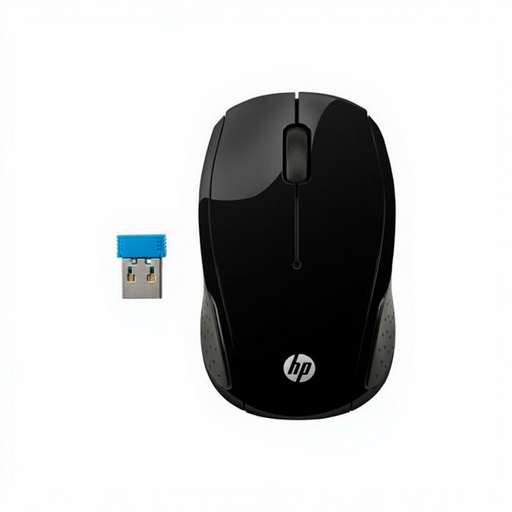
Why it suits this profile: This straightforward wireless computer mouse is designed for everyday office and laptop use. The 2.4GHz connection works via the included USB receiver, and no software installation is required.
The specifications are clear: 1000 DPI, two AAA batteries and a range of up to 10 metres. This means you do not pay for features you may never use.
Ambidextrous design, optical sensor, USB receiver and compatibility with Windows and Mac.
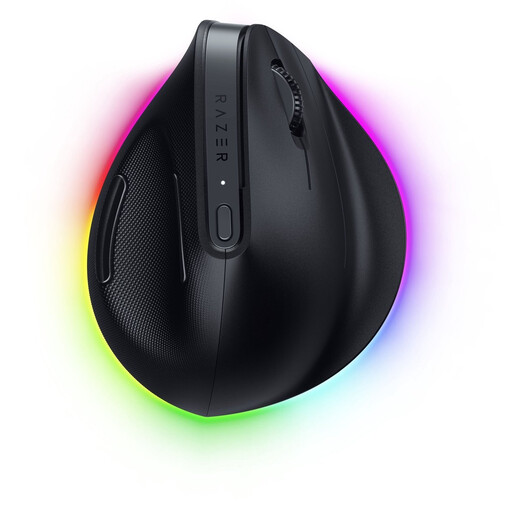
Why it suits this profile: The vertical shape with base support is designed for users who work long hours and are deliberately looking for a different mouse shape. The model works via Bluetooth and Razer HyperSpeed.
The product information clearly states the weight of 150 grams and the right-handed design. You can therefore assess in advance whether the size and orientation suit you.
Up to 30,000 DPI, six buttons, programmable functions and a stated battery life of up to six months.
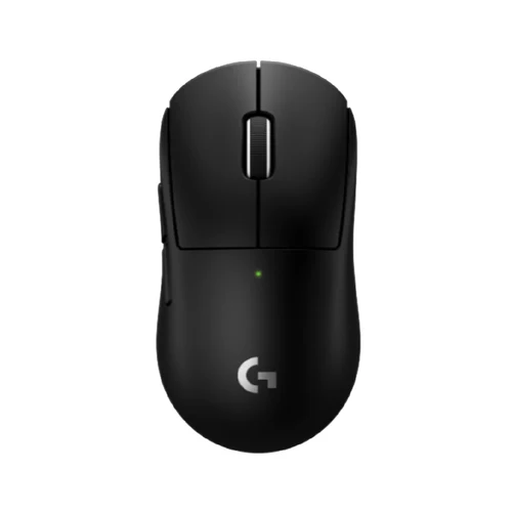
Why it suits this profile: This compact wireless gaming mouse is designed for players who value low weight and a compact shape. It uses Logitech LIGHTSPEED for its connection; Bluetooth is not supported according to the product specifications.
The product specifications state a weight of 53 grams, five buttons and no RGB lighting. This makes the choice clear for anyone who values performance and low weight over lighting.
HERO 2 sensor of up to 44,000 DPI, adjustable buttons, polling rate of up to 8 kHz and a stated battery life of up to 95 hours.
A silent wireless mouse is useful in a shared workspace, library or home office. The HP 285 Silent states up to 90% noise reduction for the left and right mouse buttons, along with a battery life of up to 18 months according to the product details.
For gaming, programmable buttons and macros can be useful, but check software support. On some models, advanced features only work in Windows. A gaming mouse with RGB lighting may sound appealing, but lighting can affect battery life and is not essential for precise control.
Finally, pay attention to the warranty. Many products are covered by a statutory minimum two-year conformity protection under the product information provided and European consumer rules. Keep your proof of purchase and check the current terms and conditions for the product.
We have put together a complete, up-to-date list of products that fully meet these strict selection criteria and the applicable European safety regulations.
Not always. A Bluetooth mouse requires Bluetooth support on the laptop. A model with a USB receiver needs a free USB-A or USB-C port, depending on the receiver. Also check the supported operating system.
This varies considerably from one model to another. According to the product specifications, an office mouse with an AA battery can work for up to 18 months, while a gaming model with lighting and a high polling rate may need recharging after just a few dozen hours. Use the stated duration as a guide rather than a fixed guarantee.
Yes, provided the connection and settings suit your games. For competitive games, preferably choose a model with a 2.4GHz connection, low latency, adjustable DPI and a polling rate supported by your computer and game. For casual gaming, a standard Bluetooth mouse may be sufficient.
