
Vandaag of morgen in huis

Kwaliteit gegarandeerd

Welkomstaanbiedingen ontgrendelen: GRATIS bezorging | Tot 80% korting | Gratis 30 dagen JoyPlus-proefperiode
Download de app
A wireless mouse keeps your desk tidy and is useful with a laptop, home office or desktop computer. However, a high DPI rating or long battery life does not tell you everything. A mouse may look appealing on paper but prove inconvenient in practice because of the wrong connection, an oversized design or limited compatibility.
So pay particular attention to these common pitfalls:
A Bluetooth mouse connects directly to a compatible device. This is practical for a laptop or tablet and leaves a USB port free. The HP 240 Black Bluetooth Mouse uses Bluetooth 5.1 and, according to the product information, works with Windows, macOS and ChromeOS.
A mouse with a USB receiver generally uses 2.4 GHz RF. You plug the receiver into a USB port, after which the mouse usually works straight away. This is a straightforward choice for a desktop PC or laptop with USB-A. Check beforehand that the receiver fits your computer. Some models, such as the Trust Ozaa+, combine a USB receiver with Bluetooth and can be paired with up to three devices.
An optical mouse uses a light sensor to track movement across a surface. Most models in this selection use an optical sensor. DPI stands for dots per inch and indicates how far the cursor moves for a particular hand movement.
A mouse with adjustable DPI offers greater flexibility. For gaming, also consider the polling rate, the number of programmable buttons and how the connection works. A high DPI rating alone does not automatically make a mouse suitable for every application.
An ergonomic mouse should suit your hand and working posture. A vertical design, such as the Logitech MX Vertical, feels different from a traditional model. Also consider the length, width and weight. A compact mouse for a laptop is easy to carry, while a larger model may provide more hand support.
When it comes to power, there are two main options:
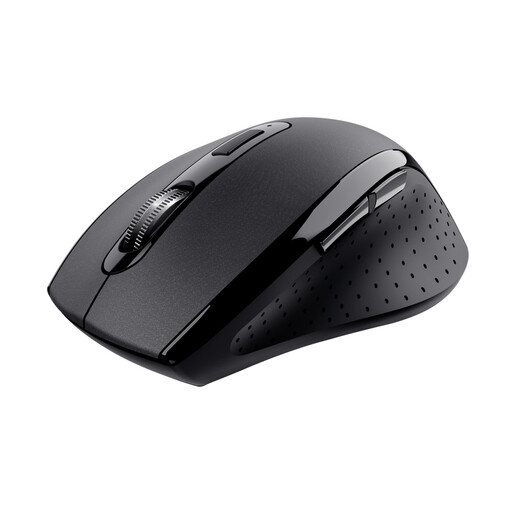
Why it suits this profile: A practical wireless computer mouse for everyday use at home or in the office, without Bluetooth pairing.
The 2.4GHz USB connection and stowable micro-USB receiver keep setup straightforward. The 1,500 DPI setting is adjustable.
Optical sensor, range of up to 10 metres, six buttons and power supplied by two AAA batteries.

Why it suits this profile: Designed for home workers and professionals who switch between a PC, laptop and tablet.
You are not limited to one connection: the mouse supports 2.4 GHz RF and two Bluetooth channels. The rechargeable battery means you do not need loose batteries.
Adjustable up to 3,200 DPI, side-scrolling wheel, six buttons and an LED battery indicator.

Why it suits this profile: For PC and laptop gamers looking for a lightweight mouse, programmable buttons and a wireless 2.4GHz connection.
As well as 4,800 DPI, the specifications list a polling rate of up to 1,000 Hz. This makes it clearer what the mouse is designed for than a DPI claim alone.
Lightweight design weighing approximately 75 grams, six programmable buttons, RGB lighting and a battery with a stated operating time of up to 80 hours.
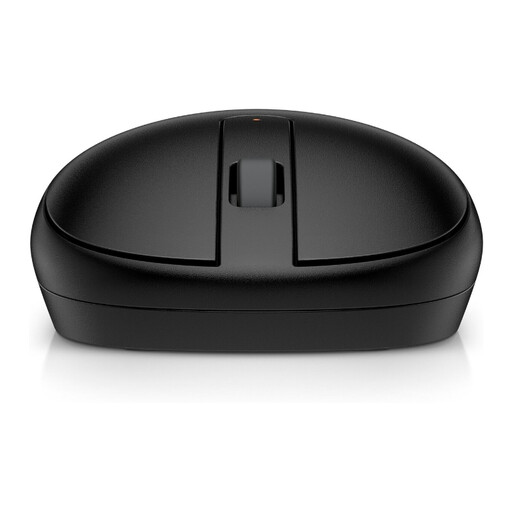
Why it suits this profile: A compact mouse for laptop users who do not want to carry a USB receiver.
The connection uses Bluetooth 5.1, so according to the product information no dongle is required. However, check beforehand that your device supports Bluetooth.
Ambidextrous design, 1,600 DPI optical sensor and support for Windows, macOS and ChromeOS.
We have put together a complete, up-to-date list of products that fully meet these strict selection criteria and the applicable European safety regulations.
For a model with a USB receiver, plug the receiver into an available USB port, insert the battery or switch on the rechargeable battery, and turn on the mouse. With Bluetooth, open your computer’s Bluetooth settings, activate the mouse and select the correct device. If you encounter problems, consult the manual and check that the receiver is inserted correctly.
This depends on the model, battery capacity, sleep mode and usage. Manufacturers sometimes state a maximum duration, such as up to 80 hours for a rechargeable gaming mouse or several months for an office model. Treat these figures as product specifications measured under particular conditions. Switch the mouse off when you are not going to use it for an extended period and use suitable batteries.
Yes, provided the mouse has features suited to your games. Consider the connection, polling rate, sensor, DPI range, weight and programmable buttons. A basic office mouse may be perfectly adequate for casual gaming, but for fast-paced games, a wireless gaming mouse with a 2.4GHz connection and adjustable features is the more obvious choice.
