
Vandaag of morgen in huis

Kwaliteit gegarandeerd

Welkomstaanbiedingen ontgrendelen: GRATIS bezorging | Tot 80% korting | Gratis 30 dagen JoyPlus-proefperiode
Download de app
A wireless mouse gives you a tidier desk and greater freedom of movement. However, a high DPI rating or long battery life does not automatically mean a mouse is right for the way you use it. An office mouse for everyday work needs different features from a wireless gaming mouse designed for fast-paced competitive games.
Pay particular attention to three common pitfalls:
A wireless mouse usually uses Bluetooth, a 2.4GHz receiver or both.
A multi-device mouse can remember several devices, but check how many devices can actually be connected at the same time. The HP 695 and Kensington MY430 EQ, for example, specify support for up to three devices. This is practical for people working from home who regularly switch between screens.
DPI determines how far the cursor moves for a particular physical mouse movement. For office work, having several adjustable settings is more important than an extremely high maximum. For example, a mouse with adjustable DPI can be set more slowly for editing text and faster for large screens.
For gaming, polling rate, weight and tracking also matter. The Razer Viper V3 Pro Wireless specifies a resolution of up to 35,000 DPI and a polling rate of up to 8,000 Hz. According to its product specifications, the Logitech G309 LIGHTSPEED uses a HERO 25K sensor. These figures are mainly relevant to players who deliberately use high sensitivity, fast movements or low input latency.
With a gaming mouse, also check whether the software supports your operating system. Some features, such as macros and button assignments, only work with specific configuration software or in a particular connection mode.
A rechargeable mouse means you do not have to replace AA or AAA batteries regularly. Do not look only at the stated battery life; also consider:
According to the product description, the Lofree Wavy Chips EP115 has a built-in 800 mAh battery, a charging time of around three hours and a stated usage time of approximately one month. The Logitech MX Vertical specifies a built-in battery with a stated life of up to four months. These are manufacturer specifications; actual battery life depends on usage and settings.
A lightweight gaming mouse may be quicker to move, but some users may find a heavier model more stable. Choose based on your grip: palm, claw or fingertip.
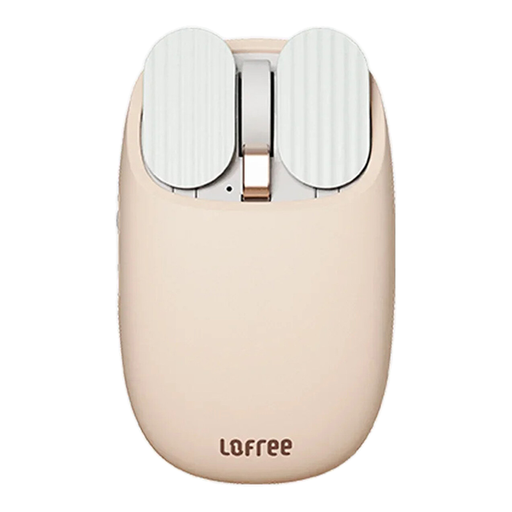
Why it suits this type of user: This compact mouse combines Bluetooth and 2.4GHz, so you can get started without having to commit to one connection type straight away. Its five DPI settings are suitable for working on a laptop, browsing and general computer use.
The dual-mode connection reduces the risk of choosing the wrong option for your laptop or PC. The specifications list 800, 1200, 1600, 2400 and 3600 DPI rather than just one fixed speed.
Bluetooth 4.0 and 2.4GHz; built-in 800mAh battery; Kailh microswitches; compatible with Windows, macOS, iPadOS, iOS and Android according to the product information.

Why it suits this type of user: An ergonomic right-handed mouse for long working days, large spreadsheets and multiple devices. The horizontal scroll and programmable buttons are designed to boost productivity.
The choice is not based on DPI alone: the shape, thumb rest, quiet clicking and controls also receive attention. However, check whether the relatively high weight of 150 grams suits your preference.
8,000 DPI, Bluetooth and Logi Bolt, connection to up to three devices, eight programmable buttons and USB-C charging according to the product specifications.

Why it suits this type of user: Designed for PC gamers looking for a lightweight gaming mouse for fast movements. The model is right-handed and weighs 54 grams according to the product specifications.
The specifications show the weight, polling rate, DPI and battery life separately. This allows you to compare performance without relying solely on marketing terms such as ‘pro’ or ‘ultralight’.
Focus Pro 35K optical sensor, polling rate of up to 8,000 Hz, six buttons and a stated battery life of up to 95 hours according to Razer.
We have put together a complete, up-to-date list of products that fully meet these strict selection criteria and the applicable European safety regulations.
No. A Bluetooth mouse requires Bluetooth support on the laptop. A 2.4GHz mouse usually uses a USB receiver. If your laptop only has USB-C ports, you may need an adapter unless the mouse includes a USB-C receiver. Also check the stated support for Windows, macOS, ChromeOS, iPadOS or Android.
That depends on the purchase price, charging frequency and battery life. A rechargeable mouse eliminates the recurring cost of disposable batteries, but it does need to be charged regularly. A model with an AA or AAA battery can be convenient if you want to keep working immediately with a spare battery.
Place the USB receiver as close to the mouse as possible and avoid metal obstacles or strong sources of interference. With Bluetooth, it can help to remove unused pairings and reconnect the mouse. Use a suitable, non-reflective surface; according to the product information for some models, strong reflections can affect tracking.
