
Vandaag of morgen in huis

Kwaliteit gegarandeerd

Welkomstaanbiedingen ontgrendelen: GRATIS bezorging | Tot 80% korting | Gratis 30 dagen JoyPlus-proefperiode
Download de app
A wireless mouse keeps your desk tidy, but not every model suits every user. A compact mouse can be convenient when you’re out and about, while the same shape may be less comfortable during long working days. Terms such as “quiet”, “ergonomic” and “high precision” can also create the wrong impression if you don’t check the technical specifications.
Pay particular attention to these three common pitfalls:
A wireless mouse with a USB receiver generally works via 2.4 GHz RF. You plug the receiver into a USB port and can often use the mouse straight away without additional software. This is practical for a desktop computer or laptop with a spare USB-A port.
A Bluetooth mouse does not need a separate dongle. This is useful with modern laptops, tablets and devices with few ports. Do check that your computer supports Bluetooth and that the operating system is compatible. Some models combine both connection types and can be paired with multiple devices.
An ergonomic mouse should suit your hand and working posture. Look at:
You should not treat a product claim about reducing strain or increasing comfort as a medical result. According to Trust’s own information, for example, the Bayo II has an angle of 57 degrees and an ErgoCert classification. This describes the design and the stated certification, but does not guarantee a personal health outcome.
A quiet mouse is useful in a shared office, library or home office. Check whether quiet buttons are actually listed in the specifications. Logitech states that the M330’s click noise has been reduced by more than 90% compared with traditional mice, according to its own product information. Treat this as a brand claim; perceived volume may vary depending on the surface and the user.
DPI determines the sensitivity of the cursor. A range of 800 to 1600 DPI is sufficient for many office tasks. A higher setting can be useful for large screens or fast navigation. A mouse with adjustable DPI offers more flexibility than a model with a single fixed value.
Finally, consider the power source. A mouse powered by AA or AAA batteries can last for months, but the batteries will need replacing. A rechargeable wireless mouse eliminates the need for disposable batteries, but must be charged in good time. Also check whether you can continue working while it is charging.
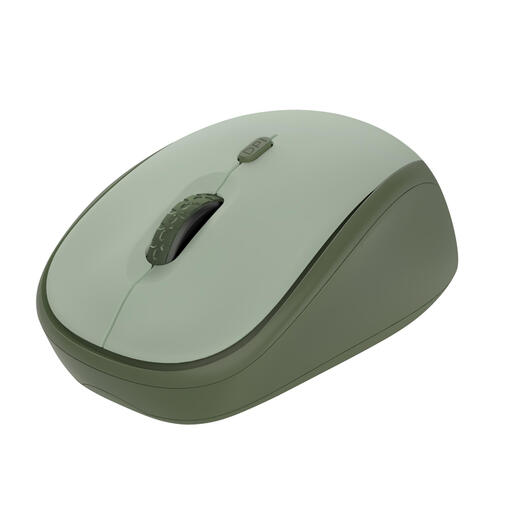
Why it suits this profile: This compact RF wireless mouse uses a USB receiver and is suitable for everyday office and home use. The DPI can be adjusted from 800 to 1600.
The product information mentions quiet buttons, an optical sensor and a clear DPI switch. This means you can see in advance which features you’re getting.
84 grams, range of up to 8 metres, one AA battery and compatibility with Windows, macOS and ChromeOS.
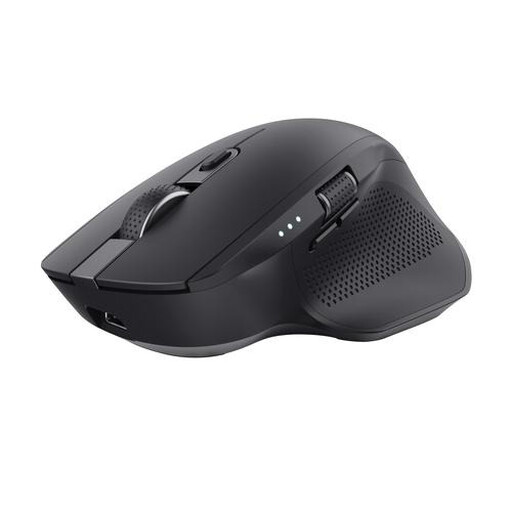
Why it suits this profile: The Ozaa+ is designed for users who switch between a laptop, PC and tablet, and often work with wide spreadsheets or timelines.
You’re not limited to a single connection: the specifications list RF via USB and two Bluetooth channels, with support for up to three devices.
Rechargeable battery, six buttons, side-scrolling wheel and adjustable optical sensor up to 3200 DPI.
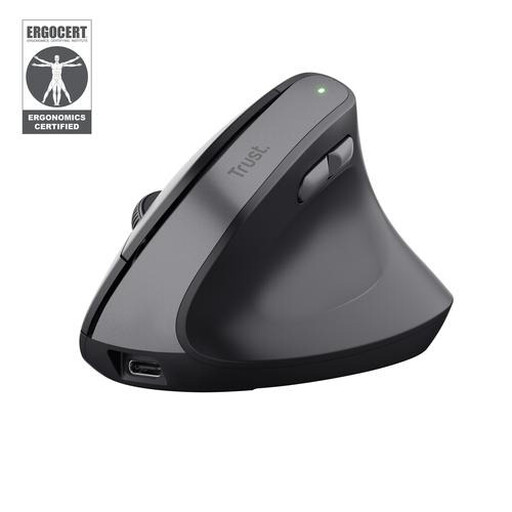
Why it suits this profile: The vertical design is intended for right-handed users who want to try a different wrist and hand position during long days at the computer.
The shape, hand orientation, connection method and DPI range are clearly described. So you know that this is neither an ambidextrous mouse nor a Bluetooth model.
57-degree vertical angle, RF connection via USB receiver, quiet buttons and rechargeable battery.
With an RF model, plug the USB receiver directly into a spare port. Ideally, store the small receiver in the mouse’s dedicated storage compartment. For Bluetooth, switch on Bluetooth on your computer, select the mouse from the list of devices and complete the pairing process.
Use a mouse mat if the cursor stutters on a shiny, transparent or uneven surface. An optical sensor generally works well on many flat surfaces, but the underlying surface still affects tracking. Clean the sensor and buttons with a soft, dry cloth, and remove the batteries from a mouse that you will not be using for an extended period.
We’ve put together a complete, up-to-date list of products that fully meet these strict selection criteria and the applicable European safety regulations.
Yes. An RF wireless computer mouse communicates directly with the USB receiver. A Bluetooth mouse uses Bluetooth between the mouse and the device. Neither connection requires an internet connection.
This depends on the model, battery, usage and power-saving function. The product specifications for the models mentioned indicate battery life ranging from a few months to around two years. These are manufacturer-stated figures and are not a fixed guarantee for every user.
A wireless mouse is often practical for home working because there is no cable to get in the way. Choose a quiet mouse if you work around other people, a Bluetooth model if USB ports are in short supply, and an ergonomic mouse if the vertical shape suits your hand. Always check compatibility, dimensions and the power method before ordering.
