
Vandaag of morgen in huis

Kwaliteit gegarandeerd

Welkomstaanbiedingen ontgrendelen: GRATIS bezorging | Tot 80% korting | Gratis 30 dagen JoyPlus-proefperiode
Download de app
A wireless mouse keeps your desk tidier and is useful with a laptop, home office setup or workplace. However, not every model is suitable for everyday use. A mouse that looks comfortable in the product photo may be too small in practice, have loud clicks or only work via a USB receiver when you actually need Bluetooth.
Use these checks to compare a wireless computer mouse based on verifiable features, rather than marketing copy alone.
A high DPI value is often presented as an advantage. However, DPI mainly determines how quickly the cursor moves across the screen. For word processing, online shopping and spreadsheets, an adjustable setting of between around 800 and 1600 DPI is sufficient for many users. A higher setting can be useful with large screens, graphic work or gaming.
So do not just look at the maximum figure. Also check:
An optical mouse generally works well on a normal, matt surface. Reflective surfaces and glass can affect tracking.
A mouse with a USB receiver usually uses a 2.4GHz radio connection. This works easily with laptops and PCs that have a spare USB-A port. A Bluetooth mouse connects directly to a compatible device, so you do not need to use a receiver.
Check the following before buying:
A model can therefore be perfectly wireless but still not be suitable for your laptop or desk setup.
An ergonomic wireless mouse can support a natural hand position, but the shape, dimensions and hand orientation are still important. For example, a vertical mouse is often designed for right-handed use. A compact wireless mouse is easy to carry around, but may feel less spacious in larger hands.
Pay attention to:
According to information from Logitech, the MX Vertical is designed at an angle of 57 degrees and places the hand in a ‘handshake’ position. This is a product claim made by the brand; it does not mean that the same position will be comfortable for every user. If you use a mouse for long periods, regularly change your hand position and take breaks.
A range of 6 to 10 metres is common with radio-connected models, but practical performance depends on obstacles and sources of interference. For an office or laptop mouse, stability and easy installation are particularly important.
A mouse with a USB receiver is often plug-and-play. With a Bluetooth mouse, you need to pair it first. A multi-device mouse is useful if you switch between, for example, a laptop, desktop computer and tablet. Check how many devices can actually be connected at the same time.
A mouse powered by AA or AAA batteries can be used straight away and does not need a charging cable. A rechargeable wireless mouse eliminates the need for disposable batteries, but it does need to be charged in good time.
Pay attention to the difference between:
Battery life depends on usage, connection type and any lighting. Treat the stated number of months as an indicative usage estimate, rather than a fixed guarantee.
A silent mouse is practical in a shared office, library or home office. Check whether ‘silent’ specifically refers to the left and right buttons, or also to the scroll wheel and side buttons. A quiet click also tells you nothing about the shape, sensor or battery life.
For everyday office work, three buttons and a scroll wheel are often enough. If you do a lot of navigating in browsers or documents, additional thumb buttons can be useful. For a gaming mouse, polling rate, programmable buttons, low latency and software support are also important. Bear in mind that some features only work with Windows software.
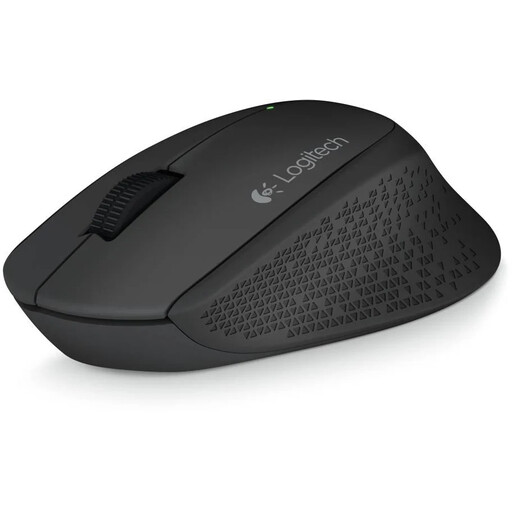
Why it suits this profile: This right-handed mouse keeps operation simple with three buttons, a 1000 DPI optical sensor and a nano USB receiver.
The specifications focus on everyday navigation without unnecessary gaming features or complicated software. The receiver and AA battery are included.
2.4GHz connection, range of up to 10 metres, rubber grips and operation with a single AA battery.
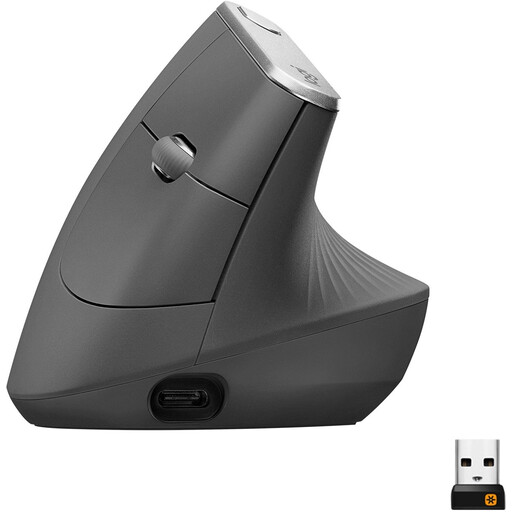
Why it suits this profile: The vertical shape, adjustable sensor of up to 4000 DPI, Bluetooth and USB receiver offer greater flexibility for a permanent workstation.
The hand orientation and dimensions are clearly stated. This means you can see in advance that this model is designed for right-handed use and is not a small travel mouse.
Bluetooth and 2.4GHz connectivity, rechargeable battery, 4000 DPI and adjustable cursor speed.
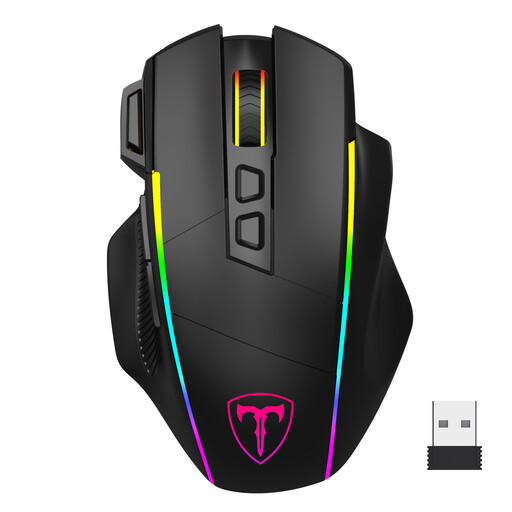
Why it suits this profile: This gaming mouse combines 2.4GHz, Bluetooth and wired USB-C use with multiple DPI settings and programmable buttons.
The product information states that the software only works on Windows and in wired mode. This prevents false expectations for Mac or Bluetooth use.
1200 to 10000 DPI, eight programmable buttons, three connection modes and a rechargeable battery.
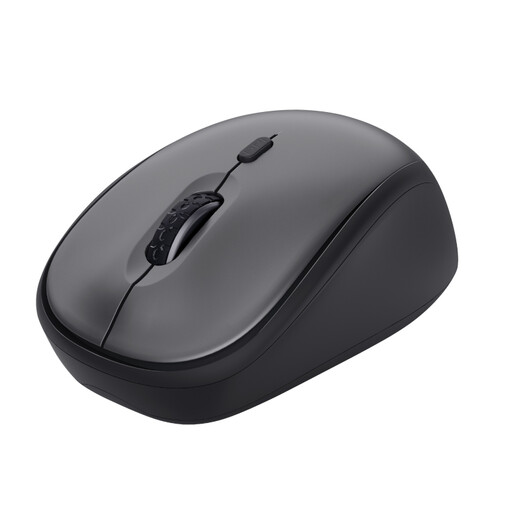
Why it suits this profile: The compact shape, quiet buttons and storage space for the USB receiver are ideal for students, hybrid workers and shared workspaces.
The specifications make it clear that this model works via a USB micro receiver and is not a Bluetooth mouse. This means you know in advance that you need a USB port.
Quiet click, 800-1600 DPI, range of up to 8 metres and operation with a single AA battery.
We have put together a complete, up-to-date list of products that fully meet these strict selection criteria and the applicable European safety regulations.
For a model with a USB receiver, insert the receiver into a spare USB port, switch on the mouse and install the battery if necessary. With Bluetooth, open the Bluetooth settings on your laptop or PC and select the mouse from the list of available devices. Check the manual if pairing does not happen automatically.
This depends on the battery type, usage time, sensor and on/off habits. Manufacturers sometimes give an estimate ranging from a few months to around a year and a half. A rechargeable wireless mouse does not need replacement batteries, but it does need to be charged periodically. A model with an on/off switch can help limit unnecessary power consumption.
Yes, a silent mouse can be practical in a shared space. However, check which buttons are described as silent. Also consider the hand shape, connection and DPI. Noise level alone does not determine whether a mouse is suitable for a full working day.
