
Vandaag of morgen in huis

Kwaliteit gegarandeerd

Welkomstaanbiedingen ontgrendelen: GRATIS bezorging | Tot 80% korting | Gratis 30 dagen JoyPlus-proefperiode
Download de app
A wireless mouse gives you more space on your desk and prevents a cable from running across your laptop or keyboard. However, not every wireless mouse is suited to the same task. A simple model for emails and documents has different requirements from a wireless gaming mouse for fast-paced matches.
Pay particular attention to these three common pitfalls:
A Bluetooth mouse works directly with devices that support Bluetooth. This is convenient for laptops, tablets and modern PCs, as you do not need a USB port for a receiver. Do check that your laptop or PC supports the appropriate Bluetooth version and that pairing is straightforward.
A wireless mouse with a 2.4GHz USB receiver is usually a practical choice for desktop computers. Plug in the receiver and you can get started straight away. The receiver does, however, use one USB port. Some models, such as the Trust Ozaa+, combine 2.4GHz with Bluetooth and can be used with multiple devices.
For gaming, a stable, low-latency connection is important. A model with a dedicated wireless gaming connection or an included USB receiver will generally be better suited to fast-paced games than a basic Bluetooth mouse.
DPI indicates how far the cursor moves in response to a particular hand movement. For office work, 1,000 to 1,600 DPI is often sufficient. A mouse with adjustable DPI gives you greater flexibility for large spreadsheets, photo editing or gaming.
A high DPI value is not automatically necessary. More important is that the optical sensor tracks predictably and that you can set the sensitivity to a level that feels comfortable. An optical mouse works on many common desk surfaces, although a mouse mat can improve tracking.
Gamers also pay attention to the polling rate. This indicates how often the mouse position is reported to the computer. A higher rate can be appealing for competitive games, but it may place greater demands on the hardware and drain the battery more quickly.
Choose a shape that suits your hand and the way you hold your mouse. An ergonomic mouse may have a more generous palm rest or a vertical design. Also check whether the model is designed exclusively for right-handed use or for either hand.
Think about the number of buttons in advance:
When it comes to power, you can choose between replaceable batteries and a rechargeable mouse. An AA battery is quick to replace, while a built-in battery eliminates the need for disposable batteries. Check the stated battery life and whether you can continue using the mouse while it charges.
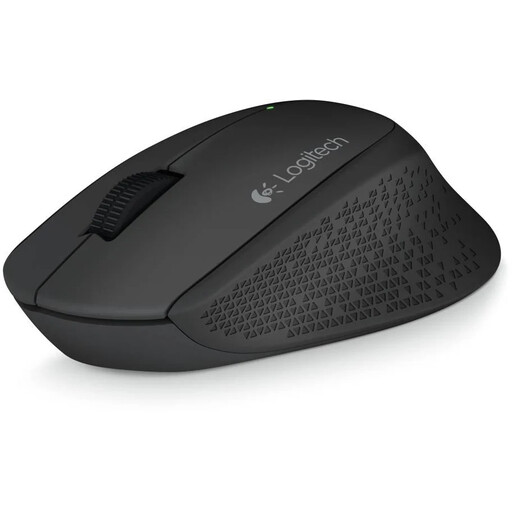
Why it suits this profile: This right-handed mouse is designed for everyday use at home or in the office and connects via a 2.4GHz receiver.
The product information lists a 1,000 DPI optical sensor, three buttons and a range of up to 10 metres. There is therefore no need for vague gaming claims when it comes to straightforward computer use.
Rubber grips, an included AA battery and a nano USB receiver for easy installation.

Why it suits this profile: The vertical shape and support for Bluetooth and a USB receiver are aimed at users who value comfort and flexible working.
The shape, right-handed design and connectivity options are clearly described. Do check that a vertical mouse suits the way you currently position your hand.
Adjustable DPI up to 4,000, a rechargeable battery and connectivity with multiple types of device.

Why it suits this profile: This wireless gaming mouse is designed for PC and laptop gamers looking for a low weight, adjustable sensitivity and extra buttons.
The specifications list a 2.4GHz connection, an optical sensor of up to 4,800 DPI and six programmable buttons. This clearly identifies the gaming features that matter.
Weighing approximately 73 grams, USB-C charging and a stated battery life of up to 80 hours according to the product information.
Check these points before placing your order:
A model such as the Trust Ozaa+ may be an interesting option for home workers who switch between a laptop, PC and tablet. The product description mentions two Bluetooth channels, a 2.4GHz receiver, silent buttons, a rechargeable battery and a side-scrolling wheel. For a laptop without a spare USB port, the HP 240 Bluetooth Mouse may be the more practical choice.
We have put together a complete, up-to-date list of products that fully meet these strict selection criteria and the applicable European safety regulations.
Not always. A USB model needs a spare USB port. A Bluetooth mouse requires Bluetooth support and sometimes a recent version of the operating system. Always check the system requirements before buying.
That depends on the model, connection, usage and lighting. An AA-powered mouse can last for months, while a rechargeable mouse needs to be charged regularly. The stated battery life is a guideline from the product information, not a guarantee for every usage scenario.
Yes, provided the mouse has a stable connection, suitable DPI settings and, where needed, programmable buttons. For fast-paced games, a dedicated wireless gaming mouse with low latency is generally a more sensible choice than a basic office model.
