
Vandaag of morgen in huis

Kwaliteit gegarandeerd

Welkomstaanbiedingen ontgrendelen: GRATIS bezorging | Tot 80% korting | Gratis 30 dagen JoyPlus-proefperiode
Download de app
A wireless mouse keeps your desk tidier and is convenient alongside a laptop. However, many people choose mainly based on DPI, battery life or an appealing design. This can result in a mouse that is not well suited to your computer, posture or intended use.
The main pitfalls are:
An RF mouse usually uses a 2.4GHz USB receiver. This is a practical choice for desktop computers and laptops with a spare USB-A port. The receiver often works immediately after being plugged in, without additional software.
A Bluetooth mouse pairs directly with a compatible device. This is useful for slim laptops or tablets where you want to keep the USB ports free. Check the supported Bluetooth version and operating systems beforehand.
A multi-device mouse sometimes combines RF and Bluetooth. This allows you to switch between multiple computers. Check the actual number of devices supported and how switching works. According to the product specifications, the HP 635 can pair with up to three devices via the USB nano receiver and two devices via Bluetooth.
An optical mouse uses a sensor to detect movement across a surface. For office work, studying and browsing the internet, values around 1000 to 1600 DPI are often sufficient. A mouse with adjustable DPI allows you to change the cursor speed.
For gaming, a higher DPI value can be useful, especially when combined with adjustable sensitivity levels and a high polling rate. However, also consider:
A sensor value of 4000 or 12,000 DPI does not, by itself, indicate how comfortable the mouse is to use.
If in doubt, measure the length and width of your current mouse. A model approximately 75 to 110 mm long feels very different from an extra-compact travel mouse. Also check whether the model is right-handed, left-handed or ambidextrous.
An ergonomic mouse can offer a different hand position, for example with a vertical shape. This is no guarantee of fewer complaints; comfort still depends on your hand, desk height and duration of use. According to the product description, the Logitech MX Vertical has an angle of 57 degrees and a rechargeable battery. Treat these as product specifications, not a medical promise.
For power, you can choose between:
For a rechargeable model, check the charging port, included cable and stated battery life. With battery-powered models, a power switch is useful for limiting unnecessary consumption.
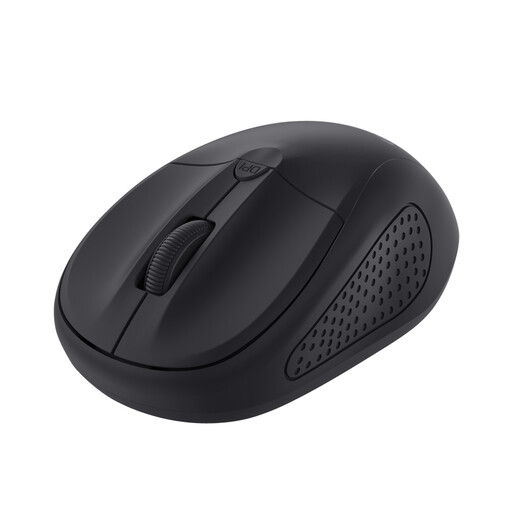
Why it suits this profile: This compact wireless computer mouse is suitable for students and laptop users looking for a simple RF connection and adjustable speed.
The specifications list a range of 1000 to 1600 DPI and a power switch. This means you are not paying for features you may not need for basic use.
Ambidextrous design, 75 grams, four buttons and an RF range of 6 metres.
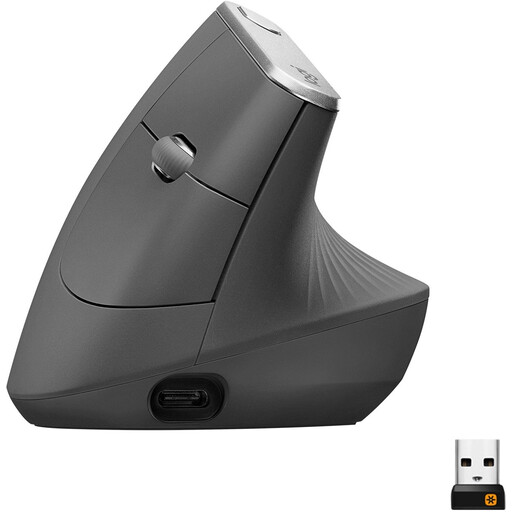
Why it suits this profile: The shape and combination of Bluetooth, 2.4GHz and a rechargeable battery suit business users who spend a lot of time working at a computer.
The vertical shape makes it clear that this is not a universally suitable compact model. Check that the right-handed design and 135 grams are suitable for your workstation.
4000 DPI, adjustable DPI, Bluetooth, USB receiver and a rechargeable battery with fast-charging function according to the product specifications.
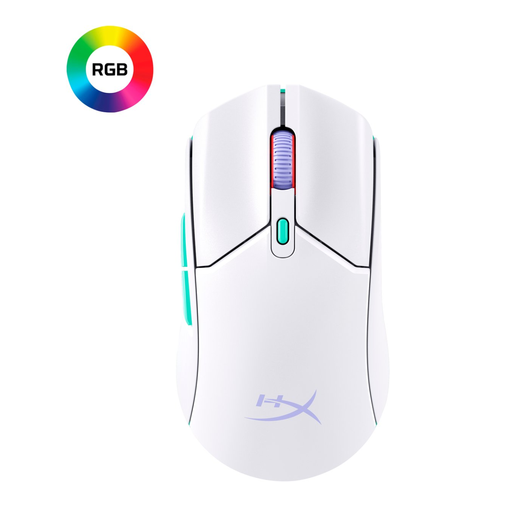
Why it suits this profile: This gaming mouse is aimed at players who want a lightweight model, high DPI and the option to use both 2.4GHz and Bluetooth.
The stated 70 grams, 1000Hz polling rate and AAA power supply make the key gaming considerations easy to check before ordering.
Up to 12,000 DPI, six buttons, Bluetooth 5.2, 2.4GHz and a stated battery life of up to 100 hours.

Why it suits this profile: A quiet mouse with both RF and Bluetooth is well suited to open-plan offices, libraries and shared workspaces.
The product description mentions quiet clicking, scrolling and gliding. However, check that the noise level is low enough for your environment.
Ambidextrous design, 67 grams, optical sensor and DPI of up to 4020 according to the listed product specifications.
We have compiled a complete, up-to-date list of products that fully meet these strict selection criteria and the applicable European safety regulations.
Check the following before completing your purchase:
An RF model usually works as soon as you plug in the USB receiver and switch on the mouse. With a Bluetooth mouse, you first need to activate Bluetooth and pair the device. Also check whether your laptop has a spare USB-A port if the mouse uses a receiver.
This varies by model and usage. Product information may state up to 12 months for certain office mice, up to 24 months for some HP models, and up to 80 or 100 hours for rechargeable or gaming models. Treat these figures as stated maximums; your actual battery life may vary.
Yes, provided the mouse has a stable 2.4GHz connection, a suitable polling rate, adjustable DPI and enough buttons. For competitive gaming, weight, shape and software are also important. A basic wireless office mouse is primarily intended for navigation, word processing and everyday computer use.
