
Vandaag of morgen in huis

Kwaliteit gegarandeerd

Welkomstaanbiedingen ontgrendelen: GRATIS bezorging | Tot 80% korting | Gratis 30 dagen JoyPlus-proefperiode
Download de app
A wireless mouse keeps your desk tidy and is useful with a laptop, PC or multiple devices. Yet many models look very similar. A high DPI value, long battery life or the word “ergonomic” does not automatically mean that the mouse is right for the way you use it.
The most common buying mistakes usually come down to three pitfalls:
A mouse with a 2.4GHz RF connection usually uses a small USB receiver. This is a straightforward choice for a mouse for your PC or laptop, but check in advance that you have a suitable USB port.
A Bluetooth mouse connects directly to a compatible device. This is useful with modern laptops and tablets, as you do not need to carry a receiver. A multi-device mouse can combine both connection types. For example, the Trust Ozaa+ connects via a 2.4GHz receiver and two Bluetooth channels to up to three devices.
Note the difference between “connecting to multiple devices” and “using multiple devices at the same time”. With most models, you need to switch between devices manually.
DPI indicates how far the pointer moves in response to a particular hand movement. A mouse with adjustable DPI is practical if you switch between large spreadsheets, photo editing and gaming. An extremely high value is not necessary for everyday use.
For gaming, the polling rate, sensor and connection are also relevant. A polling rate of 1,000 Hz means that, according to the product specification, the mouse position is transmitted up to 1,000 times per second. This can be useful for fast-paced games, but your PC, display settings and personal preferences are also important.
Do not just compare “long battery life”; look at the type of power supply:
A lightweight wireless gaming mouse, such as the 63-gram Razer DeathAdder V3 Pro White according to the product specification, is mainly designed for fast movements. A larger office mouse weighing around 110 grams may feel more stable. A silent mouse is useful in a shared workspace, but check whether only the buttons are quiet or the scroll wheel is too.
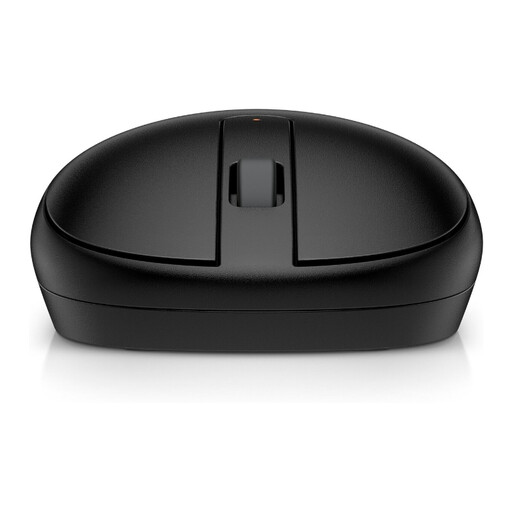
Why it suits this profile: A compact choice for everyday use without a USB dongle. The mouse works via Bluetooth 5.1 and has a symmetrical shape for left- and right-handed use.
The connection does not require a separate receiver. The product specification lists 1,600 DPI, three buttons and one AA battery.
Bluetooth 5.1, 1,600 DPI and a weight of 54.2 grams according to the product specification.

Why it suits this profile: Designed for right-handed gamers looking for a lightweight wireless gaming mouse with programmable buttons.
The product specification lists a 2.4GHz wireless connection, a 1,000 Hz polling rate, five buttons and both wired and wireless use.
63 grams, a Razer Focus Pro 30K optical sensor and a rechargeable battery. According to Razer’s own information, battery life is up to 90 hours.

Why it suits this profile: Suitable for home workers and office professionals who switch between a laptop, PC and tablet and regularly work with wide spreadsheets.
The product specification lists three connection options, quiet button operation and a side-scrolling wheel. This means the mouse is not limited to one particular use case.
Up to 3,200 DPI, six buttons, a rechargeable battery and horizontal scrolling for wide documents.

Why it suits this profile: An ergonomic mouse for right-handed users looking for a vertical design and the ability to control multiple devices.
The vertical design makes it immediately clear that this is not a compact travel mouse. Check that the 57-degree shape suits your hand and workspace.
Bluetooth and USB receiver, adjustable 4,000 DPI, five buttons and a rechargeable battery.
We have compiled a complete, up-to-date list of products that fully meet these strict selection criteria and the applicable European safety regulations.
Not every mouse works in the same way. A model with a USB receiver requires a suitable port. A Bluetooth mouse requires Bluetooth support on the laptop. Also check the operating system and any software needed for programmable buttons.
This varies by model, connection and usage. According to the product specifications, the HP 285 Silent Wireless Mouse has a battery life of up to 18 months, while the HP Wireless Mouse 220 lasts up to 15 months with daily use. Rechargeable gaming models usually state battery life in hours. Always check whether the manufacturer is referring to a maximum duration or average usage conditions.
Yes, provided the mouse has a low-latency connection, suitable sensor settings and enough buttons. A wireless gaming mouse such as the Razer DeathAdder V3 Pro or Trust GXT 929 Helox is designed for gaming. For competitive games, weight, polling rate and grip are often more important than a high DPI value alone.
