
Vandaag of morgen in huis

Kwaliteit gegarandeerd

Welkomstaanbiedingen ontgrendelen: GRATIS bezorging | Tot 80% korting | Gratis 30 dagen JoyPlus-proefperiode
Download de app
A wireless mouse keeps your desk tidier and is useful for working from home, studying, office work or gaming. However, models vary considerably in connectivity, comfort and battery usage. A low price does not automatically mean a mouse is suitable for your needs, while a high DPI value is not necessary for every user.
The most common poor purchases result from three points:
An RF wireless mouse usually uses a 2.4GHz connection with a small USB receiver. This is often straightforward: plug in the receiver and switch on the mouse. However, check that your computer has a free USB-A port. If your laptop only has USB-C, you may need an adapter.
A Bluetooth mouse pairs directly with a compatible device. This keeps a USB port free and is practical for laptops, tablets and some smartphones. Setup may involve a few more steps than plug-and-play via a receiver.
A multi-device mouse often combines Bluetooth with RF and can connect to multiple devices. This suits users who switch between a laptop, desktop computer and tablet. Check how many devices can actually be paired simultaneously and how switching works.
Look for the description left- and right-handed or ambidextrous mouse. A symmetrical model is flexible for households where several people use the mouse. An ergonomic wireless mouse with a distinct right- or left-handed shape may offer more support, but is less universal.
As well as hand orientation, consider the dimensions and weight. A lightweight mouse is easy to carry, while a larger model may support your hand more effectively. A vertical design changes the position of your hand and wrist, but usually requires a period of adjustment. Choose this type of design based on your grip and preferences, rather than relying solely on an ergonomic label.
An optical mouse uses an optical sensor for tracking. The DPI value determines how far the cursor moves with the same hand movement. For word processing, websites and spreadsheets, 1000 to 1600 DPI is sufficient for many users. A mouse with adjustable DPI is useful if you regularly switch between precise selection and fast navigation.
Gamers also consider polling rate, weight, sensor settings and programmable buttons. A wireless gaming mouse may require additional software, a dedicated receiver or a charging cable. So check that its features are compatible with your games and computer.
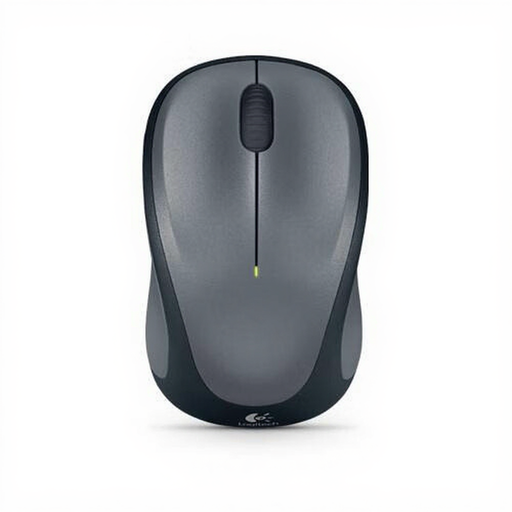
Why it suits this profile: This symmetrical model is suitable for left- and right-handed use and offers a simple 2.4GHz connection via a nano USB receiver.
The hand orientation is not limited to one side, and 1000 DPI is suitable for basic tasks without unnecessarily high settings.
Ambidextrous design, optical sensor, three buttons and a range of up to 10 metres according to the product information.
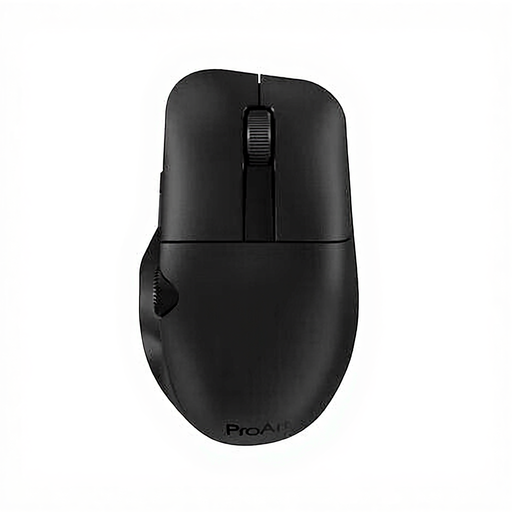
Why it suits this profile: Right-handed office professionals get RF and Bluetooth, six programmable buttons and a built-in rechargeable battery.
Having two connection types reduces reliance on a single port or device.
Optical sensor up to 4200 DPI, 6 buttons and an 800 mAh lithium-ion battery according to the product details.
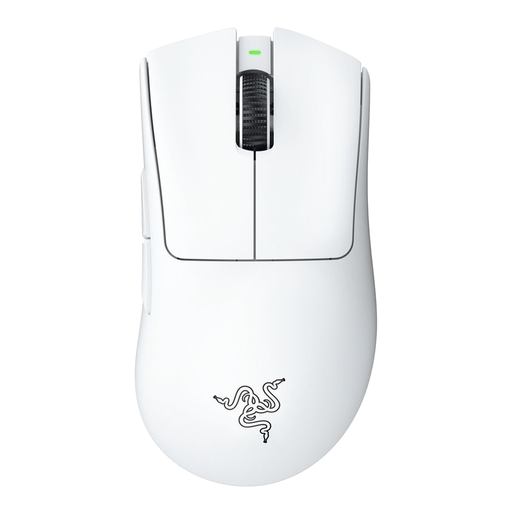
Why it suits this profile: This right-handed model is designed for gaming and users looking for a lightweight mouse with adjustable features and wireless freedom.
The specifications cover more than just DPI, also highlighting a 1000Hz polling rate, wireless technology and programmable buttons.
Weighing 63 grams, with a Focus Pro 30K optical sensor and a stated battery life of up to 90 hours.
Use this short checklist:
A quiet mouse is useful in a library, office or shared home. For travelling, a compact size and stowable receiver are practical features. If you work with wide spreadsheets, a model with a horizontal scroll wheel can save time. A multi-device mouse is particularly worthwhile if you regularly switch between devices.
We have put together a complete, up-to-date list of products that fully meet these strict selection criteria and the applicable European safety regulations.
Only if the model supports Bluetooth and your device has Bluetooth. An RF wireless mouse generally requires the supplied USB receiver. Also check whether the receiver uses USB-A or another connection.
This varies by model. Some mice use one or two AA or AAA batteries, while others have a built-in rechargeable battery. Battery life depends on factors including the settings, connection and whether the mouse is switched off between uses. So check both the stated battery life and how the mouse is charged or fitted with new batteries.
Neither connection type suits every user. Bluetooth keeps a USB port free and is useful for laptops and tablets. A USB receiver often works immediately without pairing and can be suitable for computers without Bluetooth. If you want both options, consider a mouse with RF and Bluetooth.
