
Vandaag of morgen in huis

Kwaliteit gegarandeerd

Welkomstaanbiedingen ontgrendelen: GRATIS bezorging | Tot 80% korting | Gratis 30 dagen JoyPlus-proefperiode
Download de app
A wireless mouse gives you a tidier desk and greater freedom of movement. However, the differences between models can be significant. A mouse that works well for email and spreadsheets is not automatically suitable for gaming. Terms such as “quiet”, “ergonomic” and “long battery life” can also give an incomplete picture.
Pay attention to the connection, shape, sensor and power source. Below, you’ll find the main pitfalls to avoid and practical recommendations based on verifiable product specifications.
A mouse with 26,000 or 30,000 DPI sounds impressive, but most office and laptop users will get little benefit from it. DPI determines how quickly the cursor moves. For everyday work, adjustable settings between approximately 800 and 3,200 DPI are often sufficient. Gamers may place greater value on an accurate sensor, a suitable polling rate and the ability to adjust sensitivity for each game.
Also check whether the stated DPI is an adjustable setting or simply the sensor’s maximum value. In practice, an adjustable DPI with several settings is usually more important than a high maximum.
A mouse with a USB receiver usually uses 2.4 GHz. It often works straight after connecting, but it does require a spare USB-A or USB-C port. A Bluetooth mouse can be paired directly with many laptops, tablets and Macs, without a separate dongle. However, not every PC has Bluetooth.
Some models combine both options. A multi-device mouse can therefore be connected to a laptop via Bluetooth and to a desktop via a receiver, for example. Check how many devices can be paired at the same time and how you switch between them.
A rechargeable mouse means you don’t need loose disposable batteries, but it does need to be connected to a cable regularly. With a model that uses an AA or AAA battery, replacement is easy, but running costs depend on how often you need a new battery.
Battery claims come from the brand’s product information and may vary depending on usage, lighting and connection mode. For example, HP states that the HP 430 offers up to 24 months of use with one AA battery. Rapoo lists up to 750 hours for certain VT3 models at 1,000 Hz. Treat these figures as stated guidelines, not a guarantee for every user.
Choose a mouse for laptop with Bluetooth if you have few ports or don’t want to carry a receiver when you’re out and about. A mouse with a USB receiver is practical for desktops and computers without Bluetooth. A model with both connection types offers greater flexibility.
Pay attention to the operating system. According to its product specifications, the Trust Ozaa+ is suitable for Windows, macOS and Chrome OS. The Lofree Wavy Chips EP115 supports macOS, Windows, iPadOS, iOS and Android, among others, but according to the product information it does not support Boot Camp dual-boot mode on Mac devices.
A compact mouse is easy to carry around, but may provide less support for larger hands. A larger model supports the palm better, but takes up more space. For extended use, the shape is often more important than an extra button.
A vertical mouse positions your hand differently from a standard model. The Trust Bayo II and Logitech MX Vertical are right-handed models with a 57-degree angle. According to the brands’ product information, this design is intended to support a more natural hand position. It is not a medical guarantee; fit and familiarity vary from user to user.
A quiet mouse is practical in a shared workspace, library or home office. Check whether only the main buttons are quieter, or whether the side and scroll buttons are quieter too.
For productivity, a horizontal scroll wheel and programmable buttons are useful. Think wide spreadsheets, timelines and shortcuts. Gamers also consider weight, polling rate, sensor and macro support. According to product information from Rapoo and other brands, a high polling rate can place additional strain on the processor, so a higher setting will not suit every PC.
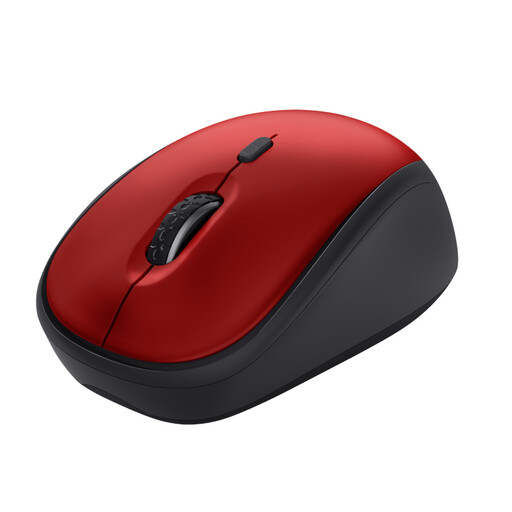
Why it suits this profile: This compact mouse uses a 2.4GHz USB receiver and is designed for office work, working from home and mobile use.
The product specifications state an adjustable range of 800 to 1,600 DPI and quiet buttons, rather than simply quoting a high maximum sensor value.
Compact size, optical sensor, quiet click and stated battery life of up to 12 months.
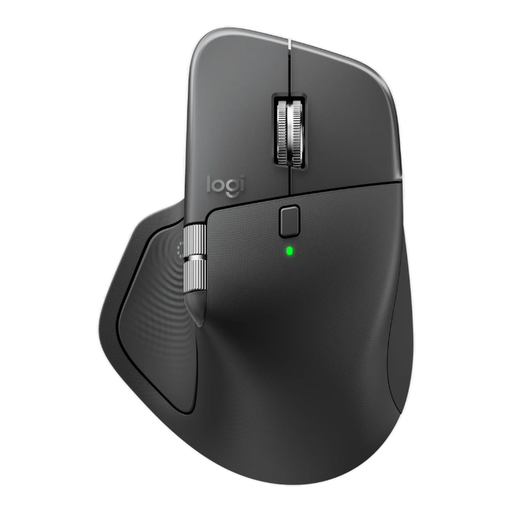
Why it suits this profile: This right-handed office mouse combines Bluetooth with a Logi Bolt receiver and supports three devices, according to the specifications.
The choice is not based on DPI alone: the mouse has eight buttons, horizontal scrolling, a quiet click and a rechargeable battery.
8,000 DPI, USB-C charging, programmable buttons and horizontal scrolling support.
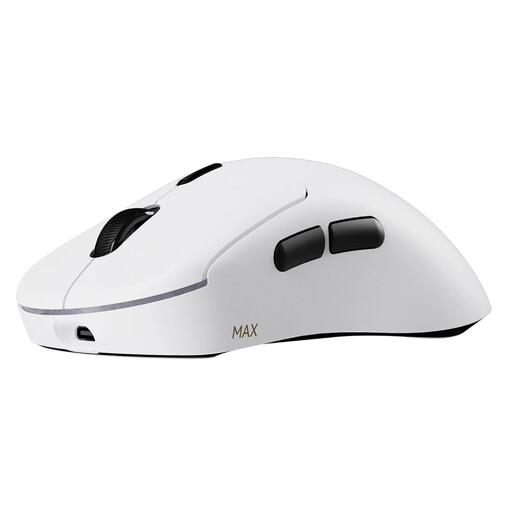
Why it suits this profile: This lightweight gaming mouse is designed for users who value low weight, a high polling rate and extensive customisation options.
The product specifications state both a weight of 53 grams and independent X/Y DPI adjustment, as well as an 8K wireless polling rate.
Up to 30,000 DPI, ten programmable buttons, macro support and stated battery life of up to 750 hours at 1,000 Hz.
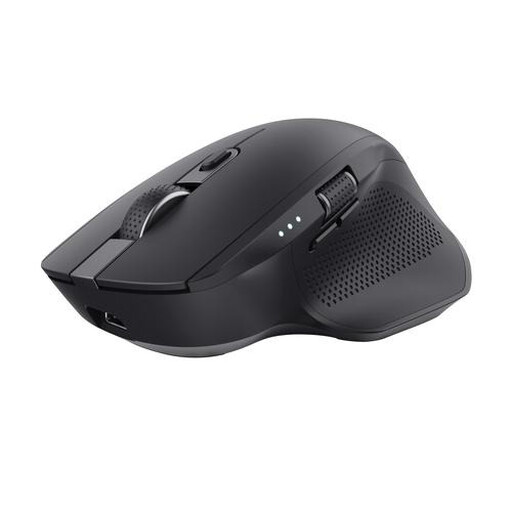
Why it suits this profile: According to the product information, the Ozaa+ can pair with three devices via one USB receiver and two Bluetooth channels.
The connection options are clearly described, and the mouse has an LED battery-status indicator, so you’re less likely to run out of power unexpectedly.
Up to three devices, quiet buttons, horizontal scroll wheel and rechargeable battery.
We’ve put together a complete, up-to-date list of products that fully meet these strict selection criteria and the applicable European safety regulations.
Bluetooth is often convenient for a laptop with few ports. A USB receiver is useful for desktops and systems without Bluetooth. A dual-mode model offers both options, but check whether the receiver is included in the box and whether your device has the correct USB connection.
Its lifespan depends on the battery, switches, scroll wheel and intensity of use. A rechargeable mouse can remain usable for years if the battery is charged correctly and the device is kept dry. With intensive gaming, buttons and wheels generally experience more wear. A brand’s stated click lifespan is a technical classification, not a promise about the mouse’s total lifespan.
No. “Quiet click” generally means that the main buttons produce less noise than standard switches. The scroll wheel, side buttons and contact with the desk may still be audible. A quiet mouse is usually a practical choice for a shared workspace, but check the product specifications and user reviews before ordering.
