
Vandaag of morgen in huis

Kwaliteit gegarandeerd

Welkomstaanbiedingen ontgrendelen: GRATIS bezorging | Tot 80% korting | Gratis 30 dagen JoyPlus-proefperiode
Download de app
A wireless mouse keeps your desk tidier and is useful for working from home, the office, studying or working on the go. However, the range often looks simpler than it really is. A low price does not tell you everything, while terms such as “silent”, “ergonomic” and “multi-device” can have different practical meanings from one model to another.
As a Joybuy Product Recommendation Officer, I therefore focus mainly on verifiable specifications: the connection, size, sensor, battery and shape. This helps you avoid buying a mouse that is not suitable for your laptop, workspace or way of working.
A wireless computer mouse can work via a 2.4GHz USB receiver, Bluetooth or both. A mouse with a USB receiver requires a free USB-A port. This can be difficult with a slim laptop that only has USB-C ports; in that case, you may need an adapter or docking station.
A Bluetooth mouse does not use a separate receiver, but your device must support Bluetooth. Also check whether the mouse works with your operating system, such as Windows, macOS, ChromeOS, Android or iPadOS.
Brands use different terms for quiet buttons. According to Logitech’s own research, the M330 Silent Plus can reduce click noise by more than 90% compared with traditional mice. According to Trust’s product information, the Yvi+ buttons are designed for quieter clicking. These are brand claims; the actual experience may depend on the surface, the pressure needed to click and the surrounding environment.
If you mainly work in a shared office, library or open-plan office, it is worth searching specifically for silent click or a quiet wireless mouse.
DPI determines how far the pointer moves with the same hand movement. A higher value can be useful on large screens, but for word processing, spreadsheets and browsing the internet, a moderate setting is often sufficient. So do not just look at the highest DPI figure. Pay particular attention to:
A mouse with a USB receiver is usually easy to connect: plug the receiver into the USB port, switch on the mouse and start using it. The Logitech M280 uses a 2.4GHz connection, has a nano receiver and a stated range of up to 10 metres.
A multi-device mouse is more convenient if you regularly switch between a laptop, desktop computer and tablet. According to the product information, the Trust Yvi+ Multi-Device can connect up to three devices via a USB receiver and two Bluetooth channels. According to the product specifications, the Rapoo 9010M set supports up to four devices, but bear in mind that this is a keyboard and mouse combination.
A compact mouse is easy to carry, but provides less support for your palm. A larger model may feel more comfortable during long periods of office work, but takes up more space in your bag.
Also consider whether it is designed for your preferred hand. The Logitech Signature M650 L is specifically designed for left-handed users with larger hands. According to the product specifications, the Trust Yvi+ has an ambidextrous shape, so it can be used by both left- and right-handed users.
Many models work with a single AA battery. Check whether one is included and whether the mouse has an on/off switch or sleep mode. The Logitech M330 Silent Plus states a battery life of up to 24 months; HP gives the HP 285 a stated battery life of up to 18 months. These are quoted figures and may vary depending on usage and settings.
A rechargeable mouse means you do not have to replace batteries regularly. The Trust Ozaa+ has a built-in rechargeable battery, a charging cable and an LED indicator. However, remember that it still needs charging and check whether you can continue using the mouse while it is charging.
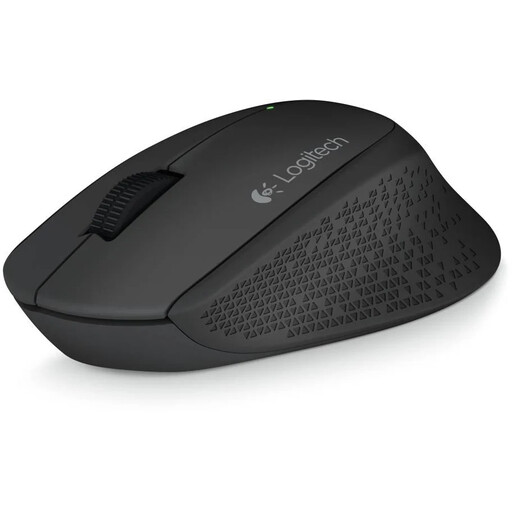
Why it suits this profile: A straightforward wireless computer mouse for everyday use at home or in the office, without Bluetooth pairing or additional software.
The connection, sensor resolution and power supply are clearly specified: 2.4GHz, optical sensor, 1000 DPI and one AA battery included.
Right-handed model with rubber grips, three buttons and a stated wireless range of up to 10 metres.
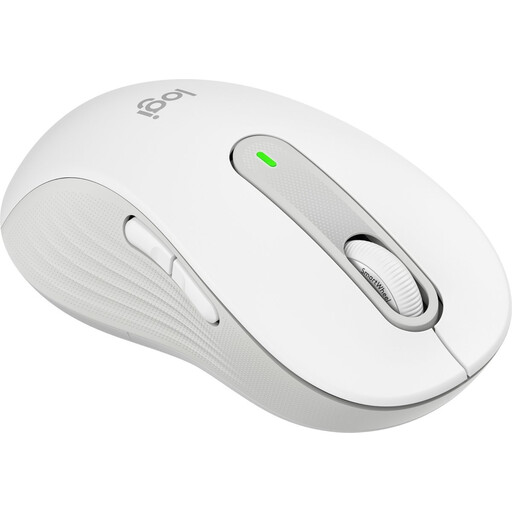
Why it suits this profile: Designed for left-handed users with larger hands who value a soft grip, quiet clicking and extra features.
The hand orientation and size are explicitly stated. According to Logitech’s own research, SilentTouch reduces click noise by up to 90 per cent.
Optical sensor up to 2000 DPI, five buttons, Bluetooth Low Energy and support for a Logi Bolt receiver.

Why it suits this profile: A larger right-handed model for users working with wide spreadsheets, timelines and multiple devices.
The mouse combines USB-RF and Bluetooth, so you do not have to pair each device again. The side scroll wheel is designed for wide documents.
Up to three devices, adjustable optical sensor up to 3200 DPI, quiet buttons and a rechargeable battery with LED indicator.
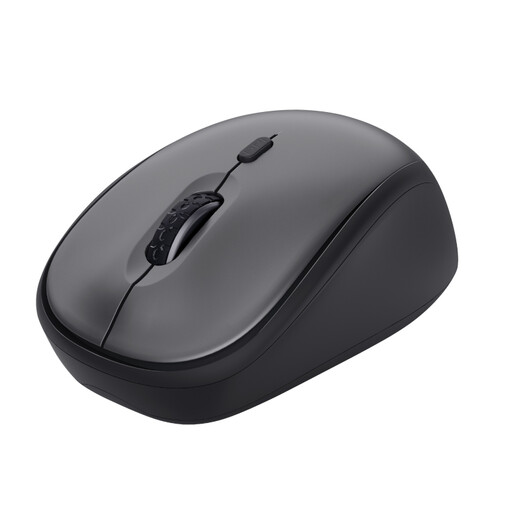
Why it suits this profile: The compact shape, quiet buttons and stowable USB micro receiver are practical for a laptop bag or small flexible workspace.
The product information states the compact size, 2.4GHz receiver, range of up to 8 metres and adjustable DPI from 800 to 1600.
Ambidextrous shape, three buttons, optical sensor and a stated battery life of up to 12 months from a single AA battery.
We have put together a complete, up-to-date list of products that fully meet these strict selection criteria and the applicable European safety regulations.
Not automatically. A model with a USB receiver requires a suitable USB port or adapter. For Bluetooth, your laptop must support Bluetooth. Also check the operating system and recommended version before placing your order.
This varies by model, battery type and usage. In this selection, stated battery life ranges from approximately 12 to 24 months for models using a single AA battery. A rechargeable mouse does not need a replaceable battery, but must be charged periodically via USB.
No. An ergonomic mouse often has a shape that positions your hand differently, but the right choice depends on hand size, hand orientation and posture. A vertical mouse may take some getting used to and is not suitable for every user. Therefore, compare its dimensions and shape with your current mouse and take regular breaks during extended use.
