
Vandaag of morgen in huis

Kwaliteit gegarandeerd

Welkomstaanbiedingen ontgrendelen: GRATIS bezorging | Tot 80% korting | Gratis 30 dagen JoyPlus-proefperiode
Download de app
A cable-free desk not only looks sleeker, but it also makes for a more pleasant workspace. Switching to a wireless mouse seems like a simple choice, but the market is filled with marketing promises that don't always deliver. Many people buy a mouse that becomes irritating, uncomfortable, or has a constantly dead battery after just a few months.
As a Joybuy Product Recommendation Officer, I see where things go wrong every day. Before you make a decision, it's wise to understand the most common pitfalls.
To avoid buyer's remorse, it's better to focus on a few objective specifications that directly impact your daily use.
The way your mouse connects is crucial for its ease of use.
Comfort is personal. The shape of the mouse should align with your posture and work environment.
The choice between replaceable batteries and a built-in battery affects convenience and cost.
Below are some recommendations tailored to specific user profiles. We focus on how the specifications solve a practical problem.
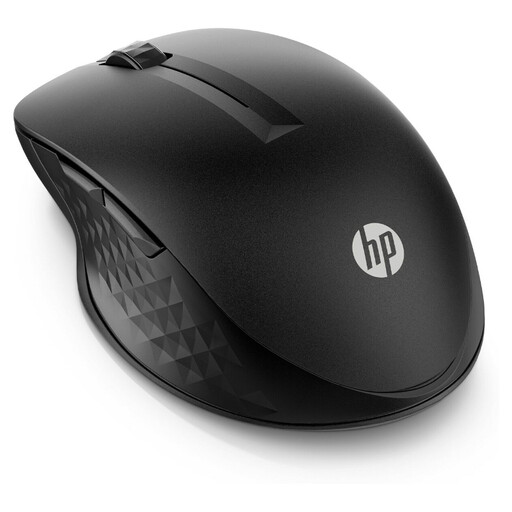
Why This Fits Their Persona: Perfect for professionals who seamlessly switch between a Windows laptop and a MacBook. The multi-device function via Bluetooth and the programmable buttons streamline workflow without any hassle.
This mouse avoids the 'overkill' pitfall by focusing on practical productivity features instead of unnecessary gaming specs. The battery life claim is supported by a smart power management system.
Connects to multiple devices (RF and Bluetooth). Features 4 programmable buttons and a long battery life (up to 24 months on a single AA battery, according to HP).
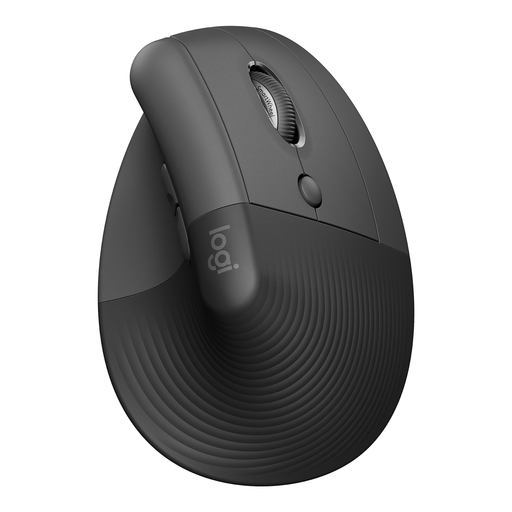
Why This Fits Their Persona: Specifically designed for people seeking a more natural posture to reduce wrist and arm strain. Ideal for those who spend long days at the computer and want to prevent discomfort.
This is not a vague 'ergonomic' mouse. The 57-degree vertical angle is a concrete, verifiable specification designed for a specific posture, thereby sidestepping the pitfall of empty marketing terms.
Promotes a natural handshake position. Silent clicks for a quiet work environment and a battery life of up to 2 years. Suitable for small to medium-sized hands.
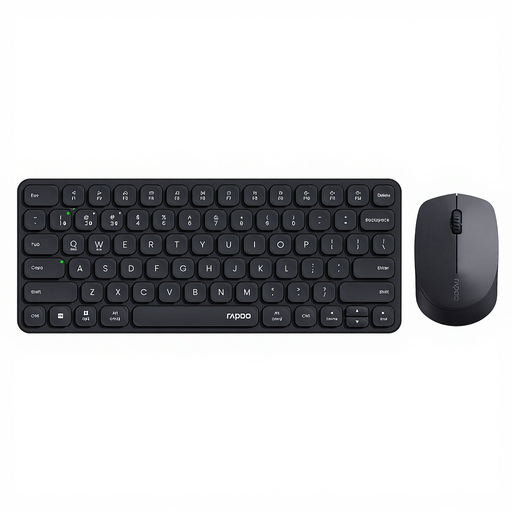
Why This Fits Their Persona: Ideal for anyone who wants a complete, uncluttered workspace. This wireless mouse and keyboard set connects to up to 4 devices and is compatible with Windows, Mac, Linux, and ChromeOS.
This set delivers a complete solution without the high price of specialized equipment. The silent click and typing features are practical benefits for an office or home environment, not superfluous luxuries.
Supports 4 devices via 2.4GHz and Bluetooth. Both the mouse and keyboard are silent in use. The mouse has an adjustable DPI up to 2400.
We have compiled a complete, up-to-date list of products that fully meet these strict selection criteria and UK regulations.
The lifespan of a wireless mouse depends on two factors: the battery and its physical durability. The battery life (how long a charge or battery lasts) varies from a few months to, according to manufacturers, up to three years, depending on the model and your usage. The total lifespan of the mouse itself is usually several years. The buttons are often the first component to wear out. Manufacturers sometimes specify this in the number of clicks (e.g., 10 million).
Neither is necessarily 'better'; it depends on your situation. A Bluetooth mouse is ideal for laptops and tablets because you don't need a USB port and can easily switch between devices. A mouse with an RF dongle often provides a slightly more stable and direct connection, which can be beneficial for a fixed desktop PC or for gaming.
Generally, no. A gaming mouse is designed for extremely fast response times and high precision, with DPI values well over 4000. For standard office work, such as emailing, browsing, and editing documents, a DPI between 1200 and 1600 is more than sufficient. A good office mouse focuses more on comfort, battery life, and potentially silent buttons.
