
Vandaag of morgen in huis

Kwaliteit gegarandeerd

Welkomstaanbiedingen ontgrendelen: GRATIS bezorging | Tot 80% korting | Gratis 30 dagen JoyPlus-proefperiode
Download de app
A wireless mouse and keyboard set keeps your desk tidy and is practical for working from home, studying or a shared office space. However, not every wireless keyboard and mouse is automatically suitable for extended typing, multiple devices or quiet use.
So don’t just focus on the price or words such as “silent” and “ergonomic”. Pay particular attention to the connection, keyboard layout, battery information and dimensions. Below, we cover the main points to consider, along with suitable options for different user profiles.
A silent keyboard and mouse combination generally reduces the sound of keystrokes and mouse clicks. However, the noise level can vary depending on the key, the surface and how much pressure you apply. A low-profile design with scissor switches, as found on some compact sets, feels different from a membrane keyboard.
When choosing a silent keyboard and mouse, look for separate information about:
“Silent” is a product feature, not a guarantee that no sound will be audible at all.
For users in the Netherlands, a QWERTY keyboard is generally the familiar choice. A Belgian AZERTY keyboard has a different layout and is mainly suitable if you already work with one. A UK QWERTY version may also differ from the Dutch layout, particularly in terms of symbols and the position of certain keys.
Check the following before buying:
The wrong layout can lead to extra searching and typing errors every day.
A 2.4GHz wireless set usually works via a USB receiver. This is convenient for a PC or laptop with a free USB-A port, but less practical with tablets or slim laptops without a suitable connection. A Bluetooth keyboard and mouse can be paired directly with compatible devices.
If you regularly switch between multiple devices, look specifically for:
Some sets support just one device, while a multi-device keyboard and mouse is designed for use with, for example, a desktop, laptop and tablet.
A USB receiver generally uses the 2.4GHz protocol. Check that your device has a USB-A port and whether the receiver can be stored inside the mouse or keyboard. This reduces the chance of losing the small component.
Bluetooth is particularly useful for laptops, tablets and smartphones. However, check that both the keyboard and mouse support Bluetooth. With some combinations, only the mouse is Bluetooth-compatible.
A stated range of, for example, 8 to 10 metres is a technical specification measured under certain conditions. Walls, metal surfaces and other wireless devices can affect the connection.
DPI determines how quickly the cursor moves across the screen. For office work, adjustable settings such as 800, 1000, 1200 or 1600 DPI are generally sufficient. A higher DPI value is not automatically more convenient; it depends on your screen size, working style and desired cursor control.
Also consider:
A silent mouse for the office with compact dimensions is easy to carry around, but may offer less support for a larger hand.
Many wireless sets run on AA or AAA batteries. Brands often provide an estimated usage time. According to Rapoo’s product information, the 9010M can run for up to around 12 months under certain usage conditions. Trust states that the Trezo Comfort can last up to 48 months for the keyboard and up to 12 months for the mouse. These are figures provided by the brands and are not a fixed guarantee for every user.
You should therefore also check:
Long battery life reduces the number of times batteries need replacing, but actual battery life depends on usage and settings.
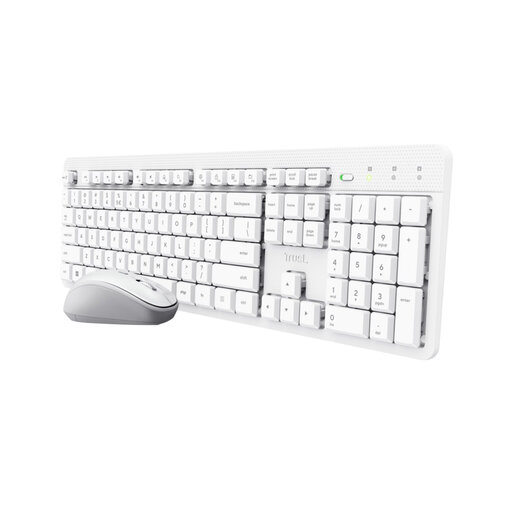
Why it suits this profile: This set is designed for simple plug-and-play use at home, for studying or in the office. The US/QWERTY layout and single USB receiver keep installation straightforward.
The layout and connection method are clearly specified. The receiver can be stored magnetically in the keyboard, making it less likely that you will lose it.
2.4GHz connection, quiet keys and mouse buttons, adjustable DPI from 800–1600, and compatibility with Windows, macOS, Linux and Chrome OS.
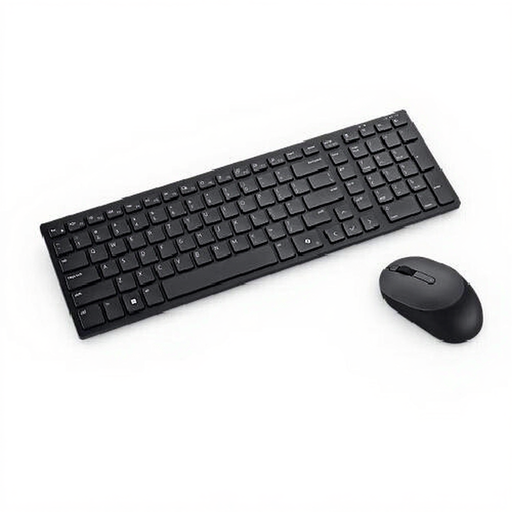
Why it suits this profile: Suitable for office professionals who need a Belgian AZERTY keyboard, numeric section and multiple connection options.
The Belgian AZERTY layout is explicitly stated. The set uses both RF via USB and Bluetooth 5.1, so you are not tied to a single connection method.
Plunger keys, multimedia and programmable keys, a numeric keypad and an ambidextrous mouse with 4020 DPI according to the product specifications.

Why it suits this profile: If you regularly switch between a desktop, laptop, tablet and phone, this set offers a combination of 2.4GHz and Bluetooth.
The set is not limited to one device: according to Rapoo, you can pair up to four devices. The connection options and supported operating systems are specified in advance.
Bluetooth 4.0/5.0 and 2.4GHz USB, a low-profile design with scissor keys, quiet mouse clicks and an adjustable mouse resolution of 800–2400 DPI.
We have put together a complete, up-to-date list of products that fully meet these strict selection criteria and the applicable European safety regulations.
For working from home, quiet keys and a comfortable mouse are often more important than extra gaming features. A full-size model with a numeric keypad is well suited to administrative work, while a compact wireless keyboard and mouse is more convenient on a small desk or in a laptop bag.
If you work with multiple systems, choose a multi-device model with Bluetooth. If you mainly use a desktop PC, a simple 2.4GHz set may be sufficient. Also check whether your laptop has a USB-A port; otherwise, you may need an adapter.
With a 2.4GHz set, insert the USB receiver into a free USB port and switch on both devices. Bluetooth models are paired via the Bluetooth settings on your computer, tablet or phone. If you are using multiple devices, consult the instructions for switching between channels.
This varies depending on the model, battery type and usage. Manufacturers often state a maximum or estimated battery life. A sleep mode, on/off switch and energy-efficient Bluetooth connection can help reduce power consumption. Always check whether the stated battery life applies to the keyboard, the mouse or both.
Yes, a model with quiet keys and quiet mouse clicks can be practical in a shared workspace. The exact noise level varies depending on the design. Therefore, read the product specifications and choose a set with the layout, dimensions and connections that suit your workspace.
