
Vandaag of morgen in huis

Kwaliteit gegarandeerd

Welkomstaanbiedingen ontgrendelen: GRATIS bezorging | Tot 80% korting | Gratis 30 dagen JoyPlus-proefperiode
Download de app
A wireless mouse and keyboard set gives you a tidy desk and greater freedom of movement. However, not every wireless keyboard-and-mouse combination is suitable for everyday use. An unsuitable layout, missing USB port or loudly clicking mouse often only becomes apparent after you have connected the set.
As a Joybuy Product Recommendation Officer, I therefore focus primarily on verifiable specifications: connectivity, keyboard layout, dimensions, noise level, battery type and compatibility. This helps you avoid finding that an attractive offer is ultimately impractical.
A wireless QWERTY keyboard is not automatically the same as a Dutch layout. Many models use US/QWERTY or UK/QWERTY. The position of the Enter key, certain symbols and AltGr functions may differ from what you are used to.
Also look out for AZERTY. The Dell KM555, for example, is a Belgian AZERTY set. It may be perfectly suitable for someone who uses AZERTY, but is less logical for a Dutch user who touch-types in QWERTY.
For product titles containing words such as silent, quiet or stille muis, it is important to check exactly which component is quieter. Some models only mention silent mouse buttons, while the keyboard remains audible as normal. For a shared workspace, library or home office, both quiet keys and a quiet office mouse are relevant.
A wireless mouse with a USB receiver usually operates via 2.4 GHz. This is practical with a PC or laptop with a free USB-A port, but less convenient with a slim laptop that only has USB-C. Bluetooth avoids the need for a separate receiver, but not every device supports the same Bluetooth version or pairing function.
So check the following in advance:
A 2.4GHz connection via a nano or micro USB receiver is often plug-and-play. The stated range for the models mentioned is between 8 and 10 metres. This is generally sufficient for a typical home office, but metal objects, other wireless devices and a computer tower under the desk can affect real-world performance.
A multi-device keyboard and mouse works differently. The Rapoo 9010M combines 2.4 GHz with Bluetooth 4.0 and 5.0 and, according to the product specification, is suitable for up to four connected devices. This is useful if you switch between a laptop, desktop computer, tablet and phone.
A full-size keyboard includes a numeric keypad, which is useful for administration, spreadsheets and invoices. A compact model takes up less space, but may lack a number pad or certain function keys.
Always check:
A wrist rest can make your working posture more comfortable, but the right height and desk setup remain important. No product design can replace a suitable workstation or regular breaks.
A quiet mouse makes the biggest difference in shared spaces. Also consider its shape. A compact wireless mouse is easy to carry, while a larger or ergonomic wireless mouse may provide more hand support.
DPI indicates cursor sensitivity. For office work, adjustable settings such as 800, 1000, 1600 or 2400 DPI are usually sufficient. A higher DPI figure does not automatically mean greater comfort or precision for everyday work.
When checking battery specifications, look at the type and stated usage time. The Trust Yvi+, for example, uses one AA battery and states a battery life of up to 12 months. Logitech quotes a battery life of up to 24 months for the M330. These are stated figures; actual consumption depends on usage, sleep mode and battery type.
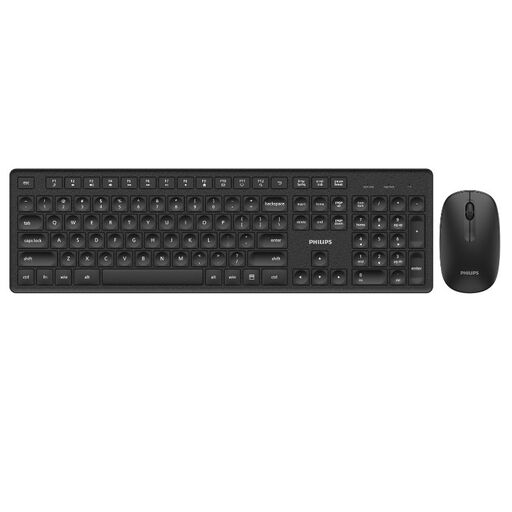
Why it suits this profile: A simple full-size set for PC, laptop or office use, with one 2.4GHz USB receiver and a quiet mouse according to the product description.
The connection and UK/QWERTY layout are clearly stated. However, check that the UK layout suits your existing typing habits.
Full-size keyboard, wireless 2.4GHz connection and a mouse with a silent-click function according to the product information.

Why it suits this profile: Designed for extended typing in a home office or shared workspace, with a full-size US/QWERTY layout and integrated wrist rest.
The product information mentions both quiet keys and mouse buttons. The US/QWERTY layout is something to consider, however, for users expecting a Dutch layout.
Battery life of up to 48 months for the keyboard and up to 12 months for the mouse according to Trust; batteries are included.
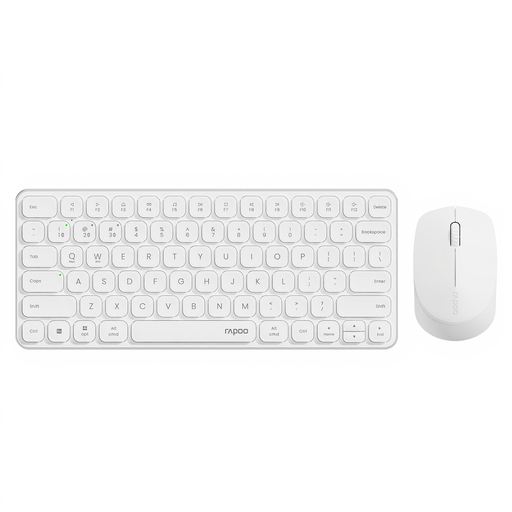
Why it suits this profile: For users who switch between multiple devices every day and are looking for a combination for Windows, Mac, Linux and Chrome OS.
The set uses both USB and Bluetooth. This means you are not dependent on a single connection type, provided your devices support the selected method.
Support for up to four devices, quiet low-profile keys and adjustable mouse sensitivity from 800 to 2400 DPI according to the product specifications.
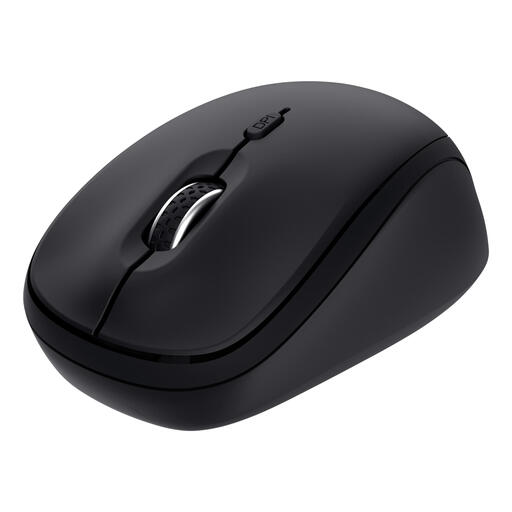
Why it suits this profile: A compact wireless mouse for laptop users, students and home workers who switch between a laptop, PC and tablet.
In addition to a USB receiver, this model supports Bluetooth. You therefore do not have to pair it again every time you switch between three devices.
Compact size, quiet buttons, 800/1600 DPI and a stated battery life of up to 12 months.
We have put together a complete, up-to-date list of products that fully meet these strict selection criteria and the applicable European safety regulations.
Not automatically. Check the operating system and connection type. A USB set usually requires a free USB-A port. Bluetooth models require Bluetooth support on the laptop, PC, tablet or phone. With macOS and ChromeOS, some keyboard shortcuts may work differently than they do in Windows.
This varies by model and usage. The stated figures in the product information range from around 12 months for a mouse to up to 48 months for certain keyboards. Automatic sleep mode, an on/off switch and switching the set off when you have finished can all help to reduce consumption.
A wired set does not require separate batteries, while a wireless set keeps your desk free from cables. So do not only consider the purchase price; also look at the battery type, stated lifespan and whether batteries are included. If you travel frequently or value a tidy desk, the practical benefits of going wireless may outweigh the small recurring cost of batteries.
