
Vandaag of morgen in huis

Kwaliteit gegarandeerd

Welkomstaanbiedingen ontgrendelen: GRATIS bezorging | Tot 80% korting | Gratis 30 dagen JoyPlus-proefperiode
Download de app
A wireless mouse gives you more space on your desk and is handy for a laptop, PC, Mac or tablet. However, choosing the wrong one can quickly become frustrating. A mouse that is too small, has an unreliable connection or needs new batteries after a short time offers very little convenience.
As a Joybuy Product Recommendation Officer, I therefore focus mainly on verifiable specifications. When comparing models, don’t just look at the brand and appearance. Consider the connection, shape, sensor, power supply and compatibility too.
A wireless mouse usually works via Bluetooth or a 2.4GHz USB receiver. Bluetooth is practical for a laptop or tablet without a spare USB port. A mouse with a receiver is often easy to connect, but it does require a USB port.
Also check how many devices you can pair it with. A standard Bluetooth mouse won’t automatically work with multiple devices. If you’re looking for a multi-device mouse, look for an explicit statement such as “up to three devices” and check how switching between them works.
An ergonomic mouse can be comfortable, but the right shape depends on your hand size, grip and working position. A vertical mouse also takes some getting used to. If you’re used to a flat mouse, you may work more slowly during the first few days.
Pay attention to the handedness. Some models are designed only for right-handed use, while others are suitable for both left- and right-handed users. Also consider the weight: a lightweight model is convenient when travelling, but a heavier mouse may feel more stable on a permanent desk.
DPI determines how far the cursor moves with the same hand movement. A mouse with adjustable DPI gives you more control, but an extremely high setting isn’t automatically more practical for office work. For documents, email and spreadsheets, a medium setting is often sufficient.
An optical mouse generally works well on a normal, matt surface. Glass or highly reflective surfaces can affect tracking. If this isn’t clearly stated in the specifications, use a mouse mat.
Check whether the mouse works via:
A stated range of 5 to 10 metres is a product specification measured under certain conditions. Walls, other wireless devices and the position of the receiver can affect the connection. For an office or home-working setup, a stable connection is more important than the maximum range alone.
A mouse powered by AA or AAA batteries can be practical if you don’t want to use a cable. Check how many batteries it needs and whether they’re included. With a rechargeable mouse, check whether it has a USB-C port, the stated battery life and whether you can continue using the mouse while it’s charging.
Battery-life claims depend on usage, settings and connection method. Treat “up to twelve months” as an indication rather than a guaranteed operating time.
For everyday office work, a good scroll wheel and a suitable size are more important than lots of extra buttons. If you work with large spreadsheets or creative software, horizontal scrolling and programmable buttons can be useful.
A silent mouse is particularly useful in a shared workspace, library or home office. According to some brands’ product descriptions, click noise can be reduced by a specified percentage. This is a brand claim; the perceived volume can vary depending on the surface and the user.
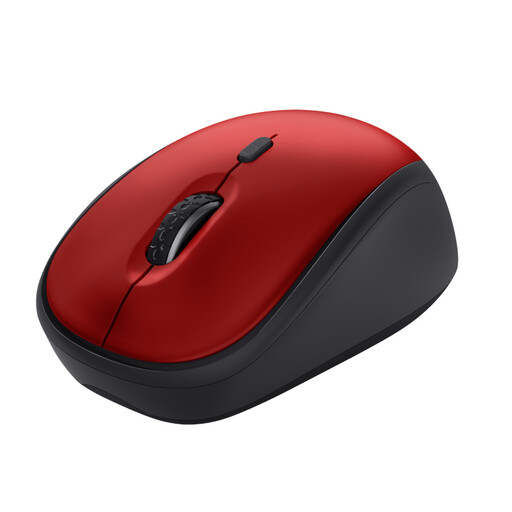
Why it suits this profile: This compact mouse is designed for everyday office and laptop use. The 2.4GHz connection works via a USB receiver, and the DPI can be adjusted between 800 and 1600.
The product specifications clearly state the connection type, optical sensor, silent click and DPI switch. Do check that your laptop has a spare USB port.
Optical sensor, silent click, ambidextrous use and a stated battery life of up to twelve months.

Why it suits this profile: This model is designed for intensive office work, with eight buttons, horizontal scrolling, Bluetooth and Logi Bolt. The sensor resolution can be adjusted up to 8000 DPI.
Control isn’t limited to a standard scroll wheel: according to the specifications, functions, DPI and buttons can be customised using software.
Rechargeable battery, three paired devices, USB-C, silent click and laser tracking according to the product information.
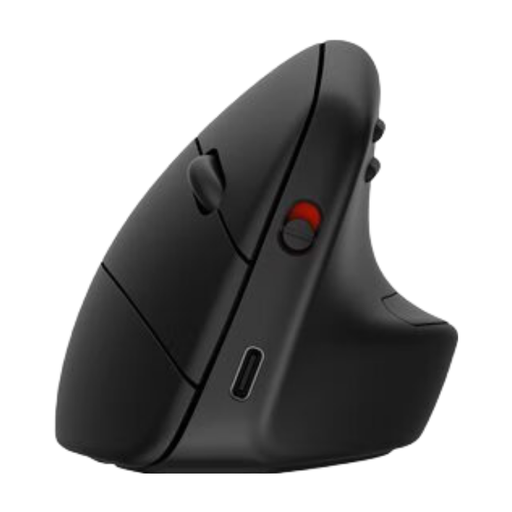
Why it suits this profile: The vertical shape is designed for right-handed users who want to try a different wrist position. The model supports Bluetooth and RF, works with up to three devices and has a rechargeable battery.
The shape, handedness, connections and battery are clearly stated. The description mentions an effect on muscle activity based on HP’s own information; this is not a medical guarantee.
Vertical design, six buttons, up to 4000 DPI, USB-C charging and compatibility with Windows, Mac and ChromeOS.
We’ve put together a complete, up-to-date list of products that fully meet these strict selection criteria and the applicable European safety regulations.
No. The laptop must support Bluetooth, and its operating system must be compatible. Also check whether the mouse supports Windows, macOS, ChromeOS, Android or iPadOS. If your laptop doesn’t have Bluetooth, choose a model with a USB receiver or use a suitable adapter.
This varies by model and usage. According to the product specifications, mice with AA or AAA batteries can work for several months or more than a year. A rechargeable mouse doesn’t need disposable batteries, but it must be charged periodically via USB-C. Frequent use, lighting and heavy connection activity can affect battery life.
A silent mouse can be useful in a shared space, but “silent” doesn’t mean completely noiseless. According to a brand’s own research or claims, click noise may be reduced by a specified percentage. The actual experience depends on the surface, the pressure used to click and the surroundings. So before buying, also check the shape, handedness and connection.
