
Vandaag of morgen in huis

Kwaliteit gegarandeerd

Welkomstaanbiedingen ontgrendelen: GRATIS bezorging | Tot 80% korting | Gratis 30 dagen JoyPlus-proefperiode
Download de app
A wireless mouse keeps your desk tidy and is useful with a laptop, PC or flexible workspace. However, not every wireless computer mouse is suitable for the same situation. A compact travel model may feel too small in the office, while a gaming mouse may offer unnecessary features for email and spreadsheets.
Product information does not always include the same types of specifications either. Pay particular attention to the connection, sensor, DPI, shape and power source. This will help you avoid paying mainly for a familiar name or a high DPI value when you do not need those features.
DPI indicates how sensitively the mouse pointer responds to movement. A mouse with adjustable DPI offers flexibility, but a higher maximum value is not automatically useful for everyday office work. For word processing and browsing, settings of around 1000 to 1600 DPI are often practical. Gamers may appreciate more adjustment options, especially in games where precise aiming is important.
So check whether the mouse has multiple settings, rather than focusing only on the maximum DPI.
A Bluetooth mouse works without a separate USB receiver, but your laptop or PC must support Bluetooth. This feature is sometimes missing from desktop PCs. A wireless mouse with a USB receiver is simpler in that case: plug the receiver into a free USB port and connect the mouse according to the instructions.
Also check the type of USB connection. A USB-A receiver will not plug directly into every modern laptop with USB-C ports only. An adapter may be needed.
The term ergonomic mouse says little by itself about the dimensions or shape. A large right-handed mouse may be comfortable for someone with a broad hand, but less suitable for a left-handed user. If you switch between both hands, an ambidextrous mouse may be a better choice.
As well as the shape, look at the height, width and weight. A compact mouse is suitable for travel, but may provide less support during long working days.
Choose a wireless mouse with a USB receiver if you want to connect quickly or use a computer without Bluetooth. A 2.4GHz radio connection is often supplied with a nano or micro receiver. Check whether you can leave it plugged into your laptop and whether the receiver can be stored in the mouse when travelling.
Bluetooth is useful when you want to keep your USB ports free. Some models combine both options and can be used with multiple devices. According to the product information, the Trust Ozaa+ supports a 2.4GHz receiver and two Bluetooth channels, allowing connection to up to three devices.
An optical mouse uses a sensor to track movement across a surface. Tracking quality depends not only on DPI, but also on the surface, the sensor and the way you use the mouse.
For a mouse for laptop and PC use, a range of around 1000 to 1600 DPI is suitable for many everyday tasks. A DPI switch is practical when you want to move between fast navigation and more precise selection. Gaming models such as the Razer DeathAdder V3 Pro quote much higher values, but that capability is mainly relevant to specific gaming setups.
A model with AA or AAA batteries works straight away when the batteries are included. However, bear in mind the ongoing costs and the need to recycle used batteries correctly. A rechargeable wireless mouse has a built-in battery and is usually charged via USB. Check whether you can continue working while it charges and what type of cable is included.
For lithium batteries, follow the manufacturer's safety instructions. Do not open the casing yourself and use a suitable certified power source.
A quiet wireless mouse can be ideal in a shared workspace, library or home office. “Quiet” usually refers to the main buttons; the scroll wheel and other buttons may still be audible. Also consider the number of buttons. Three buttons are enough for basic use, while additional programmable buttons can be useful for software or games.
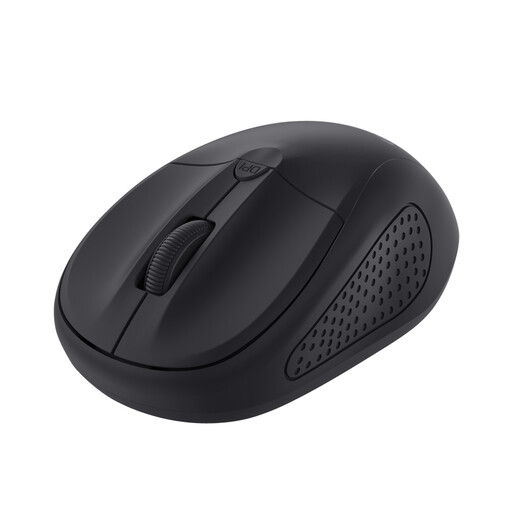
Why it suits this profile: The compact Trust Primo is designed for simple everyday use and travel. The mouse connects via a USB receiver and is suitable for both left- and right-handed use.
The product specifications state an adjustable DPI range of 1000 to 1600, so you are not limited to a single sensitivity setting. The on/off switch helps to reduce power consumption.
Optical sensor, 6-metre range, 75-gram weight and ambidextrous design. It has three buttons and a scroll wheel for basic navigation.

Why it suits this profile: This large office model is designed for users who work with a laptop, PC and tablet, and regularly view wide spreadsheets or timelines.
The shape and dimensions are clearly stated: 120 x 75 x 45 mm and 110 grams. This helps you judge in advance whether the model will be too large for your hand or laptop bag.
Up to 3200 DPI, horizontal scroll wheel, quiet buttons, rechargeable battery and connection to up to three devices via USB receiver and Bluetooth.

Why it suits this profile: This right-handed model is designed for gaming and users who value low weight, programmable buttons and wireless use.
The product information lists both HyperSpeed Wireless and USB-C use. This means you can also use the model with a cable while it is charging. However, check the preferred hand shape and software compatibility beforehand.
Approximately 63 grams, optical sensor with up to 30,000 DPI, five buttons, 1000Hz polling rate and a stated battery life of up to 90 hours.
We have put together a complete, up-to-date list of products that fully meet these strict selection criteria and the applicable European safety regulations.
Not automatically. Check whether the model uses Bluetooth, a USB receiver or both. Also look at the available port type and the supported operating system, such as Windows, macOS or ChromeOS.
This varies by model, connection and usage. A mouse powered by AA or AAA batteries does not have a fixed charging time, but the batteries will need replacing. For a rechargeable model, check the stated usage time, charging method and whether it can be used while charging.
Yes, provided the mouse offers a stable connection, a suitable polling rate, adjustable DPI and a shape that fits your hand. For casual gaming, a standard Bluetooth mouse may be sufficient. For competitive games, a gaming mouse with low latency, programmable buttons and a suitable sensor is the more sensible choice.
