
Vandaag of morgen in huis

Kwaliteit gegarandeerd

Welkomstaanbiedingen ontgrendelen: GRATIS bezorging | Tot 80% korting | Gratis 30 dagen JoyPlus-proefperiode
Download de app
A wireless mouse gives you a tidier desk and more freedom of movement. However, not every wireless computer mouse is suitable for every use. A model that works well with a laptop may fall short for gaming. What’s more, the wrong hand shape, a US/QWERTY layout or a missing Bluetooth connection can cause surprises.
So don’t just focus on the price or the looks. Instead, pay attention to the connection, the shape, the power source and the features you’ll actually use.
A Bluetooth mouse works directly with devices that support Bluetooth. That’s handy for many laptops, tablets and some desktop computers. A mouse with a USB receiver, on the other hand, typically uses a 2.4GHz connection. You’ll need a free USB-A port.
Check beforehand:
A receiver may require an adapter or docking station for a compact laptop. With a Bluetooth mouse, pairing or switching between devices can take a bit more effort.
DPI determines how sensitive the mouse pointer is to movement. A high value isn’t automatically more comfortable. For office work, a moderate setting can feel steadier, while gamers often want to switch quickly between different sensitivity levels.
Pay attention to the difference between:
According to the product information, the Trust GXT 929 Helox has an optical sensor of up to 4800 DPI and a polling rate of 1000 Hz. These are verifiable product specifications, but they don’t alone determine whether the mouse suits your play style.
An ergonomic mouse, such as a vertical model, places your hand in a different position than a traditional mouse. That can take some getting used to. Also check whether the model is designed for right-handed or left-handed use.
Consider:
A lightweight gaming mouse isn’t comfortable for everyone. A heavier model can feel more stable for precision work.
A wireless mouse with a 2.4GHz receiver usually works simply via plug-and-play, but requires a USB port. Bluetooth saves a port, but compatibility varies by operating system and device.
Check whether the mouse is compatible with your version of Windows, macOS, Chrome OS, Linux or iPadOS. Support for software that programmes mouse buttons may be more limited. For example, the Trust GXT 929 Helox states compatibility with Windows 10 and Windows 11, while the Logitech MX Vertical can also be used with macOS, Chrome OS and iPadOS according to the product information.
A rechargeable mouse saves you from having to buy disposable batteries regularly. Check how long the battery lasts according to the product description and whether you can use the mouse while it’s charging.
For models that use AA or AAA batteries, the running costs depend on the battery type and usage time. A battery-powered set can be convenient if you don’t want to plan charging sessions. Also look for an on/off switch and an automatic sleep mode.
For a shared workspace, library or home office, a quiet mouse can be a real plus. With a wireless keyboard and mouse set, you should also check:
A US/QWERTY layout differs from the Dutch QWERTY layout. So check the key layout before you order.
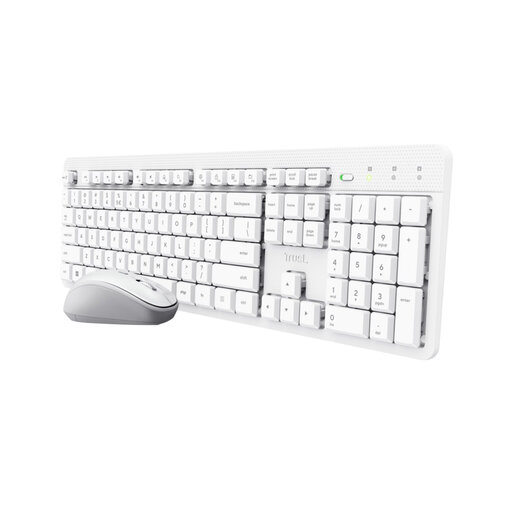
Why this fits the profile: A complete set is practical when you want to get started straight away with a laptop or PC. The quiet operation and single USB receiver suit home working and studying.
The product specifications mention quiet keys and buttons, adjustable 800–1600 DPI and a storage compartment for the USB receiver. Do check the US/QWERTY layout.
Wireless set, quiet operation, adjustable DPI and compatibility with Windows, macOS, Linux and Chrome OS according to the product information.

Why this fits the profile: This ergonomic mouse is designed for right-handed users who value a vertical shape and multi-device connectivity.
The mouse has both Bluetooth and a 2.4GHz connection via a Unifying receiver. This gives you more choice with laptops and desktops, but check which connection you want to use beforehand.
57-degree vertical angle, adjustable sensor up to 4000 DPI, rechargeable battery and a stated range of 10 metres.

Why this fits the profile: A wireless gaming mouse with a low weight, adjustable DPI and programmable buttons suits PC gamers who need to switch quickly.
The connection is clearly specified as 2.4GHz via a USB receiver. However, the mouse is right-handed, so left-handed users should take this into account beforehand.
According to the product information, the model weighs approximately 73 grams, has six programmable buttons, RGB lighting and a rechargeable battery with a stated battery life of up to 80 hours.
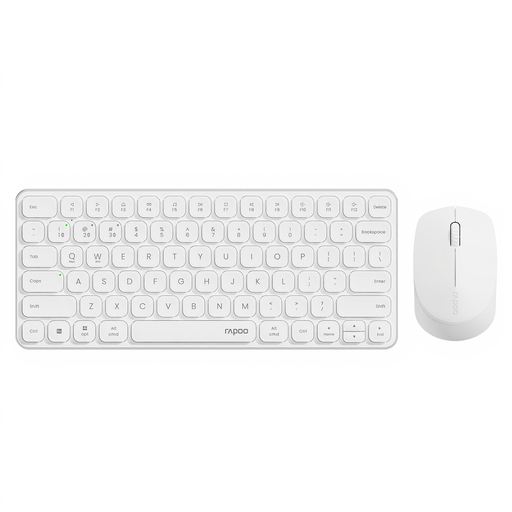
Why this fits the profile: Ideal for anyone who switches between a PC, laptop, tablet or phone and wants to use one wireless keyboard and mouse set.
The combo supports 2.4GHz and Bluetooth 4.0/5.0. According to the product information, you can pair up to four devices. Check the available connection for each device.
Adjustable mouse sensitivity from 800 to 2400 DPI, quiet keys and compatibility with Windows, macOS, Linux and Chrome OS.
With a USB receiver, plug the receiver into a free USB port and turn the mouse on. With Bluetooth, open the Bluetooth settings on your device and select the mouse from the list. For a wireless mouse, remember to store the receiver properly and charge a rechargeable model in good time.
Use the mouse on a non-reflective surface if possible. Clean it with a dry cloth and keep the charging port, sensor and battery compartment away from moisture. The statutory warranty and additional manufacturer terms may vary by product; check the information on the product page.
We’ve put together a full, up-to-date list of products that fully meet these strict selection criteria and comply with current European safety regulations.
Not every mouse works the same way with every laptop. A model with a USB receiver needs a suitable USB port. A Bluetooth mouse requires Bluetooth support and sometimes a compatible operating system. Always check the compatibility information for the specific model.
That depends on the type of power source, how intensively you use it and the product specification. A rechargeable mouse often states an estimated battery life per charge. Models with AA or AAA batteries can last longer, but bring recurring costs for replacement batteries.
Yes, as long as the mouse offers a stable connection, a suitable sensor, low latency and enough buttons. Also consider weight, grip and adjustable DPI. For competitive gaming, a 2.4GHz wireless gaming mouse can be more practical than a standard Bluetooth model.
