
Vandaag of morgen in huis

Kwaliteit gegarandeerd

Welkomstaanbiedingen ontgrendelen: GRATIS bezorging | Tot 80% korting | Gratis 30 dagen JoyPlus-proefperiode
Download de app
A wireless mouse keeps your desk tidy and is ideal for use with a laptop, home office or flexible workspace. However, not every model is suitable for daily use. A low price doesn't tell you much about the shape, while terms like "ergonomic", "quiet" and "precise" can sometimes hide important details.
So pay particular attention to three common pitfalls:
A wireless mouse with a USB receiver usually works straight away once you plug the small receiver into a USB port. This is practical for desktop computers and laptops with USB-A. However, check whether your laptop only has USB-C ports; you may need an adapter.
A Bluetooth mouse doesn't need a separate dongle. That saves a USB port and is handy with modern laptops, tablets and some smartphones. Check the supported operating systems and Bluetooth version beforehand. The Microsoft Surface Arc Mouse, for example, requires Bluetooth 4.0 or higher. With the Lofree EP115 you can choose between Bluetooth and 2.4 GHz.
An ergonomic mouse must fit your hand and the way you hold it. Don't just look at the word "ergonomic", but also at:
A vertical mouse turns your hand more to a sideways position. The Trust Bayo II has a 57-degree angle and is designed for right-handed use. This can be a logical choice if you find a vertical grip more comfortable, but the shape does require some getting used to. If discomfort persists, it's wise to adjust your working posture and take breaks; a mouse is not a medical treatment.
DPI determines how fast the cursor moves across the screen with the same hand movement. For word processing, email and spreadsheets, an adjustable range such as 800 to 2400 DPI is usually practical. A mouse with adjustable DPI is particularly useful when you alternate between precise selecting and fast navigating.
A quiet mouse can be pleasant in a shared workspace, library or office. Pay attention to the wording: manufacturers sometimes use a percentage for noise reduction. According to Logitech's own information, SilentTouch reduces the clicking noise of the Signature M650 L by up to 90 per cent; the actual noise level also depends on the surface and the way you click.
For power, you choose between replaceable AA or AAA batteries and a rechargeable mouse. A built-in battery avoids loose batteries, but you do need to charge the mouse in time. Also check whether you can continue working while it's charging.
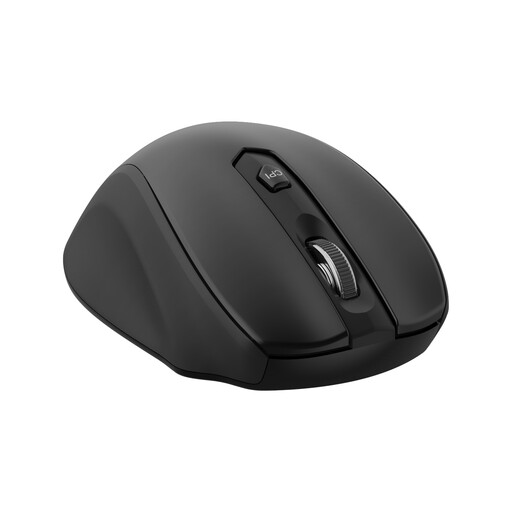
Why this fits the profile: This wireless optical mouse is designed for everyday use with a laptop, PC or MacBook and offers five DPI levels for different tasks.
The five settings from 800 to 2400 DPI make the cursor speed controllable. The USB receiver avoids reliance on Bluetooth.
Optical sensor, six buttons and a stated range of up to 10 metres via 2.4 GHz.

Why this fits the profile: The Ozaa+ is designed for office and home workers who use multiple devices and wide spreadsheets.
The combination of USB receiver and two Bluetooth channels makes the connection choice clear. The LED indicator shows the battery status.
Connection to up to three devices, side scroll wheel, rechargeable battery and adjustable DPI up to 3200.
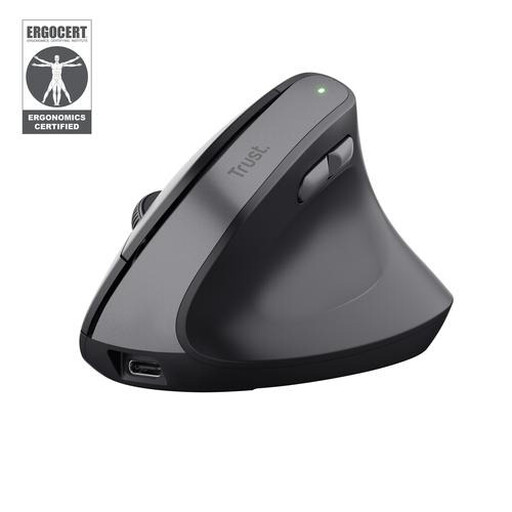
Why this fits the profile: The vertical shape with 57 degrees is aimed at right-handed users who want a different grip during long working days.
The hand orientation, vertical angle and dimensions are clearly stated. This makes it visible in advance that this is not a symmetrical or left-handed mouse.
Rechargeable battery with stated usage time of up to three months, quiet buttons, two thumb buttons and DPI settings from 800 to 2400.
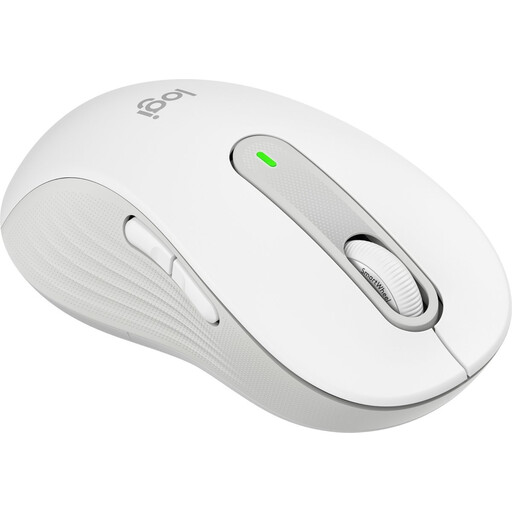
Why this fits the profile: This model is specifically left-handed and designed for larger left hands, with Bluetooth Low Energy or a Logi Bolt receiver.
The designation "L Left" avoids confusion with a universal mouse. The connection can be via Bluetooth or a compatible Logi Bolt USB receiver.
Optical sensor of 2000 DPI, five buttons, quiet click function and powered by one AA battery.
We've put together a full, up-to-date list of products that fully meet these strict selection criteria and current European safety regulations.
No. A model with a USB receiver needs a suitable USB port. A Bluetooth mouse requires Bluetooth support and sometimes a compatible operating system. Check these connections before you order.
That varies per model and usage. A mouse on AA or AAA batteries can last months to years according to the product specification. A rechargeable mouse has a stated usage time per charge. Intensive use, lighting and a short sleep mode can affect the actual duration.
Usually yes, especially in a shared space. Check whether only the left and right mouse buttons are quieter or also the scroll wheel. A quiet mouse reduces clicking noise, but doesn't make every operating sound completely inaudible.
