
Vandaag of morgen in huis

Kwaliteit gegarandeerd

Welkomstaanbiedingen ontgrendelen: GRATIS bezorging | Tot 80% korting | Gratis 30 dagen JoyPlus-proefperiode
Download de app
A wireless mouse gives you more freedom of movement at your desk and is handy with a laptop, PC or multiple devices. However, not every wireless computer mouse is suitable for the same user. A Bluetooth mouse without a USB receiver is practical when you’re on the go, while a 2.4 GHz model is often ready to use straight away with a PC.
Product descriptions are also regularly packed with terms such as “ultralight”, “gaming-grade” and “ergonomic”. These words only mean something when you check the specifications behind them. Below, we outline the main pitfalls and parameters to look out for.
A high DPI figure does not automatically mean that a mouse will be more comfortable or accurate. DPI mainly determines how quickly the cursor moves for a particular hand movement. For office work, an adjustable setting between around 800 and 3200 DPI is often sufficient. Gamers may want more flexibility, but sensor consistency, polling rate and shape are important there too.
So check whether the mouse has several settings and whether they are easy to adjust. Adjustable DPI is more practical than an impressive maximum that you never use.
There are three common connection methods:
Also consider whether you can switch between devices. A multi-device mouse can, for example, connect to a laptop, PC and tablet, but the number of devices and available connection modes vary from model to model.
A mouse with replaceable AA or AAA batteries can work for months, but actual battery life depends on usage, sleep mode and battery type. A rechargeable mouse eliminates loose batteries, but it does need to be connected to a cable regularly.
With gaming models, battery life can vary considerably depending on lighting, polling rate and wireless mode. So don’t just look at “up to” a certain number of hours. Also check:
For a laptop mouse, Bluetooth is often convenient because you don’t need to carry a USB receiver. The HP 240, for example, uses Bluetooth 5.1 and, according to the product specifications, does not have a USB-C charging port; the model runs on an AA battery. For a PC mouse, a 2.4GHz receiver is often straightforward: connect it, switch it on and use it.
Check the supported operating systems before buying. Some software for button programming or RGB lighting only works on Windows. The ET Wireless Gaming Mouse, for example, supports three connection modes, but according to the product information, the supplied programming software is only for Windows and only works in wired mode.
An ergonomic mouse is not necessarily suitable for every hand. Consider the length, width, weight and hand orientation. A right-handed model may be uncomfortable for left-handed users. A compact mouse is useful for travelling, but may provide less support for a larger hand.
A vertical ergonomic mouse positions your hand differently from a traditional model. The Logitech MX Vertical has an angle of 57 degrees and is designed for right-handed use. The manufacturer describes the design as a natural “handshake position”; this is a brand claim about the design and is not a guarantee of comfort for every individual.
A silent mouse can make a difference in a shared workspace, library or home office. According to Logitech, the M330 Silent Plus produces up to 90% less click noise than traditional mice. According to the product information, the HP 285 also offers up to 90% noise reduction. These percentages come from brand or product claims, so above all, check whether the mouse has a click feel that you find comfortable.
An extra side click or horizontal scroll wheel is useful for spreadsheets, timelines and wide documents. For straightforward browsing, three buttons and a vertical scroll wheel are often sufficient.
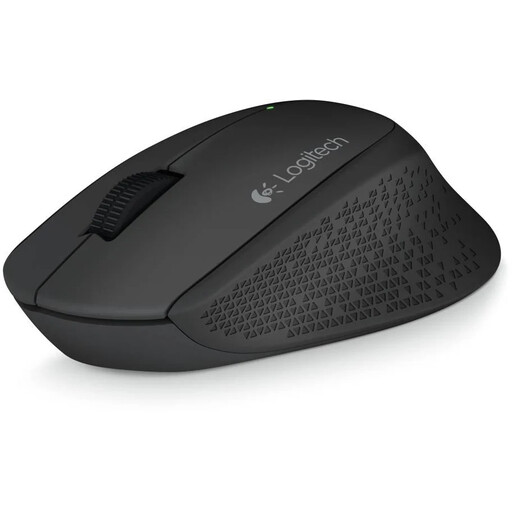
Why it suits this profile: This straightforward wireless computer mouse is designed for everyday use at home or in the office, with a 2.4GHz connection and nano USB receiver.
The specifications are clear and simple: 1000 DPI, three buttons, optical tracking and a supplied AA battery. There are no unnecessary gaming features to pay for.
Up to 10 metres of wireless range according to the product information, ergonomic rubber grips and a simple plug-and-play design.
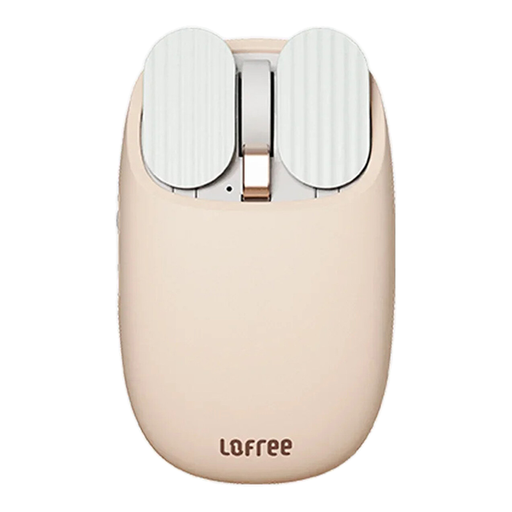
Why it suits this profile: The EP115 combines Bluetooth and 2.4GHz, making it suitable for a laptop, PC and other compatible devices.
You are not dependent on a single connection type. The five DPI settings allow you to adjust the cursor without relying solely on a high maximum figure.
PAW3220LU optical sensor, settings from 800 to 3600 DPI, built-in 800mAh battery and a stated battery life of around one month.

Why it suits this profile: This model is aimed at PC gamers who value a lightweight design, low latency and plenty of customisation options.
The product information mentions not only a high sensor resolution, but also a weight of 60 grams, LIGHTSPEED connectivity and USB-C charging.
HERO 2 sensor according to the product description, up to 32,000 DPI and a stated polling rate of 4000 Hz. Check the software and system requirements beforehand.
Choose a silent mouse if clicking sounds are distracting to housemates or colleagues. Bear in mind that “silent” usually refers to the left and right buttons; the scroll wheel or side buttons may sound different.
An ergonomic model is most suitable when its shape matches your hand and working posture. If you use it for long periods, take regular breaks and adjust your workstation properly. A mouse can make use more comfortable, but it will not automatically prevent discomfort.
We have put together a complete, up-to-date list of products that fully meet these strict selection criteria and the applicable European safety regulations.
Only if the model supports Bluetooth and your computer has Bluetooth. A 2.4GHz mouse generally needs a USB receiver. A dual-mode or tri-mode model gives you more choice.
This varies from model to model. Some mice with an AA battery claim a battery life of many months, while rechargeable models may state around one month or several dozen hours per charge, for example. Usage, lighting and connection mode all affect actual battery life.
Yes, provided the mouse has a suitable wireless connection, sensor, polling rate and shape. For competitive games, low latency, light weight and programmable buttons are often more important than a high DPI alone.
