
Vandaag of morgen in huis

Kwaliteit gegarandeerd

Welkomstaanbiedingen ontgrendelen: GRATIS bezorging | Tot 80% korting | Gratis 30 dagen JoyPlus-proefperiode
Download de app
A wireless mouse gives you a tidier desk and more freedom of movement, but not every model is right for every laptop, PC or workspace. A cheap mouse might be fine for basic navigation, but it can become less suitable when you’re working long hours every day or need precise movements.
So don’t just focus on looks or a high DPI value. The connection, shape, power source and number of buttons have a much bigger impact on whether a wireless mouse feels comfortable in daily use.
DPI indicates how sensitively the cursor responds to movement. A high value isn’t automatically more useful. For word processing and browsing, around 1,000 to 1,600 DPI is often practical. Gamers or users with multiple screens may benefit more from a mouse with adjustable DPI, so you can change the sensitivity for each task.
A high sensor resolution without good software, a suitable grip or a stable connection won’t automatically give you a better experience.
A mouse with a USB receiver usually works via 2.4 GHz. You plug the nano or micro receiver into a USB port and can generally start using it straight away. That’s handy for a desktop PC, but less practical if your laptop has few USB ports.
A Bluetooth mouse connects without a separate dongle. Just check beforehand whether your laptop, tablet or PC supports Bluetooth. Some models offer both options, which is useful if you want to use the same mouse with different devices.
A compact mouse is easy to carry around, but it may be less comfortable for larger hands. A vertical mouse has a different hand position from a standard model and takes some getting used to. Also pay attention to the controls: a right-handed mouse isn’t automatically suitable for left-handed use.
Terms like ‘ergonomic’ describe a design choice, not a guaranteed result for every user. Take regular breaks and set up your workstation properly if you spend long periods in front of a screen.
Choose a 2.4 GHz model if you mainly want plug-and-play on a PC or laptop. Check whether the receiver uses USB-A and whether your device has a suitable port. Bluetooth is handy for modern laptops and tablets because no receiver is needed.
Also check the supported operating system. Windows, macOS and ChromeOS are often supported, but features like programmable buttons may require additional software.
An optical mouse works on most desktops, but reflective or glass surfaces can affect tracking. Look at:
For office work, three buttons and a scroll wheel are usually enough. For gaming or productivity, extra programmable buttons can be useful.
A model with AA or AAA batteries is ready to use straight away, but you’ll need to keep spare batteries on hand. A rechargeable wireless mouse saves you from buying batteries regularly. Check how long the battery lasts according to the product information and whether you can continue using the mouse while it’s charging.
Weight affects how the mouse handles. Light models are easy to move and carry around. A heavier model can feel more stable. There’s no universally suitable weight; hand size and grip determine what feels comfortable.
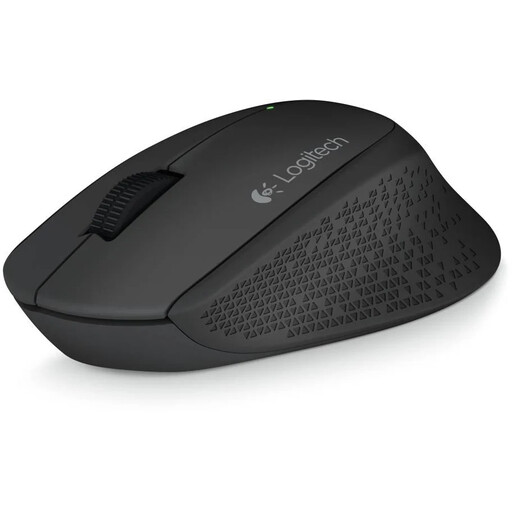
Why this fits the profile: A straightforward wireless computer mouse for home, office and everyday laptop use. Setup is via the included nano USB receiver.
The specifications are clear: an optical sensor at 1,000 DPI, three buttons and a range of up to 10 metres. No unnecessary gaming software is needed.
Rubber grips, right-handed shape, one AA battery included and connection via 2.4 GHz.

Why this fits the profile: Designed for home workers and office professionals who value a vertical shape, Bluetooth and a rechargeable battery.
The hand position and size are clearly described. The mouse is right-handed, so check this before buying if you use the mouse left-handed.
57-degree vertical shape, Bluetooth and USB receiver, adjustable up to 4,000 DPI and a rechargeable battery.
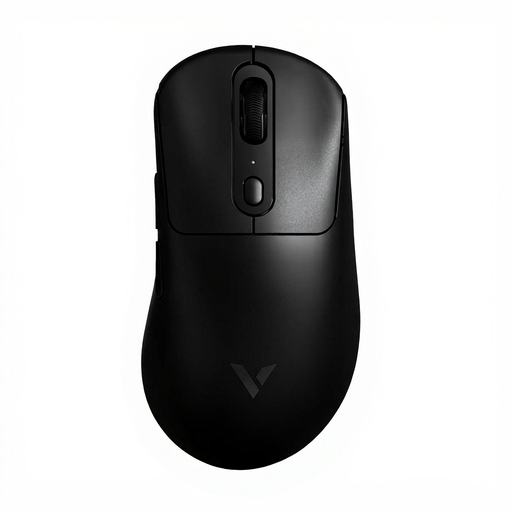
Why this fits the profile: A wireless gaming mouse for users who want a low weight, programmable buttons and a high polling rate.
The product information lists concrete values for sensor, weight, polling rate and battery. At 8 kHz, CPU usage may increase, so check your PC specifications.
59 grams, optical PAW 3950 sensor, independent X/Y DPI adjustment, eight programmable buttons and a stated battery life of up to 200 hours.
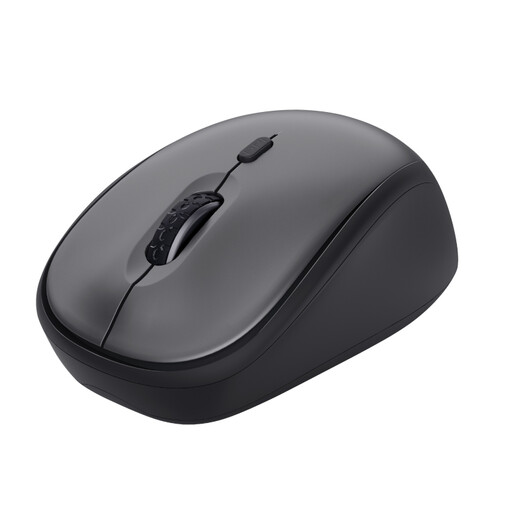
Why this fits the profile: A compact silent wireless mouse for shared offices, libraries, home workspaces and travel.
The silent buttons and compact dimensions are clearly specified. This model works via a USB receiver and not via Bluetooth, so bear that in mind.
DPI setting from 800 to 1,600, range of up to 8 metres, one AA battery and storage space for the receiver inside the mouse.
We’ve put together a full, up-to-date list of products that fully meet these strict selection criteria and comply with current European safety regulations.
For a model with a USB receiver, plug the dongle into a free USB port and turn the mouse on. For Bluetooth, activate Bluetooth on your computer, search for the mouse in the settings and confirm the pairing. Consult the manual if multiple connection modes are available.
The lifespan depends on the type of battery, the sleep mode and how often you use the mouse. Models with replaceable batteries can last a long time, while a rechargeable model will need to be recharged over time. The statutory warranty in the EU is generally at least two years, but always check the product page and your legal rights.
In addition to the purchase price, batteries, charging and any software all play a role. A model with AA or AAA batteries can incur extra costs. With a rechargeable wireless mouse, you mainly pay for electricity and you don’t replace the internal battery yourself. So choose the power source based on how often you use it, not just on the purchase price.
