
Vandaag of morgen in huis

Kwaliteit gegarandeerd

Welkomstaanbiedingen ontgrendelen: GRATIS bezorging | Tot 80% korting | Gratis 30 dagen JoyPlus-proefperiode
Download de app
A wireless mouse keeps your desk tidier and is handy for a laptop, desktop computer or multiple devices. Even so, it is not wise to look only at the price, DPI count or eye-catching design. A wireless mouse can disappoint in practice because of a limited connection, an awkward shape or batteries that run out sooner than expected.
This buying guide helps you compare the most important specifications and make the right choice for the office, working from home, travelling or gaming.
A Bluetooth mouse connects directly to a device that supports Bluetooth. This is practical for laptops and tablets, as you do not need a USB dongle. A mouse with 2.4GHz RF usually uses a USB receiver. This connection is often straightforward: plug in the receiver and switch on the mouse.
Check which ports your laptop or PC has beforehand. A USB-A receiver will not fit every device without an adapter. If you switch between multiple devices, it is better to look for a multi-device mouse with Bluetooth and a USB receiver.
DPI indicates how quickly the cursor moves in response to a particular hand movement. A mouse with adjustable DPI is useful, but 10,000 or 24,000 DPI is generally unnecessary for normal office work. For spreadsheets, word processing and browsing, a stable optical sensor and a comfortable shape are more important.
For gaming, higher DPI values, a fast polling rate and programmable buttons can be relevant. Also check whether the settings you want are only available through software and on Windows.
A standard ergonomic mouse with a rubber grip is different from a vertical mouse. A vertical shape changes the position of your hand, but it also takes some getting used to. Look at the dimensions, weight and hand orientation. A right-handed mouse is not suitable for everyone, even when the product page describes it as having a comfortable shape.
Claims about reducing strain or promoting a natural posture come from brands or certification organisations. Do not regard them as a medical guarantee. If discomfort persists, taking breaks, setting your desk to the right height and seeking professional advice are important.
Also check the operating system. Some configuration software only works on Windows, while the basic functions also work on macOS or ChromeOS.
A rechargeable mouse means you do not have to replace AA or AAA batteries regularly. On the other hand, you do need to charge the mouse. A model with a battery-level indicator makes unexpected interruptions less likely.
For models with disposable batteries, check the type and number of batteries required. Stated battery life is a manufacturer’s specification; actual battery life depends on usage, power-saving features and the connection.
A large mouse provides more hand support, but is less suitable for travelling. A lightweight gaming mouse moves smoothly across a mouse mat, while a heavier office model may feel more stable for some users. Also consider:
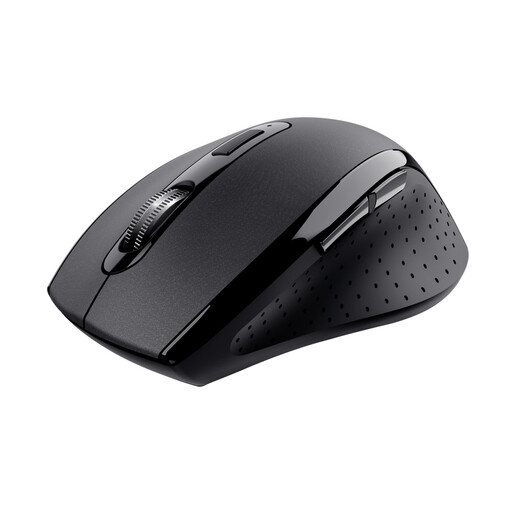
Why it suits this profile: This mouse is designed for everyday use at home or in the office and uses a 2.4GHz connection with a range of up to 10 metres according to the product information. Its shape is suitable for right-handed use.
The specifications clearly state that two AAA batteries are required. This means you know in advance that this is not a rechargeable mouse.
Optical sensor, 1500 DPI and storage for the micro-USB receiver.
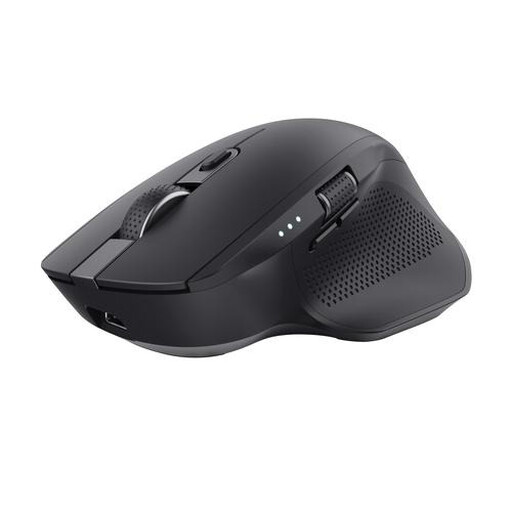
Why it suits this profile: If you work with a laptop, PC and tablet, this model can pair with up to three devices via 2.4GHz and two Bluetooth channels.
The product information mentions both the large dimensions and the right-handed design. This makes it clear in advance that it is neither a compact travel mouse nor a left-handed model.
Adjustable optical sensor up to 3200 DPI, rechargeable battery and an extra wheel for horizontal scrolling.
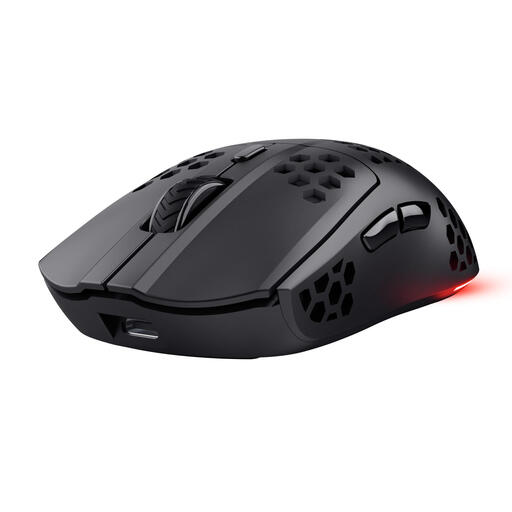
Why it suits this profile: This is a gaming mouse with 2.4GHz connectivity, an optical sensor of up to 4800 DPI, six programmable buttons and RGB lighting.
The product specifications state the weight of approximately 73 grams and the connection separately. This allows you to assess the lightweight design and connectivity independently of marketing claims.
Rechargeable battery with up to 80 hours’ use according to Trust, plus use while charging via USB-C.
A vertical mouse may suit users who want to try a different grip from that of a traditional model. According to the product information, the Trust Bayo II has an angle of 57 degrees, silent buttons, two thumb buttons and an adjustable speed of 800 to 2400 DPI. The model is right-handed and uses a 2.4GHz USB receiver; Bluetooth and multi-device pairing are not available.
The Logitech MX Vertical combines a vertical shape with Bluetooth, a 2.4GHz receiver, a sensor of up to 4000 DPI and a rechargeable battery. Its shape and weight of 135 grams make it more suited to a permanent workstation than to use on the go. A vertical mouse feels different at first, so check the dimensions and returns policy before ordering.
We have put together a complete, up-to-date list of products that fully meet these strict selection criteria and the applicable European safety regulations.
No. An RF model usually requires a free USB-A port. A Bluetooth mouse requires Bluetooth support on the laptop. Also check the operating system and whether additional software is needed for DPI or button settings.
This varies by model. According to the product specifications, the Logitech M330 has a battery life of up to 24 months, while the Trust GXT 929 Helox has a rechargeable battery with a stated usage time of up to 80 hours. These are manufacturer’s figures; brightness settings, the connection and usage affect actual battery life.
‘Silent’ usually means that click sounds have been reduced, not that there is no sound at all. Logitech states that the M330 offers noise reduction of more than 90% compared with traditional mice. Trust and HP also mention silent buttons or noise reduction. If in doubt, check the button type and user experience rather than relying solely on the product name.
