
Vandaag of morgen in huis

Kwaliteit gegarandeerd

Welkomstaanbiedingen ontgrendelen: GRATIS bezorging | Tot 80% korting | Gratis 30 dagen JoyPlus-proefperiode
Download de app
A wireless mouse keeps your desk tidier and is useful with a laptop, home office or desktop computer. However, “wireless” says little about how a mouse performs in practice. For example, a model may only work with a USB-A port, be too large for your hand or need new batteries after a short time.
The main pitfalls are:
Confusing Bluetooth and RF
A Bluetooth mouse works without a separate receiver, but your device must support Bluetooth. An RF wireless mouse usually uses a 2.4GHz USB receiver. This is practical for computers without a reliable Bluetooth connection, but less convenient with laptops that have few USB ports.
Looking only at DPI
A high DPI value may sound appealing, but for office work, adjustable speed is more important than a high maximum. An optical mouse with 1,000 to 1,600 DPI is sufficient for many everyday tasks. Gamers should also consider polling rate, response time and software support.
Confusing ergonomics with a universal solution
A standard curved mouse, a vertical mouse and a compact travel model all feel different. An ergonomic wireless mouse should suit your hand size, grip and working posture. A vertical shape, for example, is not automatically comfortable for every user.
First, check how the mouse connects:
Also check the operating system. Product information often lists support for Windows, macOS, Chrome OS, iOS or Android. Check this before buying, especially if you switch between a laptop, tablet and desktop computer.
Consider the length, width and weight. A large mouse provides more hand support, but takes up more space in your laptop bag. A compact model is portable, but may feel less comfortable during prolonged use.
Also consider the hand orientation:
Brand claims about ergonomics or noise reduction are not a universal guarantee. According to HP’s own information, the HP 285 Silent Wireless Mouse offers up to 90% noise reduction on the left and right buttons. Treat this as a manufacturer product specification rather than a guaranteed result for every user.
An optical mouse uses a light sensor and generally performs well on a normal, matt surface. Glossy or glass surfaces can affect tracking. DPI determines cursor sensitivity: a higher value moves the pointer further with the same hand movement.
Also check the type of power supply:
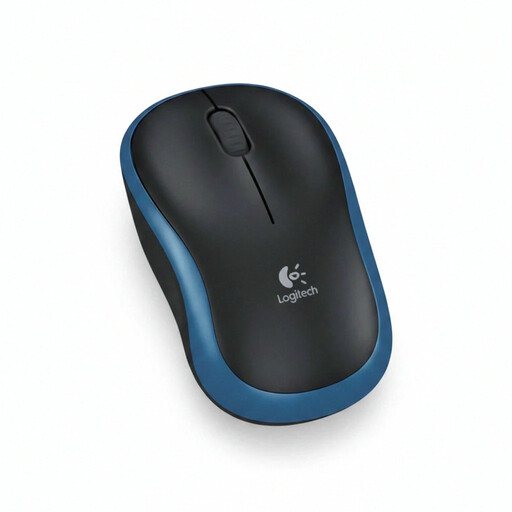
Why it suits this profile: This compact model uses 2.4GHz RF, has a USB nano receiver and runs on one AA battery. Its ambidextrous shape is suitable for both left- and right-handed use.
The connection, sensor and power supply are clearly specified. This means you do not have to pay for features you do not need for basic use.
Optical sensor, 1,000 DPI, plug-and-play operation and a compact design for use with a laptop, for studying or in the office.

Why it suits this profile: This right-handed vertical mouse combines Bluetooth and 2.4GHz via a Unifying receiver, with an adjustable sensor of up to 4,000 DPI and a rechargeable battery.
The shape and hand orientation are clearly stated. However, check that a vertical mouse suits your grip before placing your order.
Bluetooth and USB receiver, rechargeable battery, 10-metre range and adjustable DPI of up to 4,000.

Why it suits this profile: This wireless gaming mouse offers 2.4GHz, Bluetooth and wired use via USB-C. The product specifications list six DPI levels of up to 10,000, eight programmable buttons and RGB lighting.
The three connection options reduce compatibility issues. Please note: according to the product information, the programming software only works on Windows and in wired mode.
Up to 10,000 DPI, four polling rates, eight programmable buttons and a rechargeable battery.

Why it suits this profile: This mouse is designed for office work and, according to the product description, has quiet buttons. It can connect to up to three devices via a USB receiver and two Bluetooth channels.
The connection method and number of devices are clearly specified. This helps prevent a quiet wireless mouse from not working with your laptop or tablet after purchase.
Up to three devices, side-scrolling wheel, optical sensor of up to 3,200 DPI and rechargeable battery with LED indicator.
We have put together a complete, up-to-date list of products that fully meet these strict selection criteria and the applicable European safety regulations.
Not always. A Bluetooth mouse connects directly via Bluetooth. An RF model usually uses a nano or micro USB receiver. So check which ports and connections your laptop or PC has.
This varies by model and usage. The product information may state a usage time ranging from several months to more than a year. With a model that uses AA or AAA batteries, costs depend on how often they need replacing. A rechargeable wireless mouse does not require loose batteries, but it does need to be connected to a charger regularly.
No. “Quiet” usually refers to the clicking sounds of the main buttons. The scroll wheel and movement across the desk may still make noise. According to Trust’s own product information, the buttons on certain models are designed for quieter clicking; the perceived reduction in noise can vary depending on the user and the surface.
