
Vandaag of morgen in huis

Kwaliteit gegarandeerd

Welkomstaanbiedingen ontgrendelen: GRATIS bezorging | Tot 80% korting | Gratis 30 dagen JoyPlus-proefperiode
Download de app
A wireless mouse keeps your desk tidier and is useful for working from home, studying and travelling. Yet many models look very similar. A low price tells you little about click noise, battery consumption or compatibility. Terms such as “ergonomic”, “quiet” and “precise” are only useful when you check the specifications behind them.
A high DPI value may sound appealing, but for word processing, email and spreadsheets, a stable cursor with a comfortable adjustable speed is more important. A mouse with adjustable DPI gives you more control than a model with just one fixed speed. Also check how many settings are available and how you switch between them.
A Bluetooth mouse connects directly to a compatible laptop, tablet or smartphone. A 2.4GHz mouse usually uses a USB receiver. This can be convenient with a desktop PC, but less so when your laptop only has USB-C ports.
A dual-mode mouse combines both options. However, check how many devices you can actually pair and whether you can switch quickly between them. A wireless Bluetooth mouse is not automatically suitable for every operating system.
“Quiet” does not mean the same thing for every brand. According to Logitech’s own information, the M330 Silent Plus produces up to 90% less click noise than traditional mice. Trust lists quiet main buttons on models including the Mydo, Bayo II and Ozaa+. Compare these claims with the number of buttons, the shape and the power source.
The battery type also matters. A mouse with a built-in rechargeable battery eliminates loose batteries, but it does need charging. A model powered by AA or AAA batteries can be more convenient when travelling, provided you carry spare batteries with you.
Start by choosing based on your devices:
Also check your operating system version. According to the specifications, the Lofree EP115 supports macOS 10.15+, Windows 8+, iPadOS and iOS 13+, as well as Android 8+. The manufacturer states that Boot Camp on a Mac is not supported.
An optical computer mouse uses a light sensor to detect movement. A matt, non-reflective surface generally provides more predictable tracking than glass or a highly polished desk. Lofree’s safety information states that strong light or a reflective surface can affect tracking.
For office work, adjustable settings such as 800 to 2400 DPI are usually sufficient. According to the product information, the Trust Ozaa+ goes up to 3200 DPI, while the Logitech MX Vertical has a sensor resolution of 4000 DPI. A higher value is mainly useful if you work across a large screen area or prefer fast cursor movements.
A compact laptop mouse is easier to carry in a bag, but may provide less support for your palm. A larger model can feel more comfortable during long working sessions, but takes up more space on a small desk.
Consider the following:
An ergonomic wireless mouse can encourage a different hand position, but comfort is still a personal matter. According to the product information, the Logitech MX Vertical has a 57-degree angle and what is known as a handshake position. Trust lists the same angle for the Bayo II and associates it with a three-star ErgoCert classification. These are product features, not a guarantee that physical complaints will be prevented or treated.
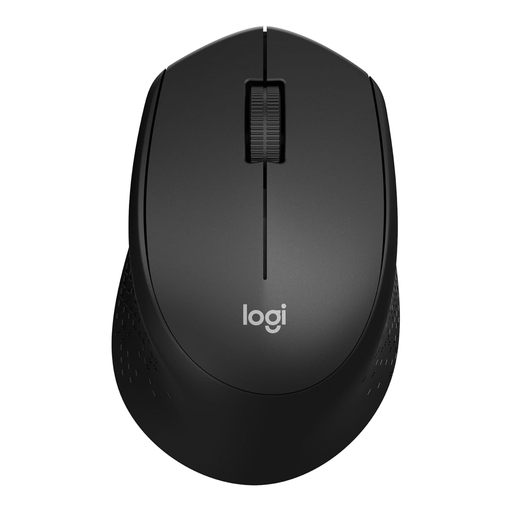
Why it suits this profile: A straightforward 2.4GHz mouse for everyday use in the office or at home, with a USB receiver and optical tracking.
The product information mentions quiet clicks, a range of up to 10 metres and a stated battery life of up to 24 months.
Optical sensor, quiet clicking and automatic sleep mode according to the product description.

Why it suits this profile: Designed for intensive office work, multi-device use and extensive control options.
You get clearly specified settings: Bluetooth and wireless connectivity, adjustable DPI and support for three devices.
8,000 DPI, horizontal scrolling, eight buttons and USB-C charging according to the product specifications.
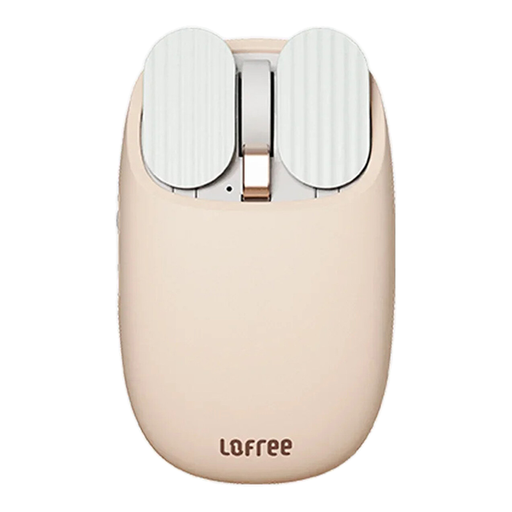
Why it suits this profile: Ideal for anyone who switches between a laptop, tablet and other devices and wants to carry a rechargeable mouse.
Bluetooth and 2.4GHz are combined, so you are not entirely dependent on one type of connection.
Five DPI settings from 800 to 3600, a built-in 800mAh battery and a stated usage time of approximately one month.

Why it suits this profile: Suitable for office and home users who work with large spreadsheets and use multiple devices.
The product description mentions quiet buttons, a rechargeable battery and an LED indicator for the battery level.
Up to three paired devices, an extra horizontal scroll wheel and adjustable tracking up to 3200 DPI.
We have put together a complete, up-to-date list of products that fully meet these strict selection criteria and the applicable European safety regulations.
No. A Bluetooth model requires Bluetooth support on the laptop. A 2.4GHz model needs a suitable USB port. Laptops with USB-C ports only may require an adapter, unless the mouse connects directly via Bluetooth.
This varies depending on the power source and usage. Product information may state up to 24 months for the battery-powered Logitech M330, approximately one month for the rechargeable Lofree EP115 and up to three months for the Trust Bayo II. These are stated figures; click frequency, connection and sleep mode affect the actual battery life.
Yes, if you want less click noise in a shared space. However, check whether only the main buttons are quiet and whether the model suits your hand preference, working posture and preferred connection. This will help ensure that a quiet wireless mouse does not turn out to be impractical for everyday use.
