
Vandaag of morgen in huis

Kwaliteit gegarandeerd

Welkomstaanbiedingen ontgrendelen: GRATIS bezorging | Tot 80% korting | Gratis 30 dagen JoyPlus-proefperiode
Download de app
A wireless mouse keeps your desk tidy and is handy with a laptop, home office setup or gaming PC. But the range can be more complicated than it first appears. A low price, high DPI rating or promise of “silent clicks” doesn’t tell the whole story. The connection, shape, power source and compatibility ultimately determine whether a wireless mouse remains comfortable to use.
Not every wireless computer mouse works in the same way. A Bluetooth mouse connects directly to a device that supports Bluetooth. This is handy with many laptops and tablets, as you don’t need a spare USB port.
A mouse with a USB receiver usually uses a 2.4 GHz connection. This can be useful for desktop PCs or computers without Bluetooth. Check that the receiver is included and that your computer has a suitable USB-A port. Some models support both connection methods; others work only with a receiver or Bluetooth.
DPI indicates how sensitive the cursor is to movement. A higher value doesn’t automatically mean a more accurate mouse for every user. For office work, an adjustable setting of around 1,000 to 3,200 DPI is often enough. For gaming, higher settings, an adjustable polling rate and a low-latency sensor may be more relevant.
Also consider the surface you’ll use it on. An optical mouse generally works well on a standard mouse mat, but reflective surfaces or glass can affect tracking. So check the product specifications if you want to use it without a mouse mat.
An ergonomic mouse won’t automatically suit every hand. A right-handed shape can feel comfortable, but is less flexible if several people use the mouse. An ambidextrous mouse works for left- and right-handed users, but may offer less thumb support.
Check the mouse’s length, width and height. A compact model is easy to carry around, while a larger one may provide more support for your hand. A vertical mouse, such as a model from the Trust Bayo range, also takes a little getting used to because your hand rests on it differently.
Check whether the mouse connects via Bluetooth, radio frequency with a USB receiver, or both. Many models quote a range of around 10 metres, but walls, other wireless devices and the receiver’s position can affect the connection in practice.
If you use several devices, look for multi-device functionality. According to its product description, the Trust Ozaa+ supports up to three devices: one via the 2.4 GHz receiver and two via Bluetooth.
A mouse may use AA or AAA batteries, a built-in rechargeable battery, or a combination of these. A rechargeable wireless mouse means you won’t need to buy disposable batteries, but you will need to charge it regularly. Check whether you can use the mouse while it’s charging and what type of cable is included.
For models with disposable batteries, battery life matters more than simply having a battery indicator. According to the product information, the HP 240 Pike Silver uses an AA battery and has a stated battery life of up to 15 months. The Trust Sura uses two AAA batteries and has a range of up to 10 metres.
For everyday use, three buttons and a scroll wheel are usually enough. Extra programmable buttons can be useful for gaming or productivity. A lightweight mouse can make quick movements easier, but some users may find a slightly heavier model more stable.
A silent mouse is particularly suitable for libraries, shared offices and working from home alongside others. Check the wording: “silent click” usually means quieter clicks, not that every action is completely noiseless. According to its product description, the Trust Ozaa+ has silent buttons; the HP 285 states that it reduces noise by up to 90% for the left and right mouse buttons.
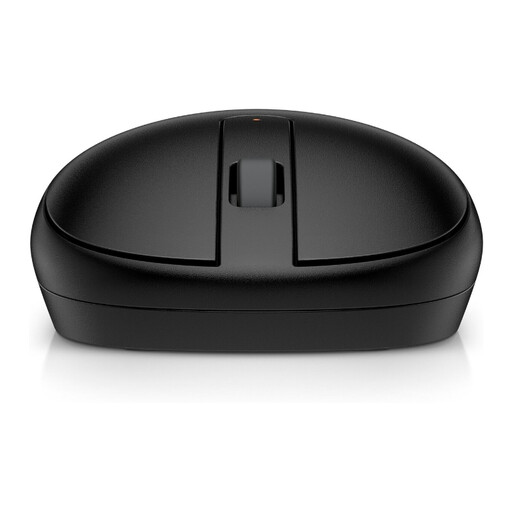
Why it suits this user: This compact Bluetooth mouse is designed for everyday use with a laptop, PC or Chromebook, and works without a separate dongle.
The connection is straightforward: Bluetooth 5.1, with no USB dongle. Its ambidextrous shape suits both left- and right-handed users.
A 1,600 DPI optical sensor, three buttons and a low weight of around 54.2 grams, according to the product information.

Why it suits this user: Its larger shape, rubber grip and support for three devices make it well suited to intensive office work across a laptop, PC and tablet.
You don’t have to choose in advance between Bluetooth and a receiver. The mouse supports both and has a rechargeable battery.
Up to 3,200 DPI, six buttons, horizontal scrolling and, according to Trust, silent buttons for shared workspaces.
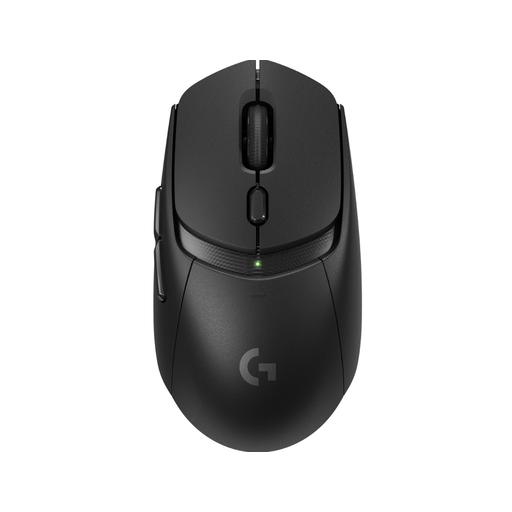
Why it suits this user: This wireless gaming mouse is aimed at players who value low latency, programmable buttons and a low weight.
The mouse offers both Lightspeed via a USB receiver and Bluetooth. This lets you combine performance and flexibility, depending on the device.
According to Logitech, the HERO 25K sensor has an adjustable sensitivity of up to 25,600 DPI. The specifications list six programmable buttons and a weight of 86 grams with an AA battery.
We’ve put together a complete, up-to-date list of products that meet these strict selection criteria and the applicable European safety regulations.
Not necessarily. A Bluetooth mouse requires your laptop to support Bluetooth. A model with a USB receiver needs a spare USB port. Also check which operating systems it supports, such as Windows, macOS or ChromeOS.
It varies depending on the model, sensor, how intensively it’s used and the battery type. Models with AA or AAA batteries can last for months. You’ll need to charge a rechargeable mouse periodically, but it saves you from replacing disposable batteries. Check the stated battery life and whether you can use the mouse while it’s charging.
Yes, provided the connection, sensor and polling rate suit the games you play. A wireless gaming mouse with a 2.4 GHz connection and programmable buttons is generally more practical for fast-paced games than a basic Bluetooth mouse. For office work, studying and general browsing, comfort, noise level and battery life usually matter more than a very high DPI rating.
