
Vandaag of morgen in huis

Kwaliteit gegarandeerd

Welkomstaanbiedingen ontgrendelen: GRATIS bezorging | Tot 80% korting | Gratis 30 dagen JoyPlus-proefperiode
Download de app
A wireless mouse keeps your desk free of cables, but not every model suits every user. A laptop user often has different needs from someone working on long spreadsheets or playing fast-paced games. Terms like “quiet”, “ergonomic” and “long battery life” only mean something when you check the underlying specifications.
A Bluetooth mouse works directly with a device that supports Bluetooth. This is handy for laptops and tablets because you don’t need a USB receiver. A 2.4 GHz mouse usually uses a small USB receiver. That connection is practical for desktops, but less suitable when your laptop only has USB-C ports and no adapter is available.
So check:
A dual-mode model with Bluetooth and 2.4 GHz offers more flexibility, but always check the stated compatibility. For example, the Lofree EP115 supports macOS, Windows, iPadOS, iOS and Android, but according to the product information, not the Boot Camp dual-boot mode on Mac devices.
DPI determines how far the cursor moves when you move the mouse. A high value isn’t automatically useful. For word processing, browsing the web and photo editing, a lower setting can be more comfortable. For gaming, adjustable DPI can help you tailor sensitivity per game or task.
Bear in mind:
A standard laptop mouse or office mouse may only need a few DPI settings. A gaming mouse often offers extra buttons, a higher polling rate and software-based settings.
A quiet mouse can be pleasant in a shared workspace, library or home office. According to the product description, the Logitech M330 is promoted with a click sound that is said to be more than 90% quieter than traditional mice. This is a claim from Logitech’s product information; it doesn’t mean every sound disappears completely.
Ergonomics are also personal. A vertical mouse can offer a different hand position, but the size, shape and orientation need to suit your hand. So check whether the model is right- or left-handed and whether you need a compact or larger casing.
For a fixed desktop setup, a 2.4 GHz receiver is often practical. For a laptop, tablet and smartphone, Bluetooth can be more convenient. If you regularly switch between your work computer, personal laptop and tablet, a multi-device mouse with separate connection channels is a real benefit.
Also pay attention to the stated range. A range of 10 metres is common in product listings, but walls, metal objects and other wireless devices can affect real-world performance.
A mouse with AA or AAA batteries can be used again quickly by replacing the batteries. A rechargeable mouse means you don’t need loose batteries, but you do need to remember to charge it. Look at:
According to the product information, the Lofree EP115 has a built-in 800 mAh battery, a charging time of around three hours and a stated battery life of about one month. Actual duration depends on usage and connection mode.
A lightweight gaming mouse can support fast movements, while a heavier office design can feel more stable. A thumb wheel or horizontal scroll wheel is useful for wide spreadsheets and timelines. Programmable buttons are especially relevant for gaming or recurring shortcuts.
With an ergonomic mouse, pay attention to the angle, palm rest and hand orientation. A vertical shape isn’t automatically comfortable for everyone; give your hand time to get used to the position.
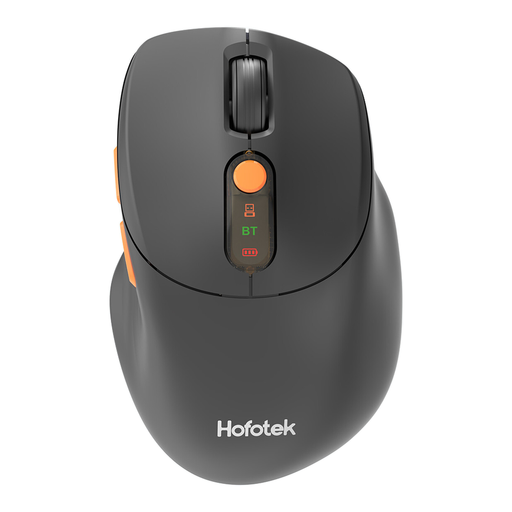
Why this fits the profile: This compact wireless computer mouse combines Bluetooth 5.1 and 2.4 GHz, making it suitable for basic use with a laptop, PC or Android device.
The mouse has five DPI settings from 800 to 4000 and uses a quiet-click design according to the product description, rather than a single fixed sensitivity.
62 grams according to the product specification, connectivity with up to three devices and an included AA battery.

Why this fits the profile: The vertical shape, Bluetooth and 2.4 GHz connection and rechargeable battery suit long office work and multi-device use.
The product specifications clearly state the right-handed vertical shape, adjustable DPI and compatibility via Bluetooth or USB receiver.
4000 DPI, rechargeable battery, fast-charge function and a stated wireless range of 10 metres.
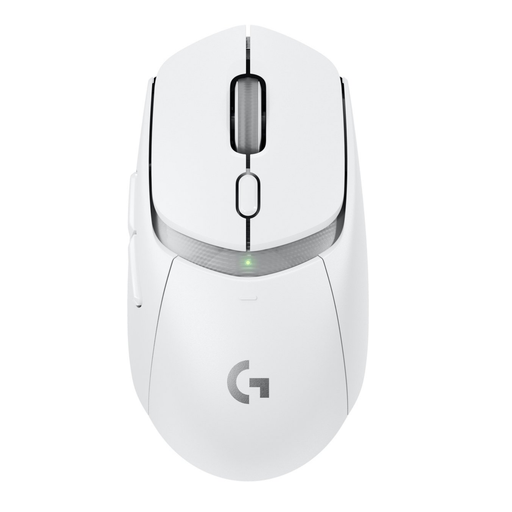
Why this fits the profile: This model is aimed at gamers who need a lightweight mouse, programmable buttons and a choice between LIGHTSPEED and Bluetooth.
The connection technologies, six buttons and adjustable sensitivity are listed separately, so you don’t have to select based on the DPI number alone.
HERO 25K sensor according to the product listing, six programmable buttons and a stated battery life of more than 300 hours with one AA battery.

Why this fits the profile: If you switch between laptop, desktop and tablet, you get support for up to three devices and an extra wheel for horizontal scrolling.
The quiet buttons, Bluetooth and RF connection and rechargeable battery are clearly specified rather than just presented as general comfort claims.
Up to 3200 DPI, six buttons, side scroll wheel and compatibility with Windows, macOS and Chrome OS according to the product information.
We’ve put together a full, up-to-date list of products that fully meet these strict selection criteria and comply with current European safety regulations.
That varies by model. Check the stated operating systems and the connection method. A mouse with Bluetooth and a USB receiver generally offers more connection options, but a USB-A receiver may require an adapter with some MacBooks.
This ranges from a few weeks with heavy use to several months or longer. A rechargeable battery needs to be charged; a model with AA batteries can continue straight away after replacement. Also check whether the stated duration is based on Bluetooth, 2.4 GHz or a specific sleep mode.
Yes, provided the mouse has a suitable connection, accurate sensor, adjustable DPI and enough buttons. For competitive gaming, users often choose a 2.4 GHz connection with low latency. For office work, travel and daily laptop use, Bluetooth and a quiet click may be more important.
