
Vandaag of morgen in huis

Kwaliteit gegarandeerd

Welkomstaanbiedingen ontgrendelen: GRATIS bezorging | Tot 80% korting | Gratis 30 dagen JoyPlus-proefperiode
Download de app
A wireless mouse gives you more freedom of movement on your desk and is handy for use with a laptop, home office or hot desk. Yet many models look similar. A low price doesn't tell you much about comfort, and a high DPI number doesn't automatically make a mouse suitable for everyday use.
The main differences lie in the connection, shape, hand orientation, battery and sensor. Below, you'll find out what to look for and which wireless mouse suits different usage scenarios.
DPI indicates how sensitive the sensor is. A higher number means the cursor moves faster across the screen, but it doesn't mean the mouse is more accurate for every task. For office work, an adjustable value between around 800 and 2400 DPI is often practical. Gamers may need more adjustment options, especially for different games and screen resolutions.
A wireless computer mouse usually works via a 2.4GHz USB receiver, Bluetooth or both.
Also check whether your laptop only has USB-C ports. If so, you may need an adapter when the receiver uses USB-A.
A compact mouse for laptop use is easy to carry, but may offer less support for larger hands. An ergonomic mouse often has a higher casing or vertical shape. That doesn't feel familiar to everyone straight away.
Look out for:
A range of around 8 to 10 metres is stated in the product specifications of many wireless mice. In practice, obstacles and interference can affect the connection. For a desk, the most important thing is that the mouse works reliably at the distance between your chair and computer.
If you use a mouse for working from home with a laptop, PC and tablet, you could look at a model with Bluetooth and a USB receiver. Also check how you switch between devices: via a button on the mouse or through the operating system.
A model with AA or AAA batteries doesn't need a charging cable, but you will have to replace the batteries eventually. A rechargeable mouse needs regular charging, but can sometimes still be used while charging.
Pay attention to the difference between:
An optical sensor is common for office and home use. A DPI button can be useful if you switch between word processing, spreadsheets and image editing. For wide spreadsheets, a horizontal scroll wheel is a concrete feature that makes more difference than a high DPI number.
For gaming, polling rate, programmable buttons, connection type and weight are also relevant. A gaming mouse with Bluetooth can be handy for everyday use, while a 2.4GHz connection or cable is often chosen when fast response times are important.
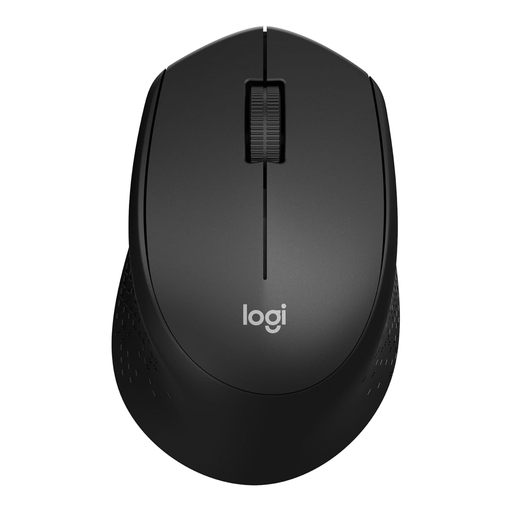
Why this fits the profile: A simple wireless mouse for everyday use with a USB receiver, optical sensor and three buttons.
The specifications are straightforward: 1000 DPI, a range of up to 10 metres and a nano receiver. According to Logitech, the clicks are up to 90% quieter than traditional mice; this is a brand claim and not a guarantee of complete silence.
Right-handed design, stated battery life of 24 months and automatic sleep mode.
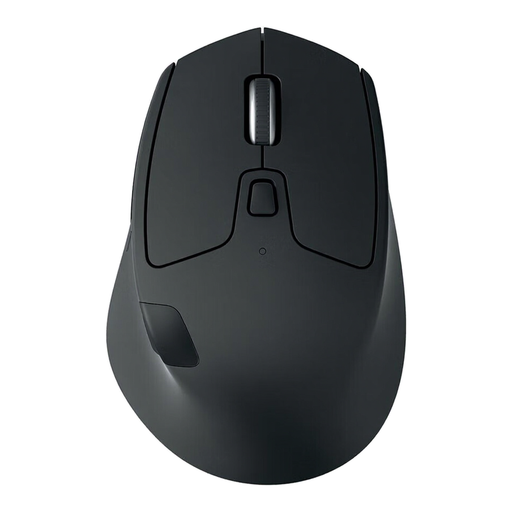
Why this fits the profile: For those who work with multiple computers and want a mouse with extra buttons and different connection options.
The Easy-Switch function is, according to the product specifications, suitable for up to three devices. Check beforehand whether Bluetooth or the included receiver works with your computer.
Eight buttons, 1000 DPI, optical sensor and a stated battery life of up to 24 months with one AA battery.
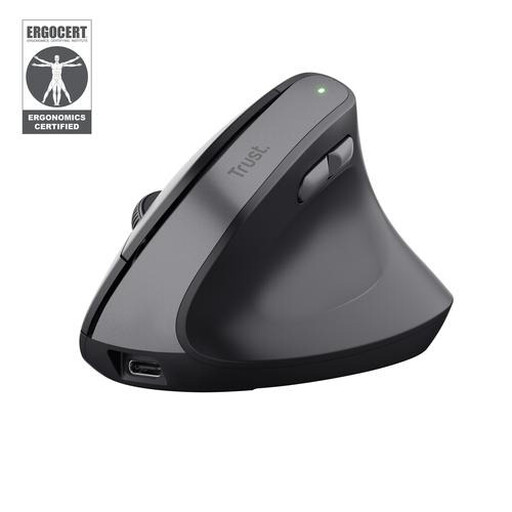
Why this fits the profile: The vertical shape is designed for right-handed users who want to try a different grip during long working days.
The 57-degree angle, right-handed shape and ErgoCert label are all clearly stated. A vertical mouse remains a personal choice: build up usage gradually if the grip is new to you.
Silent buttons, adjustable DPI from 800 to 2400 and a rechargeable battery with a stated usage time of up to three months.
We've put together a full, up-to-date list of products that fully meet these strict selection criteria and comply with current European safety regulations.
With a mouse that uses a USB receiver, insert the receiver into a free USB port and switch the mouse on. With a Bluetooth mouse, open the Bluetooth settings on your laptop or computer and select the mouse from the list. Consult the manual if a pairing button is needed.
Battery life varies greatly between models. Some mice use one battery for up to 12 or 24 months according to the product specifications, while rechargeable models state a usage time of several weeks to months. The lifespan of the mouse itself depends on use, storage, cleaning and the quality of the switches.
With a model that uses disposable batteries, you'll have recurring costs for AA or AAA batteries. A rechargeable mouse doesn't have those costs in the same way, but it does need to be charged and contains a built-in battery. So don't just look at the purchase price, but also at the battery type and the stated usage time.
