
Vandaag of morgen in huis

Kwaliteit gegarandeerd

Welkomstaanbiedingen ontgrendelen: GRATIS bezorging | Tot 80% korting | Gratis 30 dagen JoyPlus-proefperiode
Download de app
A wireless mouse gives you a tidier desk, more freedom of movement and fewer cables in your laptop bag. However, not every wireless computer mouse is suitable for daily work, a small laptop table or gaming. A low price says little about comfort, and a high DPI figure does not automatically mean the mouse will be more pleasant to use.
So pay particular attention to the connection, shape, power source and features that suit the way you use it. Below, you’ll find the key points to consider, along with some popular options based on verifiable product specifications.
A Bluetooth mouse works without a USB receiver, but your laptop or PC must support Bluetooth. Older computers, business desktops and some docking stations may not have this feature, or may be less practical to use with Bluetooth. Also check which Bluetooth version and operating systems are listed.
A mouse with a 2.4GHz USB receiver is often straightforward: plug in the receiver, switch on the mouse and start using it. The trade-off is that you need a free USB-A port. If your laptop only has USB-C, you may need an adapter.
DPI determines how far the cursor moves when you physically move the mouse. A mouse with adjustable DPI offers flexibility, but an extremely high setting is usually unnecessary for word processing, spreadsheets and browsing the internet. Multiple DPI profiles can be useful for gaming, however.
So don’t just look at the maximum figure. Also consider the available settings, the type of sensor and whether you can adjust the speed in your operating system. An optical mouse is generally a sensible choice for everyday office use, provided you use it on a suitable, flat surface.
A compact wireless mouse for laptop use is easy to carry around, but may feel too small if you have larger hands. A large ergonomic mouse offers more hand support, but takes up more space and is less suitable for use on the go.
‘Silent’ also has a practical meaning: check whether only the main buttons are quieter or whether the entire operation is quieter. According to Logitech’s own research, the M330 Silent Plus produces up to 90% less click noise than traditional mice. This is a brand claim; the perceived volume may vary depending on the surface and the user.
Choose a USB mouse with a wireless connection if you mainly work on a desktop PC or office computer. A Bluetooth mouse is useful for a laptop when you don’t want to use a USB port. If you work with several devices, look for a multi-device mouse with a clearly marked switch button.
According to its product specifications, the Trust Ozaa+ can be connected to up to three devices: via a 2.4GHz receiver and two Bluetooth channels. This is practical if you regularly switch between a laptop, PC and tablet.
Check whether the mouse is suitable for right- and left-handed use. An ambidextrous mouse, such as the Trust Primo, is more flexible in a household or shared workspace. A right-handed mouse may offer better thumb support, but it won’t suit every user.
Also consider the dimensions:
An ergonomic mouse may feel comfortable, but its shape will not automatically prevent discomfort. Take regular breaks and set up your workstation correctly.
A mouse powered by AA or AAA batteries doesn’t need a charging cable, but you will eventually need to replace the batteries. According to the product information, the Logitech M330 works for up to 24 months on one battery, while the HP 285 lasts for up to 18 months. These are stated figures; actual battery life depends on usage, sleep mode and battery type.
A rechargeable wireless mouse eliminates the need for disposable batteries. Check whether you can continue using the mouse while it is charging and which cable is included. The Trust Ozaa+ has a built-in battery, charging-status LED and included charging cable.
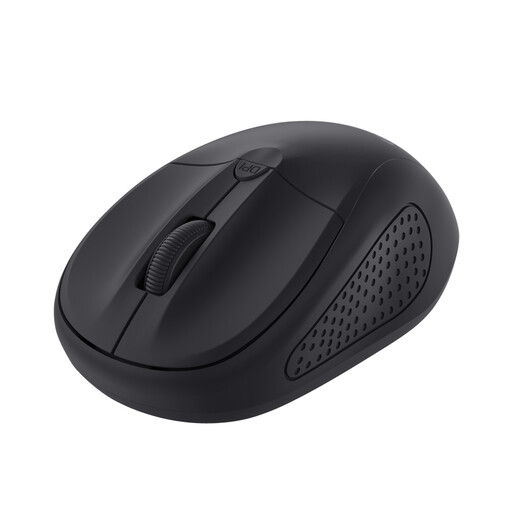
Why it suits this profile: This compact wireless mouse has a USB receiver, an optical sensor and an adjustable speed of 1000 to 1600 DPI. Its shape is suitable for left- and right-handed use and fits easily into a laptop bag.
The connection is clearly based on a USB receiver. This means you don’t depend on Bluetooth being available on an older PC or laptop.
Compact size, range of up to 6 metres, on/off switch and DPI selector.

Why it suits this profile: The large right-handed shape, rubber grip, quiet buttons and side-mounted scroll wheel are designed for office work, wide spreadsheets and extended use with multiple devices.
The specifications list both RF and Bluetooth, allowing you to decide in advance which connection suits your devices. Its size does make it less suitable for travel.
Up to three connected devices, rechargeable battery, up to 3200 DPI and horizontal scrolling.

Why it suits this profile: This wireless gaming mouse uses a 2.4GHz connection, has an optical sensor of up to 4800 DPI, six programmable buttons and a stated battery life of up to 80 hours.
The mouse combines wireless gaming with USB-C charging. You therefore don’t have to rely solely on battery life during a long session.
Product weight of 73 grams, 1000Hz polling rate, USB-C charging and RGB lighting.
We’ve put together a complete, up-to-date list of products that fully meet these strict selection criteria and the applicable European safety regulations.
Not automatically. A model with a USB receiver needs a suitable USB port. A Bluetooth mouse requires Bluetooth support on the laptop. Also check whether Windows, macOS or ChromeOS is supported. If your laptop only has USB-C, you may need a USB-C adapter for a standard USB-A receiver.
This varies by model and usage. Manufacturers sometimes state a battery life of 15 to 24 months for mice with AA batteries. A rechargeable mouse often works for less time per charge, but has the advantage that you don’t need to buy loose batteries. Check whether the mouse remains usable while charging.
Yes, but pay attention to the connection and features. A wireless gaming mouse with 2.4GHz, low latency, adjustable DPI, a high polling rate and programmable buttons is better suited to fast-paced games. These features aren’t essential for basic office work. So choose based on how you use the mouse, not simply the highest DPI figure.
