
Vandaag of morgen in huis

Kwaliteit gegarandeerd

Welkomstaanbiedingen ontgrendelen: GRATIS bezorging | Tot 80% korting | Gratis 30 dagen JoyPlus-proefperiode
Download de app
A wireless mouse keeps your desk tidy and gives you greater freedom of movement. However, it can be difficult to see past the marketing terms. A high DPI value does not automatically mean that a mouse will be more comfortable to use. A Bluetooth mouse may not always be the right choice for an older PC or a workspace with lots of wireless devices.
In this guide, you’ll discover what to look for in terms of connectivity, comfort, precision and battery use. You’ll also find some popular choices for different situations.
DPI indicates how sensitive the sensor is: at a higher value, the cursor moves further with the same physical movement. For office work, 800 to 1600 DPI is often sufficient. A high-DPI gaming mouse offers more adjustment options, but a large DPI figure alone says little about tracking, software or click response.
Also check:
A Bluetooth mouse works without a separate receiver, which is useful with laptops that have few USB ports. However, you’ll need to activate Bluetooth on the device and pair the mouse. A mouse with a USB receiver usually works straight away once the nano receiver has been connected.
A 2.4GHz connection via USB can be practical for desktops, business laptops and gaming. Check in advance whether your computer supports USB-A, USB-C or Bluetooth. Some models offer both options, such as the Logitech MX Vertical, Trust Ozaa+ and Logitech G G309.
A mouse powered by AA or AAA batteries can last for months, but you’ll need spare batteries to hand. An rechargeable mouse avoids the need for repeated battery purchases, but it does need to be charged in good time. So check:
The stated battery life depends on usage, connection, lighting and polling rate. Treat these figures as product specifications under certain conditions, rather than as a guaranteed usage time.
A compact mouse is handy for travelling, but may be less comfortable during prolonged use if you have larger hands. A large mouse with palm support offers greater support, while a lightweight model may be suitable for quick movements.
An ergonomic mouse or vertical mouse has a different shape. The Logitech MX Vertical has an angle of 57 degrees and is designed for right-handed use. This type of shape usually requires a short adjustment period. Also check whether the model is designed exclusively for right- or left-handed use.
If you work with a laptop, desktop and tablet, choose a multi-device mouse. Pay attention to the actual number of paired devices and how you switch between them. The Trust Ozaa+ supports up to three devices: one via the 2.4GHz receiver and two via Bluetooth.
Connectivity is particularly important for gaming. Models such as the Logitech G G309 and various Rapoo mice combine Bluetooth with their own wireless connection. Bluetooth generally uses less energy, while a dedicated 2.4GHz connection is designed for low latency.
For word processing, two or three buttons are usually enough. Programmable buttons are useful for shortcuts, browser navigation or game commands. Check whether the configuration software is available for Windows and macOS.
A polling rate of 1000 Hz is more than sufficient for many users. Gaming mice with 4000 or 8000 Hz may use more system resources. According to Rapoo’s product information, a high polling rate can increase CPU usage. So check that your computer can handle it before choosing a higher value solely for that reason.
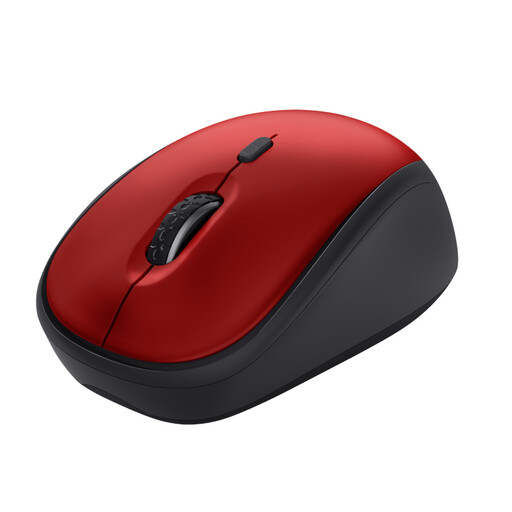
Why it suits this profile: A compact choice for the office, home use and travelling, with simple installation via the USB receiver.
The DPI can be adjusted from 800 to 1600, and the 2.4GHz connection works via plug and play. You therefore won’t be paying for features you may not use.
Quiet clicking, compact size, a range of up to 8 metres and a stated battery life of up to 12 months.

Why it suits this profile: Designed for professionals who frequently switch between devices and work with large documents or spreadsheets.
The specifications list three connected devices, Bluetooth and a Logi Bolt receiver. You’re not dependent on just one type of connection.
Adjustable 8000 DPI, horizontal scrolling, eight buttons, quiet clicking and a rechargeable USB-C battery.
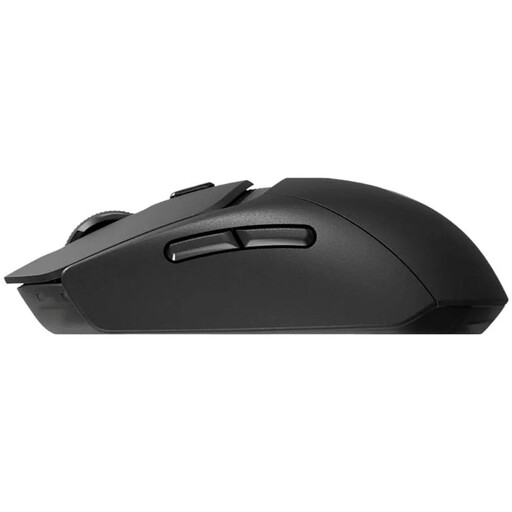
Why it suits this profile: For gamers who want a lightweight wireless gaming mouse with both Bluetooth and a dedicated wireless connection.
The mouse uses an AA battery rather than a fixed charging cycle. According to the product description, the stated usage time is more than 300 hours.
86 grams, a HERO sensor with 25,600 DPI according to the specifications, 1000 Hz polling and six programmable buttons.

Why it suits this profile: The vertical shape and right-handed design suit users who consciously consider shape and hand position.
The product shape is clearly specified: vertical, right-handed and with an angle of 57 degrees. However, check that this position suits your grip.
Bluetooth and USB receiver, adjustable 4000 DPI, five buttons and a rechargeable battery with fast-charging functionality.
We’ve put together a complete, up-to-date list of products that fully meet these strict selection criteria and the applicable European safety regulations.
Not always. Check whether your laptop supports Bluetooth or has a free USB port for the receiver. Also check the operating system: some configuration software only works with Windows, while the basic functions are usually also available on macOS or ChromeOS.
Yes, provided you choose a model with a suitable wireless connection, sensor and polling rate. A standard Bluetooth mouse may be sufficient for casual gaming, but for fast-paced competitive games, a gaming model with a 2.4GHz receiver is usually more practical. Also consider the weight, shape and programmable buttons.
With a model that uses AA or AAA batteries, you’ll occasionally need to pay for replacements. A rechargeable mouse mainly requires electricity and a working charging cable. So don’t just compare the purchase price; also consider the battery type, stated usage time and whether you can continue working while the mouse is charging.
