
Vandaag of morgen in huis

Kwaliteit gegarandeerd

Welkomstaanbiedingen ontgrendelen: GRATIS bezorging | Tot 80% korting | Gratis 30 dagen JoyPlus-proefperiode
Download de app
A wireless mouse gives you more freedom of movement in the office, at the kitchen table or on the go with a laptop. However, the available options are not always easy to compare. A low price can be tempting, but the wrong shape, limited connectivity or a battery that runs out quickly can soon make a mouse impractical.
Joybuy Product Recommendation Officer filters the most important product information by usage scenario. This helps you see which specifications matter and which marketing claims are worth checking before you place your order.
A high-DPI mouse can move the cursor very quickly across the screen. This is particularly useful for certain games and large screens. For word processing, spreadsheets and browsing the internet, an adjustable resolution of, for example, 1,000 to 4,000 DPI is often more than sufficient. So don’t just look at the highest figure. Also check whether you can adjust the speed.
A Bluetooth mouse connects directly to devices that support Bluetooth. This is useful with laptops and tablets because you don’t need to occupy a USB port. A wireless mouse with a USB receiver usually uses 2.4 GHz and is practical for desktops or computers without a reliable Bluetooth connection.
Check the following before buying:
Some models support both options. This gives you greater flexibility, but also check whether software features work in the same way on Windows and macOS.
An ergonomic mouse won’t suit every hand in the same way. A vertical design, such as the Logitech MX Vertical, may feel very different from a compact, low-profile model. Pay attention to the dimensions, weight, thumb-rest position and whether the mouse is designed for left- or right-handed use.
A left-handed mouse usually has a specifically mirrored design. A symmetrical mouse can be used with either hand, but that does not automatically mean its shape will be equally comfortable for prolonged use.
For everyday office work, a stable connection is more important than an extremely high polling rate. Bluetooth LE often helps keep your desk free from clutter, while a USB receiver provides a direct solution for computers without Bluetooth. Some models can be paired with multiple devices. This is useful if you switch between a laptop, desktop and tablet.
Also check whether features such as programmable buttons, macros or customised DPI settings require software. A programmable mouse can boost productivity, but only if the associated application works on your system.
An optical sensor is common in office and gaming mice. A laser sensor may work on more surfaces according to the product specifications, but a suitable mouse mat is still advisable for predictable tracking.
Pay attention to these three details:
A wireless gaming mouse with 4,000 or 8,000 Hz may require additional system resources. According to the product information for some models, a high polling rate can increase CPU usage. For office work, this figure does not automatically provide a noticeable benefit.
A mouse powered by AA or AAA batteries is ready to use again as soon as you insert a spare battery. A rechargeable mouse does not need disposable batteries, but it does need to be charged. So check:
According to Logitech’s own product information, the Signature M650 L can run for up to two years on a single AA battery. This is the manufacturer’s stated figure, and actual battery life depends on usage and settings.
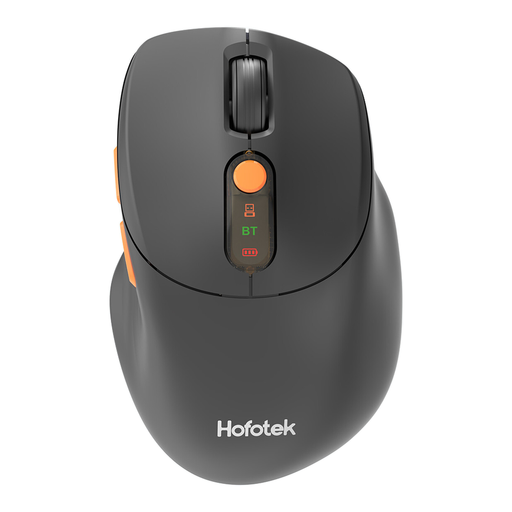
Why it suits this profile: A practical mouse for laptop and office work, with Bluetooth 5.1 and 2.4GHz connectivity. According to the product specifications, the mouse weighs approximately 62 grams and runs on a single AA battery.
You aren’t dependent on a single connection type and can set the DPI to 800, 1,600, 2,400, 3,200 or 4,000.
Quiet clicking, two connection types and support for Windows, macOS and Android according to the product description.

Why it suits this profile: Designed for professionals who scroll frequently, use multiple devices and value programmable buttons.
The product specifications list both Bluetooth and a Logi Bolt receiver, as well as a rechargeable battery. You therefore don’t have to rely solely on disposable batteries.
8 programmable buttons, horizontal scroll wheel, adjustable 8,000 DPI and support for up to three paired devices.

Why it suits this profile: Designed for gamers who value low weight, plenty of buttons and adjustable sensitivity.
The battery life, 8K polling rate and DPI values are listed separately. Bear in mind that the higher polling rate may place greater demands on your computer.
53 grams, 10 programmable buttons, adjustable X and Y DPI and a stated battery life of up to 750 hours at 1,000 Hz according to the product information.
We’ve put together a complete, up-to-date list of products that fully meet these strict selection criteria and the applicable European safety regulations.
For Bluetooth, open the laptop’s Bluetooth settings, put the mouse into pairing mode and select the model from the list. With a mouse that uses a USB receiver, insert the receiver into an available port. Only install software if the manufacturer requires it for additional functions.
This varies by model, connection and usage. A mouse with an AA or AAA battery can last from several months to several years according to the stated product specifications. Rechargeable models often specify a usage time per charge. Treat these figures as a guide: intensive use, lighting and a high polling rate can affect battery life.
It can be, but check the weight, click noise and shape. A gaming model with lots of programmable buttons and a high polling rate is not always necessary for documents or spreadsheets. If you mainly want to work quietly, look for a silent mouse with a suitable ergonomic shape and adjustable DPI.
